
How to use network gateways in Telegram: real-world use cases and tools

Network gateways in Telegram are used to manage IP addresses and network connections. They let you build a traffic routing layer: distribute requests across addresses, define access conditions, and separate sources of activity.
Using IP relays is used to solve the following tasks:
connecting to Telegram in networks with access restrictions;
distributing the load across IPs - reducing the concentration of requests on a single address;
separating sessions and accounts across different IPs - avoiding overlaps;
configuring connection parameters - authorization, geography, IP type;
scaling the number of simultaneous connections through a pool of addresses.
When working with Telegram, network intermediaries act as an intermediate network layer. They make it possible to organize controlled connections, separate traffic, and set access rules based on the task at hand.
Managing multiple accounts
Telegram has server-side limits on the frequency and number of requests. These limits are implemented through rate limiting and flood control mechanisms: when the limits are exceeded, the server returns errors with an execution delay (for example, FLOOD_WAIT). The limits depend on the type of operation - authorization, sending messages, API requests, and interactions with chats.
When several accounts are managed from the same IP, these limits are triggered faster. This is due to the concentration of requests and repeating activity patterns coming from a single address.
IP relays allow you to separate traffic sources and manage connections:
distributing accounts across different IPs - reducing the concentration of requests on one address and lowering the chance of hitting limits;
separating sessions by IP - preventing overlaps in activity between accounts;
scaling the number of accounts - connecting additional IPs without aggregating requests on a single address.
This approach is used in traffic arbitrage, project support, channel network management, and agency operations.
Parsing and automation
Collecting data from channels and chats involves a large number of repetitive requests: fetching messages, member lists, updates, and metadata. These operations run sequentially or in parallel and create a steady load on the connection.
When everything goes through one IP, request density increases, which reduces data processing speed and limits the number of parallel tasks.
Network gateways make it possible to:
distribute requests across multiple IPs - reducing the load on a single address;
separate request flows - running several independent parsers in parallel;
increase the volume of processed data by expanding the IP pool.
Without IP relays, tasks like these are limited by the capacity of a single IP and the number of operations allowed per unit of time.
Running and maintaining Telegram bots
Bots process incoming updates through long polling or webhooks. At a high event rate, this creates a continuous flow of connections and API requests. When bots are hosted on your own servers, all traffic goes through one IP, which limits the number of connections that can be handled at the same time.
Network intermediaries make it possible to:
move bot processing to different IPs - separating connections and outgoing traffic;
distribute webhook and polling requests across addresses - reducing connection density on a single IP;
isolate services - each bot uses a separate IP and does not affect the others in case of failures or restrictions.
In an infrastructure with multiple bots, network gateways make it possible to separate connections and traffic sources, eliminating a single point of failure.
Geographic presence
IP geography affects some Telegram scenarios: bot and channel availability, content display, ad launches, and testing user scenarios.
Checks from a single region do not reflect how the service behaves in other countries. For tasks tied to local audiences, you need to connect through an IP from the required geography.
IP relays make it possible to:
check the availability of bots and channels from different regions;
test local scenarios - ads, content, and user reactions;
use an IP from the required country when interacting with a local audience.
Without connecting through an IP from the required region, test results are distorted.
When using network gateways, it is not only the IP addresses themselves that matter, but also how convenient they are to work with: obtaining them, replacing them, configuring authorization, and integrating them into your own services or scripts.
This is where providers differ most. With one provider, the addresses are available immediately, there is an API, a personal account, and testing options. With another, it is just a list of IPs that requires manual setup and adaptation.
Below, we will look at Proxy-solutions - a service with centralized gateway management, an API, and built-in tools.

Proxy-solutions is a service for selling and managing network gateways with automatic personal account creation and built-in infrastructure for working with IP addresses. After payment, the gateways are immediately available in your account: you can download them, renew them, change authorization settings, check them through the service's tools, or integrate them into your own projects via the API.
There are also Viber and Telegram bots as an alternative to the web version, as well as the PSs browser extension, which lets you automatically load orders from your personal account.
What gateways are available in the catalog
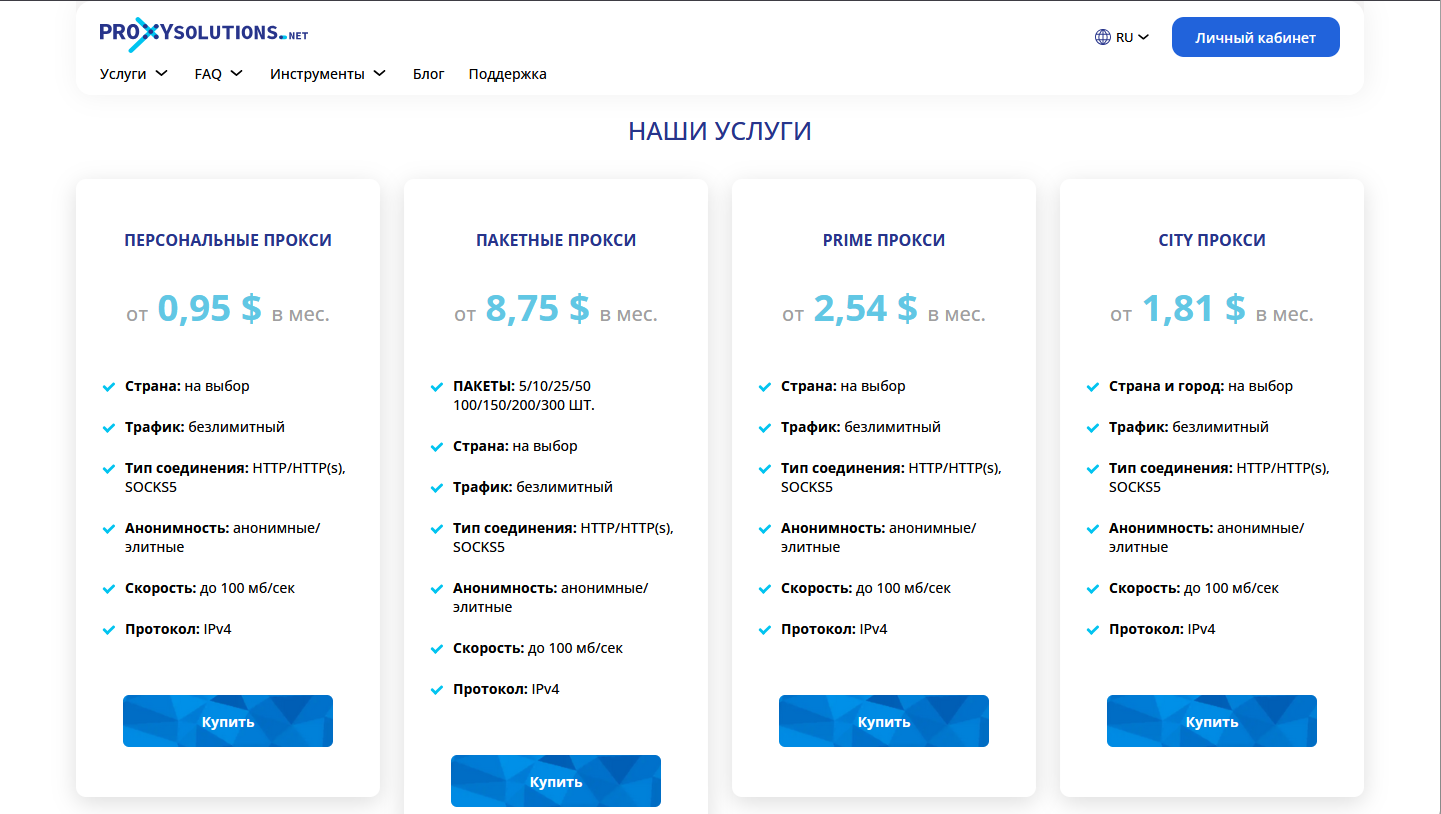
Gateway types are grouped by IP format and technical characteristics.
The following solutions are available:
Personal IPv4 - private IPs issued to one user, without rotation, with a choice of country and rental period.
Bundle IPv4 - multiple personal IPs are purchased in a single order, and management and renewal are handled as one package. The price is significantly lower when bought in bulk.
City gateways - personal IPv4 gateways with the ability to choose a specific city within a country.
Prime gateways - personal IPv4 gateways with ISP or residential/business address types.
UDP gateways - personal IPv4 gateways with support for the UDP protocol.
Multi protocol gateways - support for proxy protocols: SOCKS5 + TLS, Shadowsocks, Trojan + TLS, VLESS + TLS.
Mobile gateways - dynamic mobile carrier IPs with rotation.
Mobile+ - mobile IPs with a choice of a specific operator and location, dynamic and rotating.
You can buy gateways individually or in bulk, with the required geography and rental period.
How to place an order
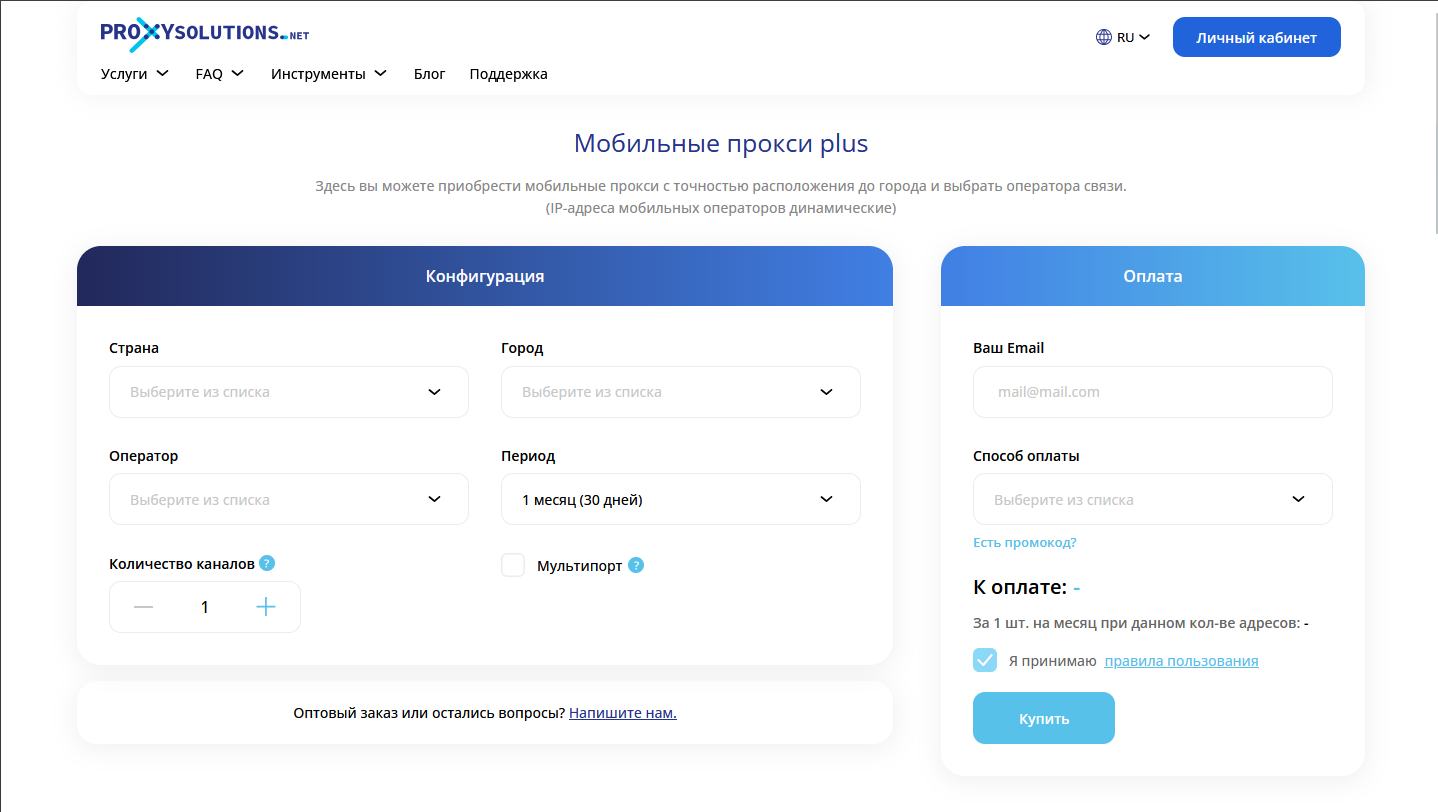
The order form consists of two blocks: gateway configuration and payment. First, you specify the order parameters, then you complete the payment.
For personal IPv4 - these are private dedicated gateways - you choose the country, rental period, and number of addresses. In the City service, these parameters also include city selection.
The principle is different for mobile gateways. One order is placed based on the number of channels. A channel is one mobile gateway in which the IP address changes automatically on a timer or manually. The number of channels determines how many independent mobile gateways will be included in the order at the same time.
The ordering process is the same:
choose the gateway type;
set the country and, if necessary, the city and operator;
specify the rental period;
determine the number of IPs or channels;
enter your email;
choose a payment method;
confirm your agreement with the rules;
pay for the order.
For mobile gateways, an additional "Multiport" option is available - the ability to change the location and operator within the selected country at any time during an active order.
After payment, the account is created automatically. Access details are sent to the specified email, and the order appears in the personal account immediately.
Managing your personal account
The personal account is used to work with services. Gateways are grouped by type, and within each group you see specific orders with their parameters and rental periods.
The following actions are available for each service:
download the gateway list;
renew the order for the selected period;
enable or disable auto-renewal;
go to authorization settings.
In the authorization settings, you can change the login and password - set your own credentials or generate new ones in one click - or configure access by IP addresses.
The "Order History" section shows previously purchased services that can be renewed again but are no longer active.
The "API for Developers" tab contains a personal API key and lets you specify the IP addresses from which API requests will be accepted. You can also top up a dedicated balance there.
The API itself is free. The balance is used only to pay for gateways if their purchase or renewal is performed remotely, without logging in to the website.
Tools and the Network Tools subscription
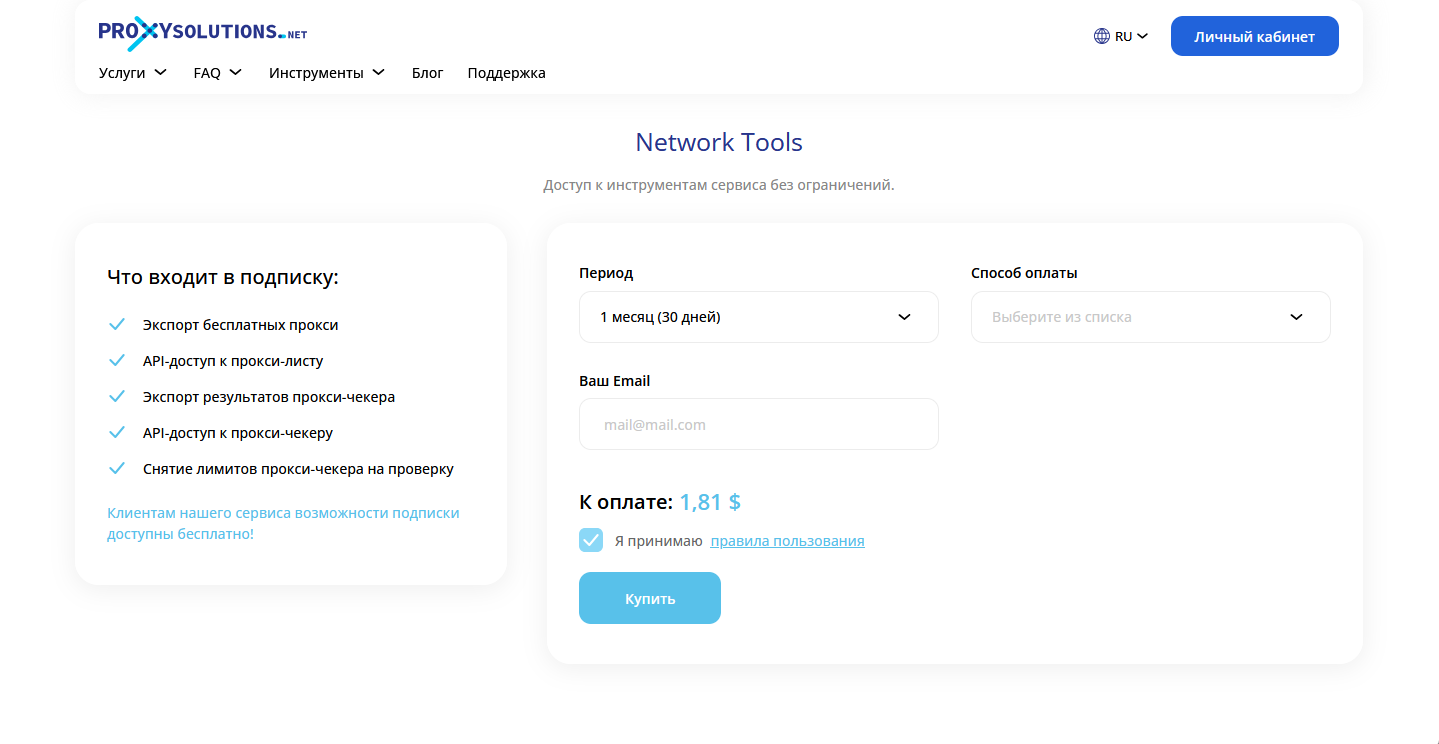
The "Tools" section includes:
My IP - shows your current IP address, country, city, provider, and connection type, as well as the information about you that the browser provides;
Gateway Checker - allows you to mass-check gateway lists, identifies the protocol (HTTP, HTTPS, SOCKS4, SOCKS5), anonymity level, geolocation, and latency;
Format Converter - converts gateway strings into the required format based on the order of the IP, port, login, and password; the result can be copied or downloaded;
Free Gateways - a list of publicly available gateways with filtering by country, protocol, anonymity, and other parameters.
If you have active services, the tools work without restrictions. If you do not need gateways but want the full functionality of the tools, you need to purchase a Network Tools subscription.
It expands the limits of the gateway checker, unlocks the full functionality of the converter, and provides access to the tools API.
Extension and bots
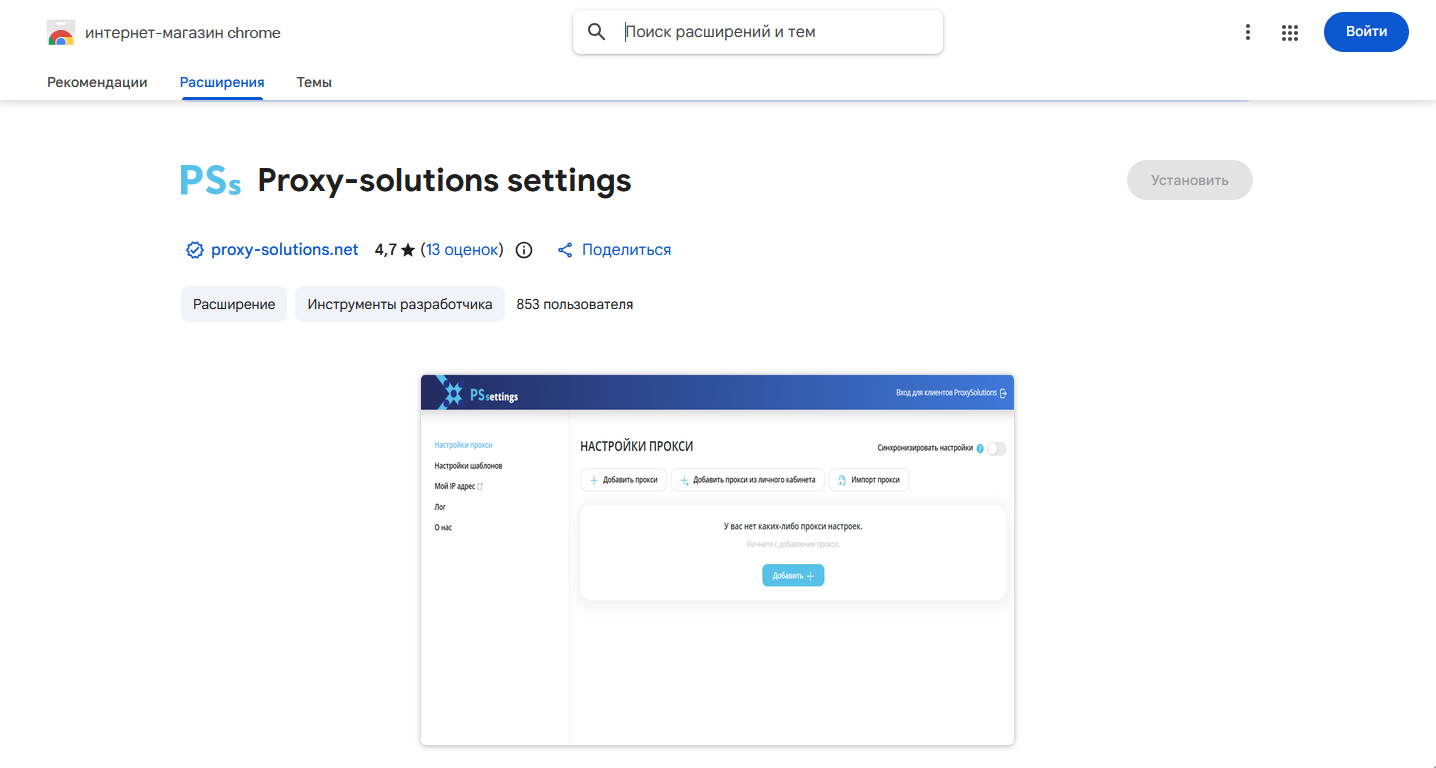
The service team has developed the PSs browser extension - a separate tool for working with gateways in the browser: one-click switching, list import and export, logs, blacklist and whitelist management, settings synchronization, and IP checking. It supports both private and shared gateways. Proxy-solutions clients can automatically load the required orders directly from their personal account.
In addition to the web version, there is a Telegram bot (and a Viber bot) that duplicates the main functionality of the personal account. Through it, you can renew and purchase gateways, manage your active services, and get information without opening the website.
API
The REST API makes it possible to perform gateway operations programmatically: view the list of available services, request information about your orders, place new gateway orders, and renew existing ones. Through the API, you can retrieve data about the validity period, number of IPs, and parameters of purchased services.
Each request is executed using a personal API key. In the settings, you need to specify the IPs from which requests are accepted so that operations are performed only from trusted addresses. For example, you can renew gateways when the expiration date is approaching, automatically order additional services when the load increases, or retrieve up-to-date data.
Important: this website is the only official website of the Telegram Expert project. Licenses, updates, and official technical support are available only through this website. Any other websites offering Telegram Expert are not affiliated with BLB.Team and are either unofficial or fraudulent.

Download Telegram Expert - software for Telegram promotion
Telegram Expert is professional software for fast channel growth and sales in Telegram. Launch mass mailings and invites, warm up accounts without bans, consolidate dialogs in one place, and scale your team. All in one window - fast, safe, and tailored to your tasks.
What it can do:
- TDATA Converter - массово переводит session+json в TDATA.
- Booster - account warm-up via smart dialogs to increase trust.
- Registrar - account creation via any SMS services with the sms-activate standard.
- Duplicator - a second session for existing accounts for transfer and protection.
- Forwarder - routes incoming replies to a working group and sends replies to clients.
- Interceptor - catches messages by keywords from chats/channels and forwards them to you.
- Invite via admin - invitations even to restricted groups.
- Channel and chat cloner - full copies, including protected content.
- Reporter - mass complaints about messages/users/channels.
No one has left a comment yet

Telegram Bots: automation that saves time and keeps respect
A bot in Telegram is needed wherever the same steps repeat: onboarding, navigation, file delivery, short requests, reminders, and opt-in broadcasts. A good bot speaks clearly, avoids unnecessary questions, and always leaves a path to a human. Where a bot brings maximum value Onboarding: introduce yourself, clarify the goal, offer 2–3 short paths. Content navigation: categories, quick search, “best of the month”. Requests/appointments: minimal fields, confirmation, reminde...

How to Scale Telegram in 2026 Without Bans: Multi-Accounting, Automation and the Right Gateways
Telegram in 2026 is no longer a simple messenger – it is a competitive space with one of the strictest anti-spam systems around. If you work in traffic arbitrage, affiliate marketing or audience acquisition through Telegram, you have probably noticed the old playbook has stopped working. Mailing software burns accounts after a few dozen messages, registration numbers get flagged, and parsing returns databases full of bots. Scaling Telegram traffic without bans now depends on two things working t...

Dolphin Anty: An Antidetect Browser for Telegram Multiaccounting
Managing multiple Telegram accounts has become standard practice. Some users promote channels, others run ads, work with clients or trade crypto. A regular browser or the Telegram app is usually enough when you only have a few accounts. But as that number grows, keeping track of the right profile and constantly logging back into sessions quickly becomes a mess. This is exactly where an antidetect browser like Dolphin Anty can help. It helps organize any number of accounts by keeping each one ...

What functionality Telegram offers to companies for business
What Functionality Does Telegram Offer for Businesses Telegram provides many tools that can be useful for businesses. Familiarizing yourself with them and using them will help you run your activities more effectively and make them as profitable as possible. Communication Methods in the Messenger In Telegram, there are 4 types of communication: Personal chat – encrypted private messaging with one person; Groups – communication between multiple users in a single chat; Channels – essen...