

How to Exclude Already Processed Users from a Telegram Expert Database
When collecting an audience in Telegram again, you may get users you have already worked with. For example, you collected members from several niche chats, sent them messages, and a week later prepared a new database. Some users appeared in both selections.
Regular duplicate removal will not help here. It removes repeated records within the same database, while users from previous mailings may appear only once in the new file.
To remove these users, you need to compare the new audience with the results of previous operations. Telegram Soft Expert has a dedicated “Database Exclusion” module for this. It lets you remove from the main selection users who are present in another database or in a separate username list.
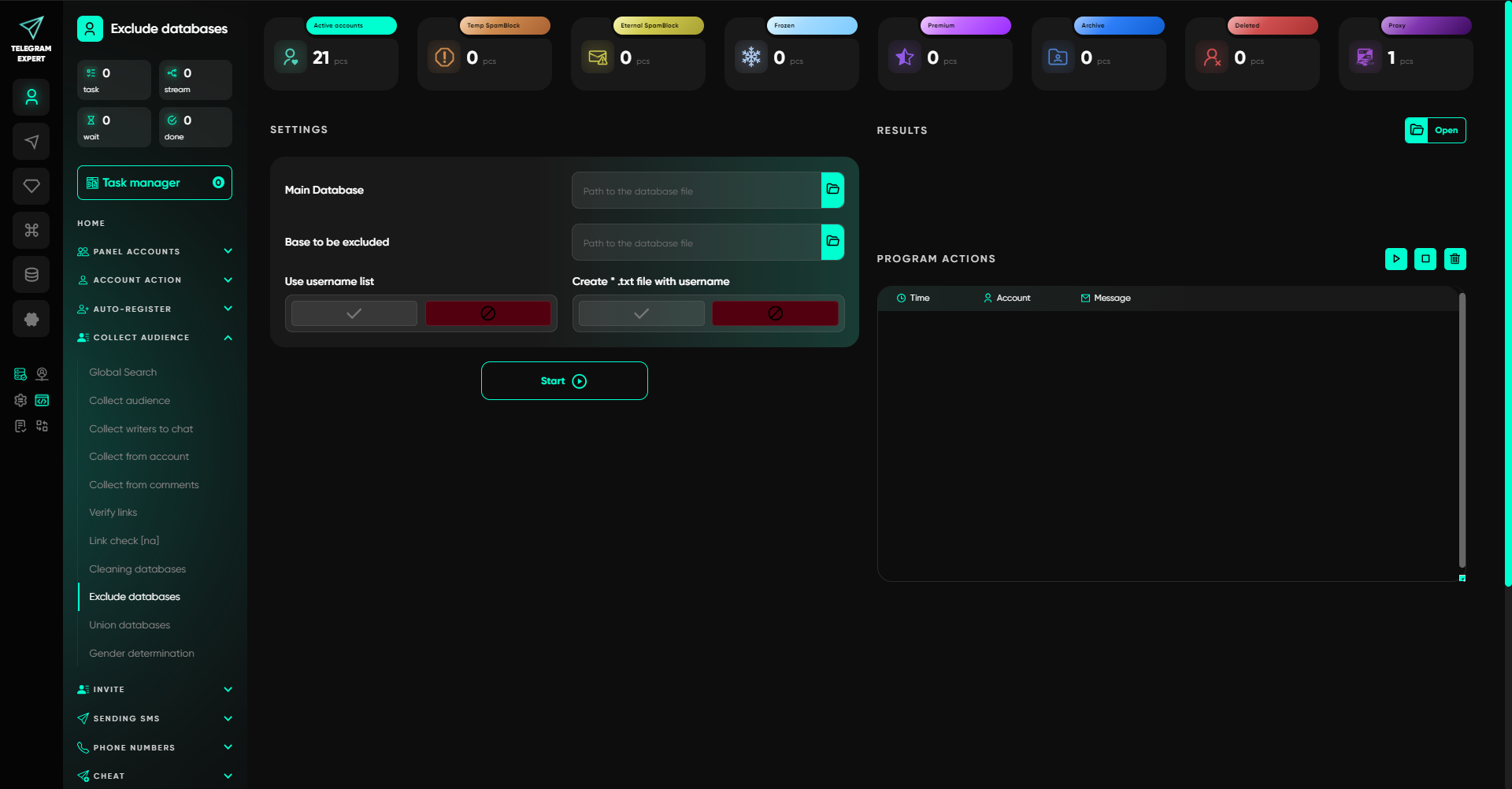
Below, we will look at how to prepare the data, exclude an already processed audience, and verify the result before the next mailing or invitation.
Why Processed Users Remain After Cleaning the Database
Suppose you are promoting a niche community and regularly collecting audiences from several relevant chats.
On Monday, you collected members from three groups and ran a mailing. On Friday, you added new sources and collected users again. Some of them may be people you already messaged on Monday.
Removing duplicates from the new database will delete repeated records if the same user was collected from several sources. However, this kind of cleaning does not take the history of the previous mailing into account.
That is why, when working with the same audience repeatedly, it is useful to separate two operations.
Duplicate removal helps create a list without repeated records. For example, if one user belongs to three chats, their presence in all three sources does not require three separate records in the final selection.
Excluding processed users removes from the new list people who have already taken part in a specific operation. For this, you need a database containing the results of the previous work.
Both tasks can be handled in Telegram Expert. The software combines audience collection, database preparation, mailings, invitations, and statistics. This makes it possible to use the results of previous operations when preparing the next selection.
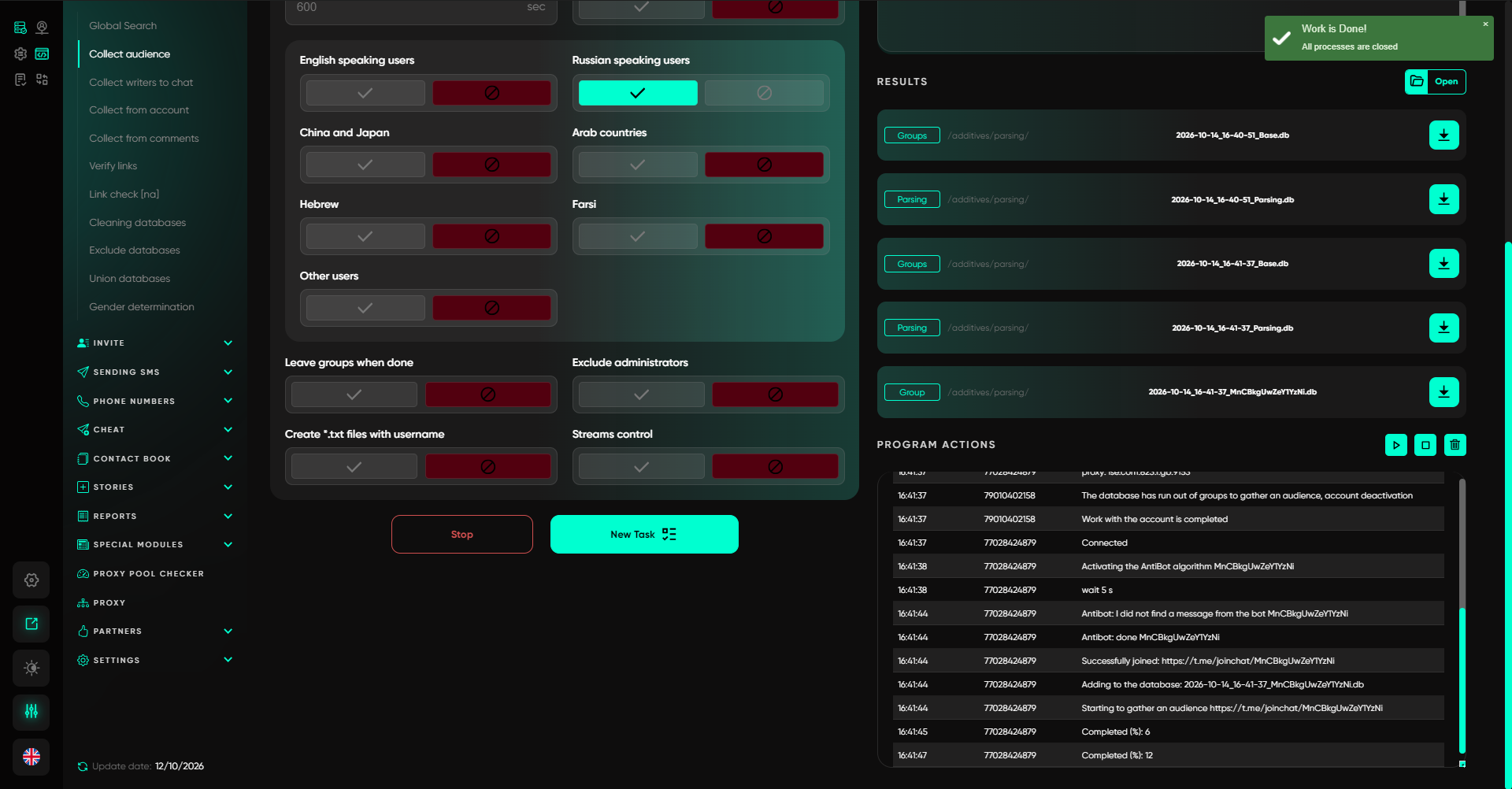
How to Determine Which Users Should Be Excluded
The exclusion set depends on what kind of work you performed with the audience.
If the goal is to prevent sending the same message twice, you need the users to whom the message was successfully sent.
If you invited users to a group, use the invitation results as your reference.
When working with databases in Telegram Soft Expert, it is important to consider operation statuses. They show what happened to a specific record while the task was running.
Which Statuses Show the Processing Result
Telegram Expert databases use the following status labels:
Done. The operation completed successfully. For a mailing, the message was sent; for an invitation, the user was added to the chat.
Ready. The record is ready to be processed and can be picked up by the program.
Taken. The record has been taken into processing.
Error statuses. These indicate why a specific action could not be completed. For example, ForbiddenError when sending a private message is related to restrictions on receiving messages.
Different operations may have their own status fields. For example, in a collected-audience database, Send_Status reflects the mailing status, while Invite_Status relates to invitations.
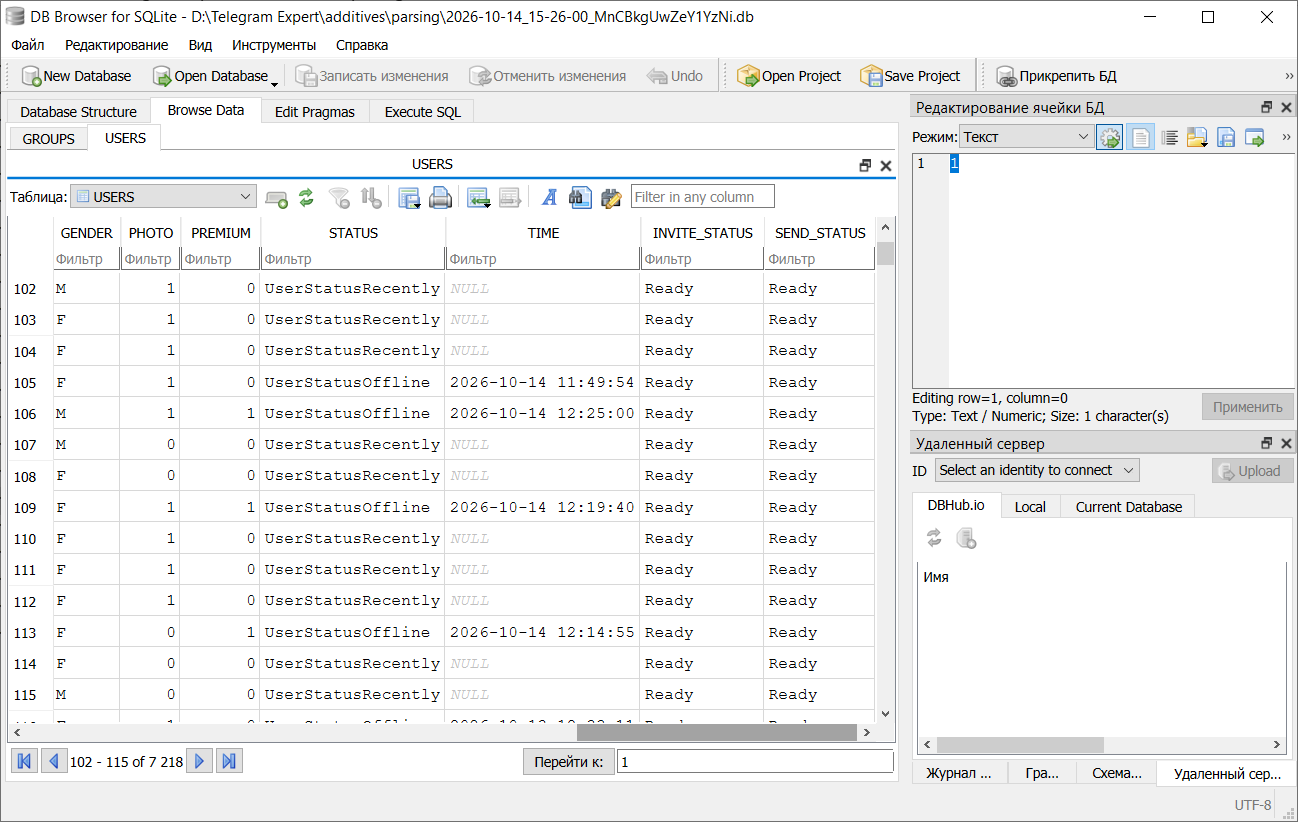
If you are preparing an exclusion after a mailing, use the sending results. For invitations, use the corresponding invitation statistics.
The Ready status may also appear after manual data changes or after resetting working statuses. Therefore, to restore the history of a previous run, it is better to use the saved results database.
Where to Find the Results of a Previous Mailing or Invitation
After operations are completed, Telegram Expert saves databases containing the results. They can be opened from the program interface or found in the corresponding folders.
By default, working data is stored in the additives directory.
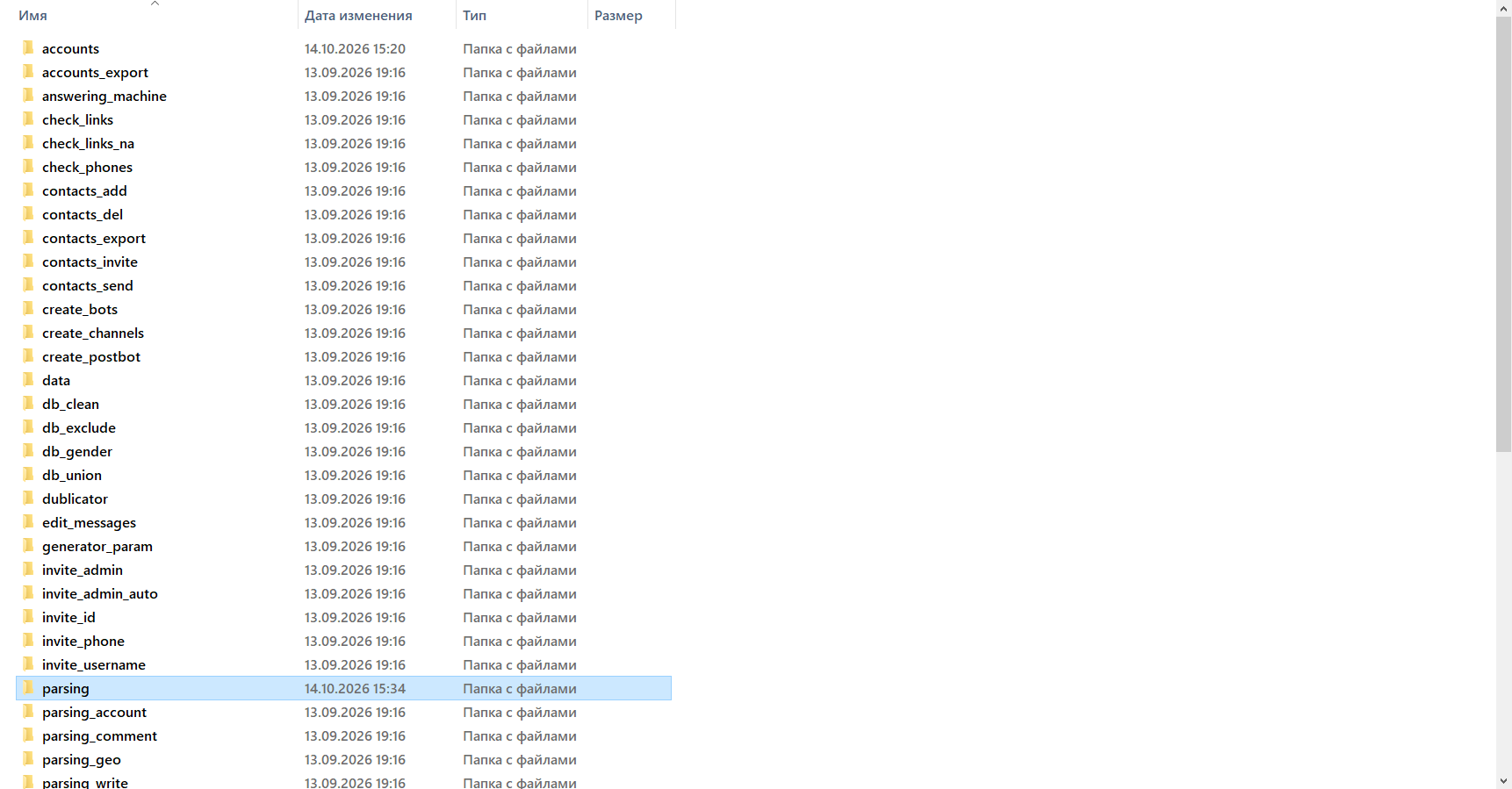
When looking for results, use the operation type as a guide:
send in a folder name refers to mailings;
invite refers to invitations;
db_exclude is used for database exclusion results.
Inside operation folders, you may find BaseParsing and ResultStat databases.
BaseParsing contains the source data submitted for processing when the task was launched from a list. For example, it may contain the username list used for a mailing.
ResultStat stores the results of an operation. It lets you review processed records and the statuses they received. Database names may differ depending on the module.
To prepare an exclusion after a successful mailing, you need information about users with the Done status.
How to Get a Database Containing Only Successful Operations
Manually reviewing a large table and writing down every user is inconvenient, especially if a mailing was run with several accounts or finished with different statuses.
Telegram Expert includes a “Report Generator” that can select successful results from a statistics database.
The workflow is as follows:
Open the “Report Generator” module.
In the statistics database field, select the result of the required mailing or invitation.
For a mailing, use the “Filter by Successful Mailings” option. Invitations have a separate filter for successful invites.
Generate the report and open the resulting database.
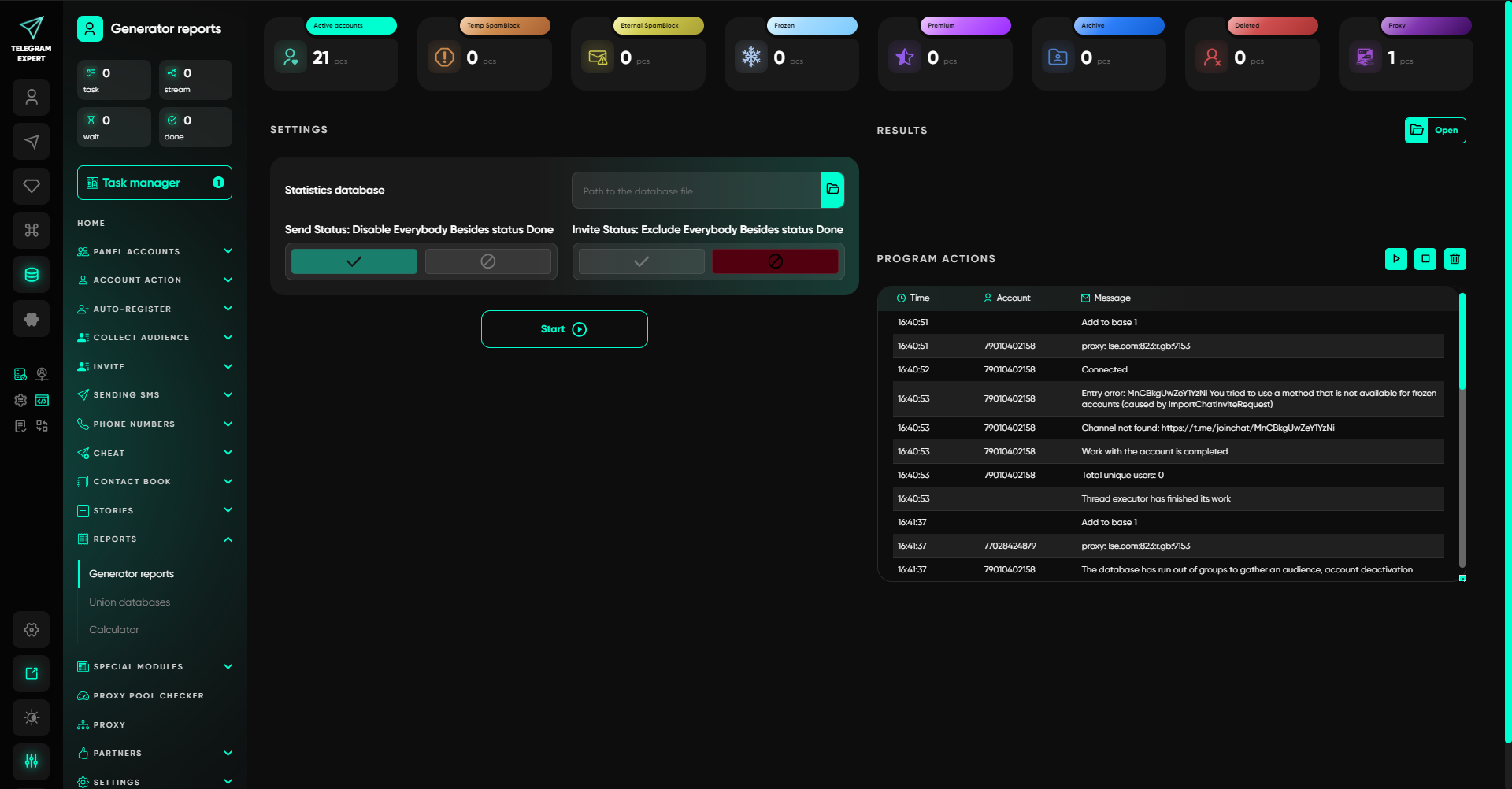
After filtering, only operations with the Done status will remain.
If you ran several mailings, prepare the results from the runs related to the current task. For example, when preparing a repeat mailing for the same offer, you may need the results of all previous sends for that offer.
Keep the original databases and work with copies so that the processing history can be restored if necessary.
How to Exclude Processed Users in Telegram Expert
Once the list of previously processed users is ready, you can proceed with the exclusion.
You will need two selections:
Main database. The new audience you plan to work with.
Exclusion database. The users who must be removed from the new audience.
For example, after collecting members of niche communities, you have a new database. You previously ran a mailing to part of this audience. Now you need to remove users from successful sends while keeping the rest for the next task.
01
Step 1. Prepare the Main Database
Open the new database and check what data it contains.
If the audience was collected from several chats, perform the required cleaning first. Also check that the database contains the user identifiers you will need for the next steps.
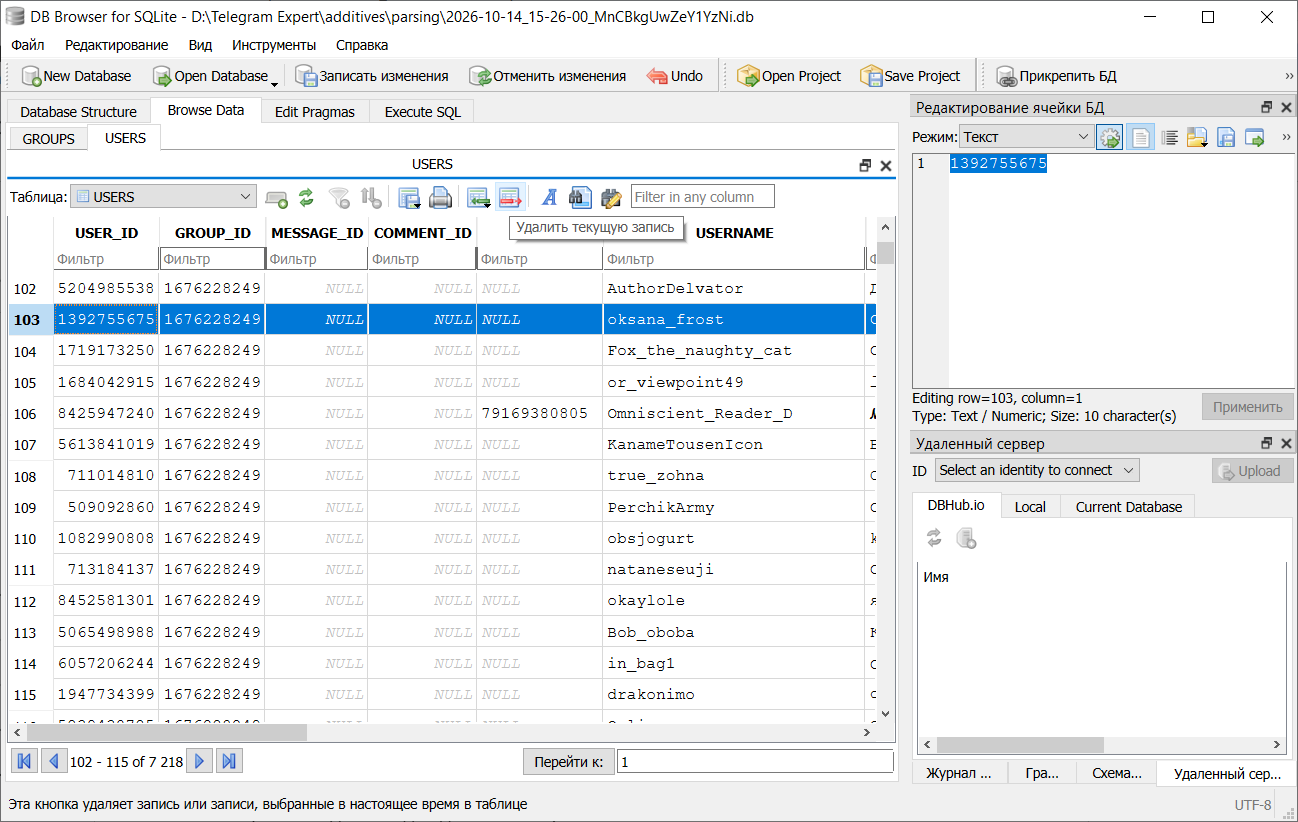
When preparing a username list, it matters whether the corresponding field is filled in for each user.
02
Step 2. Add the Database to Exclude
Open the “Database Exclusion” module in the audience tools section.
In the “Main Database” field, select the prepared new selection.
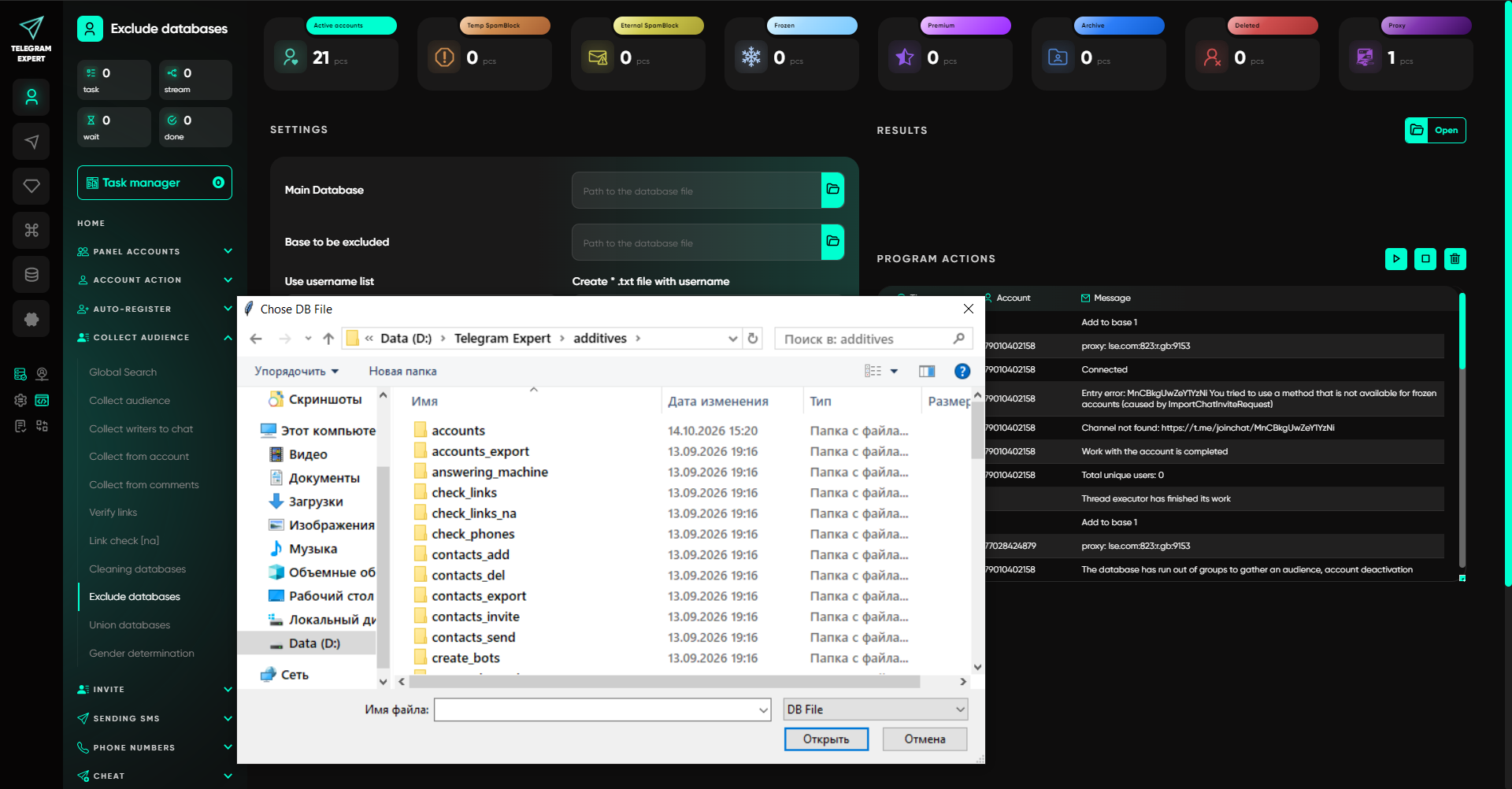
In the “Database to Exclude” field, add the database containing the users you have already processed.
After the operation is completed, the program will create a new database with matching records removed.
This approach can be used, for example, to prepare an audience for the next group invitation while excluding users who were already added during the previous run.
03
Step 3. Use a Username List If You Do Not Have a Separate Database
Telegram Soft Expert also supports exclusion using a list of public usernames.
This is useful if you still have a list of usernames from a previously processed audience but do not have a suitable exclusion database.
To do this:
Prepare a text list of the usernames you want to remove.
Make sure those usernames are present in the main database.
In the “Database Exclusion” module, enable “Use Username List.”
Add the prepared list and run the exclusion.
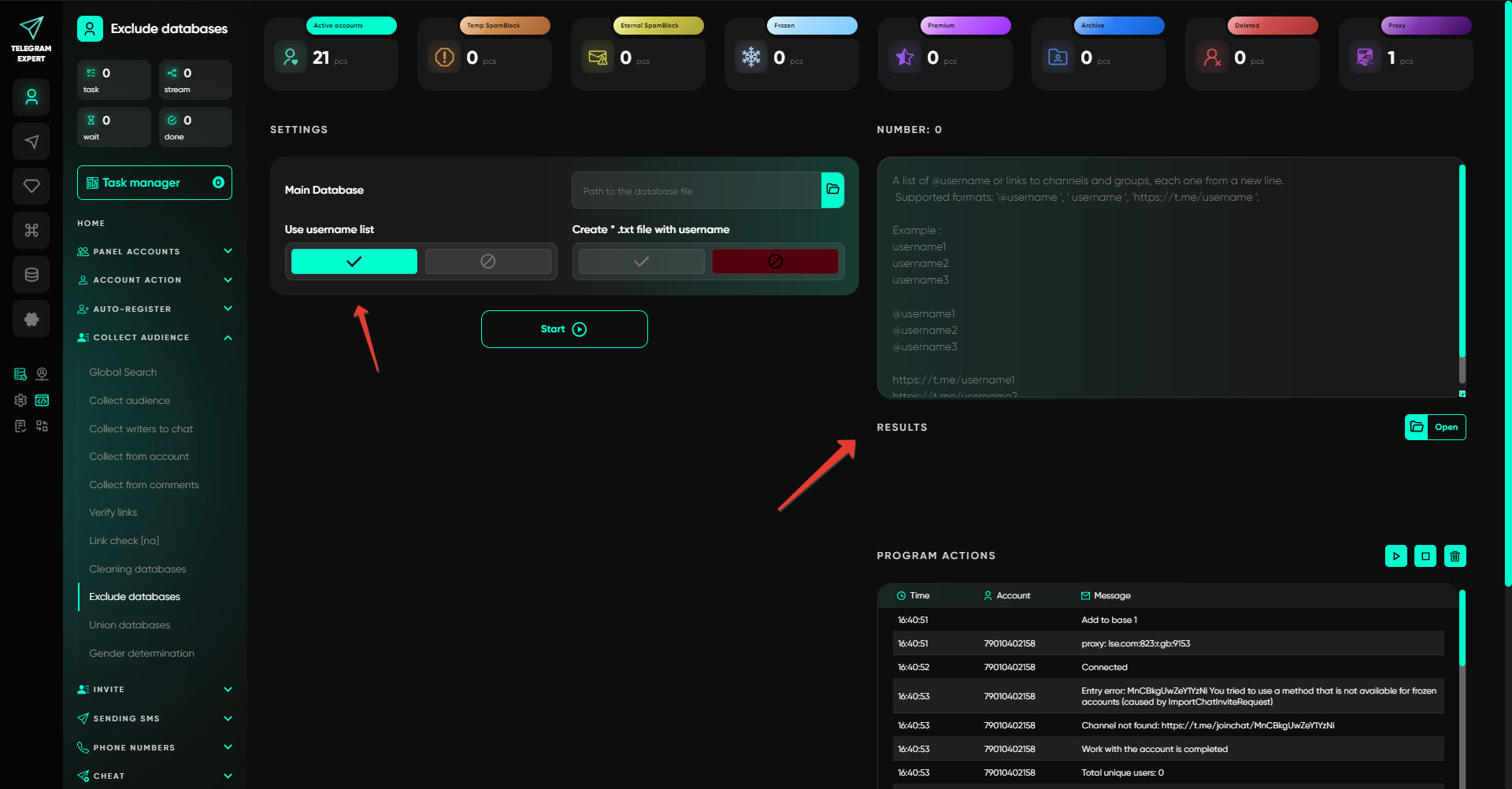
This mode removes the specified usernames from the main database.
When working with lists, keep in mind that a Telegram user can change or remove their username. If the saved public username differs from the current one, verify that the record still corresponds to the same user before excluding it.
Numeric User_ID values and usernames are different types of data. In username-list mode, use public usernames specifically.
04
Step 4. Save the Result
After the exclusion, open the resulting database.
If the next operation requires a regular text list, use the “Create a TXT File with Usernames” option.
Telegram Expert can generate a TXT file containing the unique usernames of the remaining users.
If you plan to continue working with the database itself, keep it in its original format so that other fields remain available.
How to Verify That Processed Users Were Actually Excluded
Start the check with several users whose processing history you know.
Open the result of the previous mailing, find records with the Done status, and check whether they are present in the new database. Users who were included in the exclusion list and matched by the data used for comparison should be absent.
Then check several users from the main database who were not part of the exclusion. They should still be present.
If the result differs from what you expected, check the following points one by one.
Processed Users Are Still in the Database
First, open the prepared exclusion set and find the specific user in it.
If the user is not there, check the results of the previous operation and the filtering conditions. It is possible that only successful sends were included in the exclusion while the user in question had a different status.
When excluding by username, check the spelling of the public username in both lists.
Users You Wanted to Keep Disappeared from the Database
Check which file was used as the exclusion database.
For example, in a repeat mailing, the message should be sent to people who did not successfully receive it during the previous run. If you load the entire original audience from the previous run into the exclusion, users with errors or unfinished operations that are present in that database will be excluded together with successful sends.
To select only successful results, filter by Done.
The Number of Rows Is Lower Than Expected
When viewing a database in SQLiteStudio, the number of displayed rows depends on the interface settings.
Open the display settings and check the configured limit. For example, a database containing 20,000 records may show only the first 1,000 rows on screen.
Also check the applied filters and open the other pages of the table.
Users with Ready Status Reappeared After Cleaning
Check whether the “Reset Working Statuses in Database” function was used.
It is located in the “Database Cleaning” module and resets mailing and invitation statuses to Ready. After such a reset, the program can process those records again.
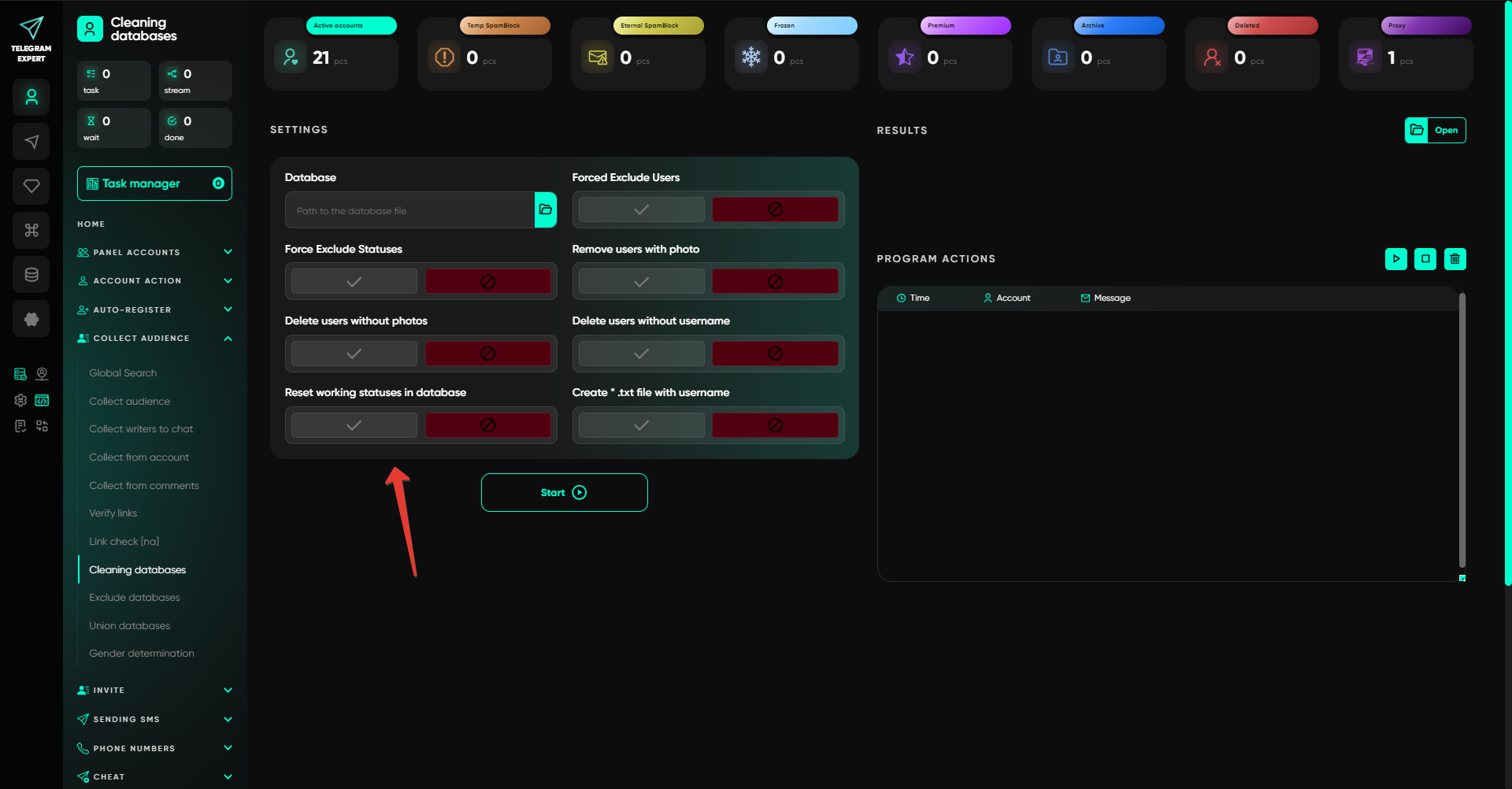
To exclude an audience that has already been processed, use the saved results of the previous operation and then build a new selection.
How to Prepare Databases for Regular Audience Work
When running several mailings or invitations, it is important to save the results of every run. This is especially useful when the audience is collected from overlapping communities.
The workflow can be organized as follows.
WORKFLOW
After collecting users, save the original database. When running a mailing or invitation, save the statistics database with the results. Before the next run, select processed users through the “Report Generator” and use the resulting data in the exclusion module.
If you need to account for several previous runs, prepare a combined list of users who should be excluded. When merging data, check for duplicate identifiers and keep the original results of each individual operation.
For convenience, use clear file names with the date and purpose, for example audience_october, send_done_october, and audience_next.
This way, you can reconstruct the history of work with a specific audience and prepare the next selection without manually checking every user again.
As a result, for the next mailing or invitation you will have a separate database containing the remaining users. You can use it in the appropriate Telegram Expert module while keeping the previous results for future audience updates.

Download Telegram Expert - software for Telegram promotion
Telegram Expert is professional software for fast channel growth and sales in Telegram. Launch mass mailings and invites, warm up accounts without bans, consolidate dialogs in one place, and scale your team. All in one window - fast, safe, and tailored to your tasks.
What it can do:
- TDATA Converter - массово переводит session+json в TDATA.
- Booster - account warm-up via smart dialogs to increase trust.
- Registrar - account creation via any SMS services with the sms-activate standard.
- Duplicator - a second session for existing accounts for transfer and protection.
- Forwarder - routes incoming replies to a working group and sends replies to clients.
- Interceptor - catches messages by keywords from chats/channels and forwards them to you.
- Invite via admin - invitations even to restricted groups.
- Channel and chat cloner - full copies, including protected content.
- Reporter - mass complaints about messages/users/channels.
No one has left a comment yet

Mini-apps in Telegram: what is it?
Mini-Apps in Telegram: What They Are and How They Help Businesses Mini-apps in Telegram are lightweight IT solutions that don't require special installation, as they open and perform their functions directly within Telegram. With them, users can access a variety of services: pay for goods and services, play their favorite music, play strategic or board games, track their physical activity, and more. They provide significant help to businesses, which is of great interest to entrepreneurs promoti...

Telegram Bots: automation that saves time and keeps respect
A bot in Telegram is needed wherever the same steps repeat: onboarding, navigation, file delivery, short requests, reminders, and opt-in broadcasts. A good bot speaks clearly, avoids unnecessary questions, and always leaves a path to a human. Where a bot brings maximum value Onboarding: introduce yourself, clarify the goal, offer 2–3 short paths. Content navigation: categories, quick search, “best of the month”. Requests/appointments: minimal fields, confirmation, reminde...

SEO on Social Media: How to Increase Visibility
Search engine optimization has long gone beyond Google. Social media platforms have become full-fledged search engines in their own right—people use them to look for information, products, and answers to questions. That is why SEO principles are being applied more and more actively to TikTok, Instagram*, Pinterest, and other platforms. If you properly optimize your profiles and posts for social media search, you will become more visible not only within those platforms, but also in traditional...

The Era of Synthetic Engagement: What Happens When AI Starts Talking to AI on Telegram
You look at the comments under a post: dozens of them, lively, full of emoji. An advertiser asks for engagement statistics. You send the numbers. But how do you know how many of those comments were written by real people, and how many by neural networks? The problem is not that AI can write text. The problem is that the familiar metrics no longer reflect reality. If you still judge a channel by likes and ER, you are mistaking noise for signal. And that will cost you money. Let us break dow...