
How to Keep Bot and Junk Traffic Out of Your Telegram Funnel (and Finally Trust Your Numbers)

You launch a campaign, the dashboard shows 5,000 clicks, and your channel gains 140 subscribers. Is that a bad creative, a bad offer, or a bad audience? Very often it is none of them. A noticeable share of those "clicks" were never people.
If you drive traffic to a Telegram channel, bot, or a landing page that leads into one, cleaning your traffic is one of the cheapest ways to improve results. Not because it makes more people subscribe, but because it shows you which sources actually work and stops you from scaling the wrong ones.
This guide walks through a practical setup you can apply this week.
Why Telegram funnel numbers often lie
A typical funnel looks like this:
Ad or post
→
click
→
landing page (or direct link)
→
join channel / start bot
→
subscriber activity
Every step can be polluted:
Link-preview and security crawlers. Messengers and security tools open links automatically to build previews or scan for threats. These visits can register as clicks.
Scrapers and monitoring bots. Competitors, aggregators and analytics tools regularly request pages to track what you advertise.
Datacenter and VPN traffic. Requests coming from hosting providers rather than home or mobile networks are rarely your target customer.
Accidental and low-intent clicks. Real people, but not your audience: wrong country, wrong language, wrong device.
None of this is unusual. The problem starts when you optimize based on blended numbers where junk and real visitors are mixed together.
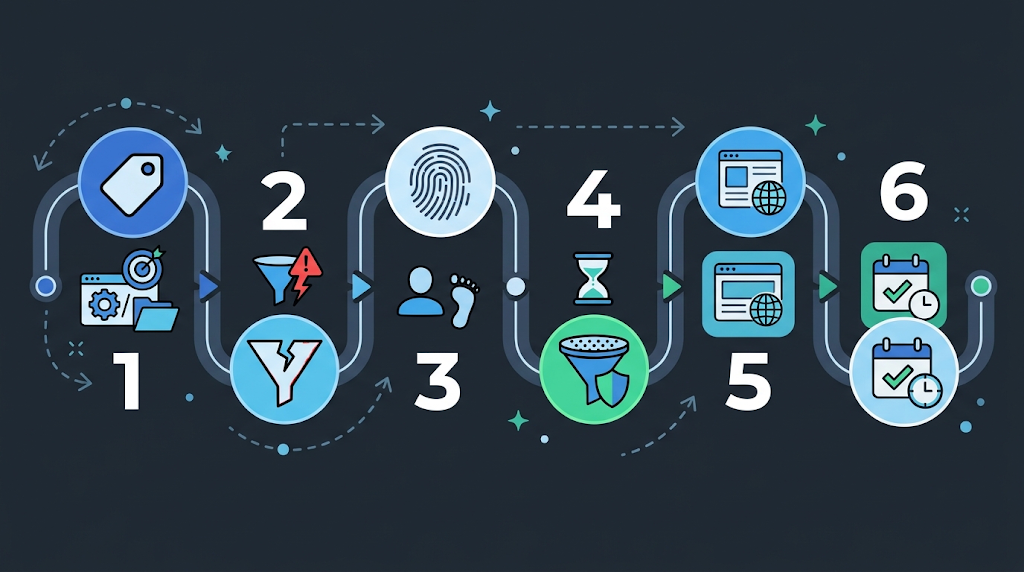
Step 1: Give every source its own tagged link
You cannot clean what you cannot separate. Before anything else, make sure each placement has a unique identifier.
Use a separate link (or at least a separate UTM tag) for every channel, post, creative and ad group.
Keep a simple naming convention, for example source_placement_creative_date. Boring, but it saves hours later.
For Telegram invite links, create a separate invite link per source, so you can see which source brought which subscribers.
The goal: when something looks off, you can point to the exact source instead of guessing.
Step 2: Measure the gaps between funnel steps
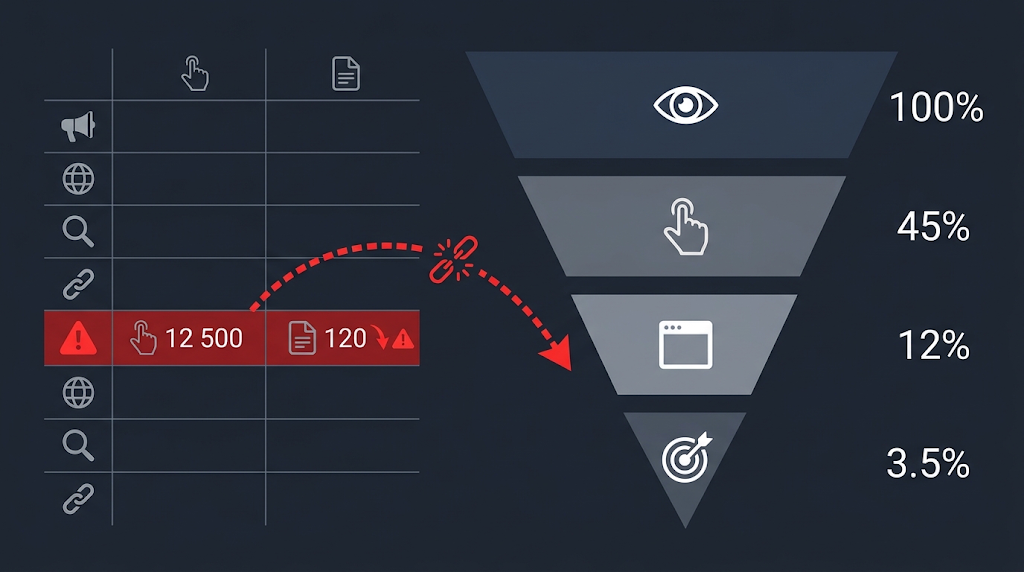
Most junk traffic reveals itself in the ratio between steps, not in any single number. Track at least these:
Metric | What it tells you |
|---|---|
Clicks → landing page views | Large drop means many clicks never loaded the page: bots, instant bounces, slow page |
Landing views → button clicks | Very low rate suggests visitors who never interact like a human would |
Button clicks → joins | Reflects real intent and offer quality |
Joins → active in the first 48 hours | Shows whether subscribers are real and engaged |
Rules of thumb that work in practice:
If one source shows a much higher click volume but a noticeably lower join rate than your others, treat it as suspicious before you treat it as "bad creative."
If visits arrive in tight bursts (hundreds within a minute) with near-zero time on page, that is almost never human behavior.
Compare against your own baseline. There is no universal "good" rate, so what matters is deviation from your normal.
Once sources are separated and you can see where the funnel loses people, Telegram Expert can serve as the operational layer inside Telegram: centralizing multiple accounts, channels and chats, different types of broadcasts, and auto-replies. Traffic filtering and acquisition-quality analysis remain a separate stage, which keeps audience acquisition distinct from the work that happens after users reach Telegram.
Step 3: Look at the technical fingerprints
When a source looks suspicious, check what kind of visitors it actually sent. These signals are the most useful:
Network type. Is the IP from a residential or mobile provider, or from a datacenter? A big share of datacenter IPs in a campaign aimed at regular consumers is a red flag.
User-Agent patterns. Outdated, empty, or identical user-agent strings repeated across thousands of requests suggest automation.
Referrer. Real ad traffic usually arrives with a consistent referrer pattern. Missing or strange referrers across a whole source deserve a closer look.
Geo and language mismatch. An English-language offer targeted at one country but receiving heavy traffic from unrelated regions points to leakage or junk.
Timing. Requests spaced at perfectly regular intervals are a classic sign of scripts.
You do not need to analyze all of this manually forever. But doing it once, for your worst-performing source, teaches you what your own junk traffic looks like.
Step 4: Filter before the visitor reaches your page
Cleaning data after the fact helps you understand what happened. Filtering before the page loads helps you stop it from happening.
The idea is simple: put a decision layer between the click and your landing page. Every request is checked against rules (network type, device, geo, behavior patterns, known bot lists), and then routed:
likely real visitor → your landing page or funnel;
likely bot, crawler, or scraper → a neutral page or simply nothing useful.
You can build this yourself with server-side scripts if you have the time to maintain bot lists and update rules. Many teams prefer a ready-made traffic filtering tool for that. For example, XCloak is built around exactly this layer: it filters bots, spy services, VPN and datacenter traffic, and gives you live analytics on clicks so you can see how much traffic was routed where. You manage several traffic flows from a single account instead of maintaining filter code per campaign, and an API is available if you want to connect the filtering layer to your own tooling.
Whichever route you choose, a few principles hold:
Start with logging, not blocking. Run your filter in observation mode for a few days. See what it would have excluded before you let it decide.
Be careful with strict rules. Over-filtering real users is as damaging as letting bots in. Review borderline cases regularly.
Keep one flow per campaign or source. Mixed flows make it impossible to tell which rule did what.
Check your own traffic. Test the flow from your phone, home network and a different region, so you know what a real visitor experiences.
Step 5: Make the landing page do some of the filtering for you
Even without technical tools, page design changes who converts and who just clicks:
Match the promise. The headline should repeat what the ad said. Visitors who feel a mismatch leave, and that is data too.
One clear action. A single "Join the channel" button beats five competing links.
Load fast. Heavy pages inflate the click-to-view gap and punish real mobile users on slow connections.
Show social proof honestly. Real numbers, real screenshots, real previews of channel content.
Add a light human step when needed. A short choice (for example "Which topic interests you?") can quietly separate engaged visitors from scripted hits.
After a visitor passes the filtering layer and reaches Telegram, Telegram Soft Expert can support the next stage of the funnel: account, channel and chat workflows, broadcasts, and auto-replies. This keeps the roles clear: XCloak filters the incoming flow before the handoff, while the Telegram software handles recurring operations once the audience is inside Telegram.
Step 6: Run a 15-minute weekly check
Consistency beats complexity. Once a week:
Open your funnel report and compare each source against its own average.
Flag any source where click volume jumped but joins did not.
Check the network and geo breakdown for those flagged sources.
Pause or cap a source only after you have seen evidence, not only a bad day.
Write down what you changed and why. Next month you will not remember.
Common mistakes to avoid
Judging a creative by clicks alone. Clicks are the easiest metric to inflate and the least meaningful.
Changing everything at once. If you edit the creative, the page and the filter in the same day, you will never know what worked.
Ignoring small campaigns. Patterns show up in small tests first, and fixing them early is cheap.
Trusting a single report. Compare numbers from your tracker, your landing page analytics and Telegram's own subscriber data. Differences are where the insight is.
Quick checklist
✓ Every source has a unique link or UTM
✓ A separate invite link per source
✓ Funnel step ratios tracked per source
✓ Network, geo and user-agent reviewed for weak sources
✓ A filtering layer in observation mode first, then enforced
✓ Landing page loads fast and matches the ad promise
✓ Weekly 15-minute review in the calendar
Final thoughts
Telegram growth is rarely held back by a lack of traffic. More often it is held back by not knowing which traffic is real. Clean data lets you cut weak sources earlier, scale strong ones with confidence, and stop paying for visitors who were never going to subscribe.
If you want to put the filtering layer in place without writing and maintaining it yourself, you can try XCloak with a 30% discount using the promo code EXPERT30. Start in observation mode, look at what your traffic really consists of, and decide from there.

Download Telegram Expert - software for Telegram promotion
Telegram Expert is professional software for fast channel growth and sales in Telegram. Launch mass mailings and invites, warm up accounts without bans, consolidate dialogs in one place, and scale your team. All in one window - fast, safe, and tailored to your tasks.
What it can do:
- TDATA Converter - массово переводит session+json в TDATA.
- Booster - account warm-up via smart dialogs to increase trust.
- Registrar - account creation via any SMS services with the sms-activate standard.
- Duplicator - a second session for existing accounts for transfer and protection.
- Forwarder - routes incoming replies to a working group and sends replies to clients.
- Interceptor - catches messages by keywords from chats/channels and forwards them to you.
- Invite via admin - invitations even to restricted groups.
- Channel and chat cloner - full copies, including protected content.
- Reporter - mass complaints about messages/users/channels.
No one has left a comment yet

Telegram trading, you can and you should
Trading via Telegram: It's Possible and Necessary The Telegram messenger, one of the most popular applications, is actively used by entrepreneurs, bringing high profits to channel owners. However, not all users know how to do it correctly. Let’s start with the main point. Why Should You Trade on Telegram? There are many reasons. Here are the most important ones: This messenger has an audience with high purchasing power, and it grows year by year. Telegram stands out for its intuitive, s...

How to Exclude Already Processed Users from a Telegram Expert Database
When collecting an audience in Telegram again, you may get users you have already worked with. For example, you collected members from several niche chats, sent them messages, and a week later prepared a new database. Some users appeared in both selections. Regular duplicate removal will not help here. It removes repeated records within the same database, while users from previous mailings may appear only once in the new file. To remove these users, you need to co...

Dolphin Anty: An Antidetect Browser for Telegram Multiaccounting
Managing multiple Telegram accounts has become standard practice. Some users promote channels, others run ads, work with clients or trade crypto. A regular browser or the Telegram app is usually enough when you only have a few accounts. But as that number grows, keeping track of the right profile and constantly logging back into sessions quickly becomes a mess. This is exactly where an antidetect browser like Dolphin Anty can help. It helps organize any number of accounts by keeping each one ...

Network Limits in Telegram Automation: How Many Accounts per IP
table.sota-grid::before, table.sota-grid::after, table.sota-grid > thead::before, table.sota-grid > thead::after, table.sota-grid > tbody::before, table.sota-grid > tbody::after, table.sota-grid tr::before, table.sota-grid tr::after { content: none !important; display: none !important; } Contents Why network limits are not Telegram limits How many accounts to run on one IP Rotation or static IP: what each stage requires How much traffic account operations actua...