
Which Gateway Type Should You Use for Telegram? A Practical Guide
If you're using Telegram casually on one phone or laptop, gateways probably aren't something you think about very often.
That changes once Telegram becomes part of a larger workflow.
Maybe you're monitoring industry chats, managing business accounts, running customer-support processes, testing regional behavior, or using Telegram automation software. At that point, the connection behind each session starts to matter.
The mistake we see fairly often is choosing a gateway based on which type sounds the most advanced.
Mobile must be better than residential. Residential must be better than datacenter. More rotation must be better than less rotation.
In practice, none of those assumptions is universally true.
A fast static datacenter IP can be completely appropriate for one setup. Another project may genuinely need a mobile carrier connection. A rotating residential pool can give you enormous geographic flexibility, but it can also be the wrong choice if your priority is keeping one IP unchanged for long periods.
The useful question is much simpler:
What does your Telegram setup actually need from the network?
What a Gateway Changes
A gateway sits between your software and the internet.
Instead of traffic going directly from your own public IP address to the destination, it passes through the gateway first. The destination sees the IP used by that gateway connection.
The important part is that different gateway types behave very differently.
Some give you one dedicated IP that stays the same.
Others let you rotate through a pool.
Some use mobile carrier networks. Others use ISP-owned commercial ranges or datacenter infrastructure.
For a Telegram-related setup, you might care about:
keeping one IP for a long-running session;
periodically changing IPs;
connecting through a specific country;
using a mobile carrier IP;
having unlimited bandwidth;
supporting HTTP, HTTPS, or SOCKS;
keeping latency reasonable;
running multiple simultaneous connections.
Those requirements should decide the gateway type — not the other way around.
For teams that manage several Telegram accounts, gateway selection is easier when it is tied to the software layer. Telegram Expert can help organize multi-account workflows, assign gateway settings to specific accounts or processes, and automate repetitive Telegram tasks. The gateway type then becomes part of the account configuration rather than a separate decision.
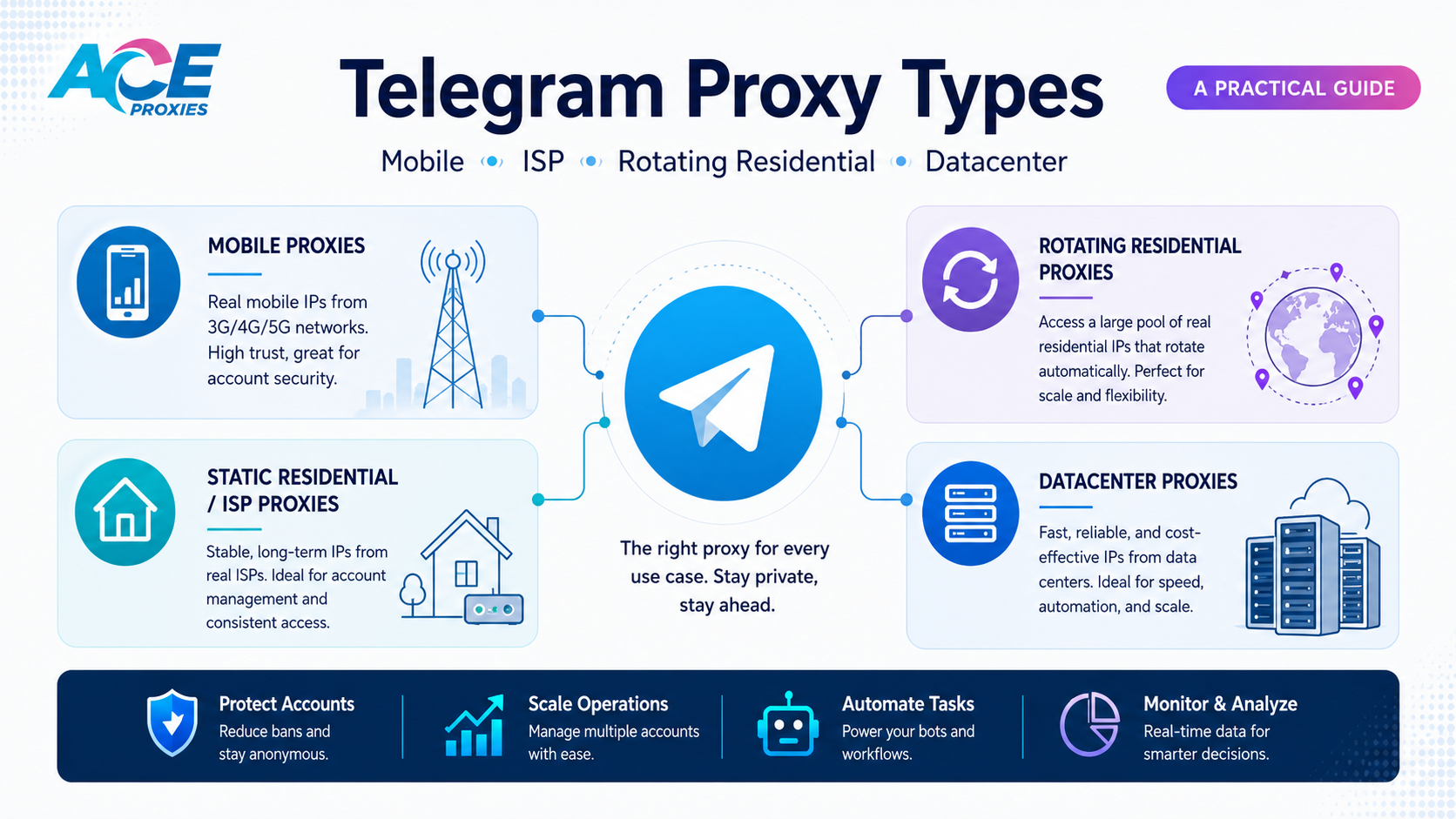
Mobile Gateways: When You Need a Real Carrier Connection
Mobile gateways route traffic through actual 4G, 5G, or LTE carrier networks using SIM cards connected to mobile devices or modems.
At Ace Proxies, the current dedicated mobile locations are:
United States — New York / East Coast through T-Mobile
Germany — Berlin through O2
Austria — Vienna through A1 and Magenta
Each dedicated mobile gateway provides one active IP at a time.
When you trigger a rotation, the mobile connection refreshes and the carrier assigns another IP from its available pool. The idea is similar to reconnecting a phone to its cellular network and receiving a different public IP.
Rotation can be configured from approximately 1–2 minutes up to 30 minutes or longer, or triggered manually through a provided rotation URL.
Because the address ultimately comes from the carrier, a rotation normally takes around a minute rather than happening instantly.
Ace Proxies is also preparing a Multi-SIM Mobile Gateway option for users who need faster rotation. Instead of relying on one SIM, a Multi-SIM configuration typically uses several SIM cards — around five per gateway — and cycles traffic between them while other SIMs refresh their IPs in the background.
When Mobile Makes Sense
Mobile gateways are useful when the mobile-network origin is actually relevant to the project.
Ace Proxies' dedicated mobile service currently includes:
unlimited bandwidth;
HTTP, HTTPS, and SOCKS support;
99% uptime;
scheduled or manual IP rotation;
username-and-password authentication.
There is no strict connection limit, although we generally recommend staying around 30 concurrent threads or fewer per gateway for better performance.
Mobile connections are naturally more variable than server-based infrastructure. Carrier congestion, routing, distance, your own internet connection, and the destination can all affect speed.
If you do not specifically need a mobile network, there may be a simpler and less specialized option.
Static Residential / ISP Gateways: Built for Stability
Static Residential gateways are often called ISP gateways.
They sit somewhere between traditional residential and datacenter infrastructure.
These IP addresses are purchased or leased from Internet Service Providers for commercial use, usually in larger ranges such as /24 or /23 blocks. They are not individually assigned home broadband connections.
That distinction matters because people sometimes assume an ISP gateway is simply someone's home internet connection that happens to stay online permanently.
It isn't.
At Ace Proxies, current Static Residential ranges are associated with providers including:
Cogent Communications
CenturyLink
Windstream
RCN
Current locations include New York, Virginia, and Delaware.
The biggest advantage here is consistency.
The IP is static, dedicated, and private rather than being pulled from a rotating pool.
Ace Proxies' ISP gateways currently provide:
unlimited bandwidth;
99% uptime;
HTTP, HTTPS, and SOCKS support;
network capacity of up to 10 Gbps;
a dedicated static IP.
For a long-running Telegram session where keeping the same IP is useful, that can be much more practical than constantly changing residential addresses.
One thing worth knowing is that IP databases do not always agree with one another. An ISP range may appear differently across different IP checkers because each company maintains its own data and classification system.
That is why the technical nature of the gateway matters more than relying on one lookup result.
Rotating Residential Gateways: When You Need Reach and IP Diversity
Rotating Residential Gateways use a completely different model.
Instead of assigning you one permanent IP, they provide access to a large residential pool.
Ace Proxies currently has 40+ million residential IPs worldwide, with country targeting available across 195+ countries.
The network can be configured to rotate:
on every request;
every 1 minute;
every 10 minutes;
every 30 minutes.
Thirty minutes is currently the maximum sticky-session interval.
This makes rotating residential gateways useful when geographic coverage or IP diversity is more important than keeping the exact same address indefinitely.
Gateway IP vs. Residential Exit IP
This is an area that sometimes causes confusion.
The gateway details you generate act as a gateway into the residential network.
The gateway itself is not necessarily the IP that the destination sees.
When you actually use the gateway, a residential exit IP is pulled from the available pool according to your targeting and rotation configuration.
That is why multiple gateway entries can use the same gateway infrastructure while still producing different residential exit IPs.
Bandwidth Is Different
Ace Proxies' Mobile, ISP, and Datacenter products include unlimited bandwidth.
Rotating Residential does not.
Residential traffic is sold through Pay-As-You-Go bandwidth or fixed GB plans. Fixed plans are valid for 30 days or until their bandwidth is consumed, whichever happens first. Unused bandwidth does not roll over.
That can make a big difference to cost.
If your workflow transfers large amounts of data but does not actually need rotating residential IPs, an unlimited-bandwidth static gateway may make more sense.
The current Rotating Residential service supports HTTP and HTTPS.
It does not currently support SOCKS, so protocol compatibility is something to check before purchasing.
Datacenter Gateways: Simple, Fast, and Often Enough
Datacenter gateways are server-hosted IPs.
They are easier for online services to identify as datacenter infrastructure than residential or mobile addresses, but that does not make them a poor choice by default.
For many workflows, they are the most straightforward option.
Ace Proxies' dedicated datacenter service currently provides:
dedicated private static IPs;
New York and New Jersey locations;
HTTP, HTTPS, and SOCKS support;
unlimited bandwidth;
99% uptime;
network capacity of up to 1 Gbps.
If you simply need a stable connection and residential or mobile network origin is not important to your task, a datacenter gateway can be a very efficient solution.
There is little point in paying for mobile or residential infrastructure if the project does not benefit from it.
Which One Should You Choose?
The easiest way to decide is to start with the requirement.
You need one IP that stays the same
Consider Static Residential / ISP or Datacenter.
Both provide dedicated static IPs.
You specifically need a mobile carrier connection
Use a Mobile Gateway.
Ace Proxies currently provides T-Mobile in the United States, O2 in Germany, and A1/Magenta in Austria.
You need IPs across many countries
Use Rotating Residential.
Ace Proxies currently provides country targeting across 195+ countries through a pool of more than 40 million residential IPs.
You need regular IP rotation
Use Rotating Residential or a Mobile Gateway, depending on whether you need residential broadband or mobile carrier IPs.
You need unlimited bandwidth
Ace Proxies currently provides unlimited bandwidth with:
Mobile Gateways
Static Residential / ISP Gateways
Datacenter Gateways
Rotating Residential is usage-based.
Your software requires SOCKS
Current Ace Proxies products supporting SOCKS include:
Mobile
Static Residential / ISP
Datacenter
Rotating Residential currently supports HTTP/HTTPS only.
That compatibility check is worth doing before purchasing the gateway rather than discovering it afterward.
A Quick Comparison
Gateway Type | IP Behavior | Network Source | Ace Proxies Coverage | Bandwidth |
|---|---|---|---|---|
Mobile | One active carrier IP, rotatable | 4G/5G/LTE carrier | USA, Germany, Austria | Unlimited |
Static Residential / ISP | Static | ISP commercial ranges | New York, Virginia, Delaware | Unlimited |
Rotating Residential | Rotating | Residential IP pool | 195+ countries | PAYG / GB plans |
Datacenter | Static | Datacenter infrastructure | New York, New Jersey | Unlimited |
Once the differences are laid out like this, choosing becomes much easier.
Don't Rotate an IP Just Because You Can
More rotation is not automatically better.
Suppose you have a business session that stays logged in throughout the day. If the connection is working correctly and the session benefits from consistency, changing the IP every few minutes may solve nothing.
Now imagine a completely different monitoring project where tasks are independent and need residential IPs from different countries.
Rotation becomes useful.
Same platform. Different requirement.
That is a good rule to keep in mind with gateways generally:
Every feature should solve an actual problem.
If it does not, you may simply be adding complexity.
Gateway Infrastructure and Telegram Software Are Different Layers
Telegram automation software and gateway infrastructure handle different parts of the setup.
A tool such as Telegram Expert handles the Telegram-side workflow.
The gateway handles the network connection underneath it.
If the software allows gateways to be assigned to accounts or processes, you can then choose the connection that fits each task instead of using one gateway type for everything.
For example, a persistent account environment may benefit from a dedicated static IP.
A geographically distributed monitoring setup may benefit from a residential pool.
A process that specifically requires mobile carrier routing can use a mobile gateway.
A simple server-side task may work perfectly well through a datacenter IP.
There is no reason every process needs the most expensive option available.
In this kind of setup, Telegram Soft Expert remains the Telegram automation layer, while the gateway profile changes with the task. A long-running account can use a stable ISP or datacenter IP, while geographically distributed monitoring can use residential rotation without changing the core account-management workflow.
Start Small Before Scaling
Before building a large gateway setup, test the workflow with a smaller number of connections.
Check:
whether your software supports the gateway protocol;
whether you really need residential or mobile IPs;
whether sessions should remain static;
which countries you actually need;
how much bandwidth the workflow consumes;
how many concurrent connections are realistic.
Run the setup for long enough to see how it behaves outside a ten-minute test.
Watch latency, bandwidth usage, connection stability, and session behavior.
Scaling something that already works is much easier than troubleshooting a large setup that was never properly tested.
Responsible Use Still Matters
A gateway changes the network route behind a connection.
It does not override Telegram's rules or make inappropriate automation acceptable.
The same principle applies to any automation platform.
Businesses should use gateway infrastructure and Telegram tools for legitimate purposes and make sure their activity complies with the platform's rules and any laws that apply to their operation.
The best infrastructure is usually the infrastructure that quietly does its job without becoming the focus of the workflow.
Final Thoughts
There is no universally best Telegram gateway.
There is only the gateway that matches what you need.
Need a real mobile carrier connection?
Choose Mobile.
Need the same dedicated ISP-associated IP tomorrow that you used today?
Choose Static Residential / ISP.
Need residential IPs across many countries?
Choose Rotating Residential.
Need a stable, unlimited-bandwidth server IP without residential requirements?
Datacenter may be all you need.
Ace Proxies currently provides all four categories, including dedicated Mobile Gateways, Static Residential ISP Gateways, Rotating Residential Gateways with a pool of 40+ million IPs across 195+ countries, and dedicated Datacenter Gateways.
You can learn more about the available services here:
Static Residential / ISP Gateways
https://www.aceproxies.com/buy-proxies/static-residential-proxies
Rotating Residential Gateways
https://www.aceproxies.com/buy-proxies/residential-proxies
Dedicated Datacenter Gateways
https://www.aceproxies.com/buy-proxies/dedicated-private-proxies
For a good Telegram setup, the gateway should eventually become the boring part.
Choose it properly, configure it once, and let the software do the interesting work.

Download Telegram Expert - software for Telegram promotion
Telegram Expert is professional software for fast channel growth and sales in Telegram. Launch mass mailings and invites, warm up accounts without bans, consolidate dialogs in one place, and scale your team. All in one window - fast, safe, and tailored to your tasks.
What it can do:
- TDATA Converter - массово переводит session+json в TDATA.
- Booster - account warm-up via smart dialogs to increase trust.
- Registrar - account creation via any SMS services with the sms-activate standard.
- Duplicator - a second session for existing accounts for transfer and protection.
- Forwarder - routes incoming replies to a working group and sends replies to clients.
- Interceptor - catches messages by keywords from chats/channels and forwards them to you.
- Invite via admin - invitations even to restricted groups.
- Channel and chat cloner - full copies, including protected content.
- Reporter - mass complaints about messages/users/channels.
No one has left a comment yet
How to Exclude Already Processed Users from a Telegram Expert Database
When collecting an audience in Telegram again, you may get users you have already worked with. For example, you collected members from several niche chats, sent them messages, and a week later prepared a new database. Some users appeared in both selections. Regular duplicate removal will not help here. It removes repeated records within the same database, while users from previous mailings may appear only once in the new file. To remove these users, you need to co...
Account booster
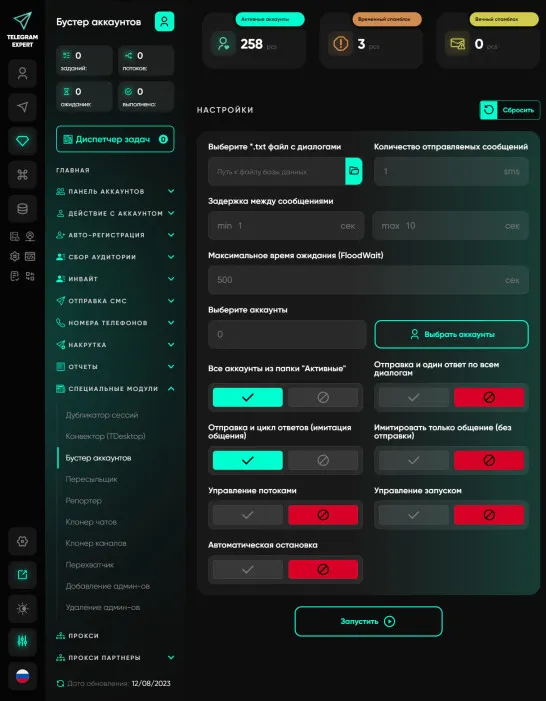
Our unique Account Booster module, developed by the Telegram Expert team, is designed to increase trust in your accounts by simulating real communication. It has become an integral part of the strategy of many successful users. Using the Account Booster module is a process that even a beginner can master. You select a group of accounts, add a database of dialogues, and the module takes care of all the rest of the work. You no longer need to spend hours simulating activity - the module does it fo...
How AI Agents Use Network Intermediaries for Reliable Web Data Collection in 2026 | Gateproxies
AI DATA INFRASTRUCTURE GUIDE AI agents can search, compare, monitor, and summarize public web information faster than a manual research team. Their output is only as reliable as the data pipeline beneath them. IP routing infrastructure matters when that pipeline needs geographic coverage, repeatable sessions, parallel collection, and clean separation between requests. 2026 trend guide Practical infrastructure 7 original visuals [me...

Guide: how to create AI videos that get millions of views
3 Proven Combos | Ready-to-Use Prompts | Step-by-Step Instructions from Idea to Upload If you're looking for ways to automate content for YouTube Shorts, TikTok, or Instagram Reels account networks, you're in the right place. In this guide, we break down three foolproof viral video formats that consistently generate millions of views. Each method includes detailed ChatGPT prompts and a step-by-step pipeline. If short-form video is used as the top of a funnel that ...