

How to Manage Multiple Telegram Accounts: Tools and Best Practices
Preview: Running multiple Telegram accounts for marketing? This guide covers what Telegram's anti-spam system actually detects, how to choose the right gateway type, and a step-by-step warm-up schedule that keeps your accounts alive long-term.
Running multiple Telegram accounts is standard practice for any serious marketing operation. You need separate accounts for different campaigns, client projects, geographic regions, or A/B testing message strategies. A single account simply can't cover all of that without becoming a cluttered mess.
The problem is that Telegram doesn't make multi-account management easy. The platform actively fights it. If you don't set things up correctly, you'll burn through accounts faster than you can create them. This guide covers the full stack: what Telegram detects, what tools you need, and how to keep accounts alive long-term.
What Telegram Actually Detects
Telegram's anti-spam system is ML-based. It doesn't rely on a single signal. Instead, it analyzes message frequency, content patterns, and IP anomalies simultaneously.
IP-based linking. This is the biggest risk. When multiple accounts send messages from the same IP address, Telegram treats them as linked. The system tracks message volume per IP within short time windows. Five accounts blasting messages from one IP is an obvious pattern, and it gets flagged fast.
Phone verification issues. Not all phone numbers are created equal. VoIP and virtual numbers are often pre-flagged in Telegram's system. Certain country codes carry elevated risk scores. If the number looks disposable, the account starts life with a trust deficit.
Device fingerprinting. Identical OS versions, app environments, and device parameters across multiple accounts signal a single operator. Telegram collects enough device metadata to spot this.
Geographic mismatches. An account registered with a UK phone number but consistently connecting from a Brazilian IP raises flags. The gap between registration country and connection country is a high-risk signal.
The Basic Toolkit
Before diving into IP gateways, here's what you need at a minimum:
Multiple phone numbers. Physical SIM cards are safer than virtual numbers. Virtual and VoIP numbers carry higher ban risk because Telegram has learned to distrust them. If you must use virtual numbers, choose providers that offer real mobile network numbers, not VoIP.
Separate IP per account. This is the single most critical rule. For maximum safety, assign one IP to one account. If you're budget-constrained, you can run 2-3 accounts per IP, but only with strict message pacing and staggered activity times.
Automation software. You need tools that handle message scheduling, account switching, and campaign management across multiple accounts without manual babysitting.
Warm-up discipline. New accounts need time before they can handle campaign volume. Skipping warm-up is the fastest way to lose an account. More on this below.
Why IP Gateways Matter for Multi-Account Telegram
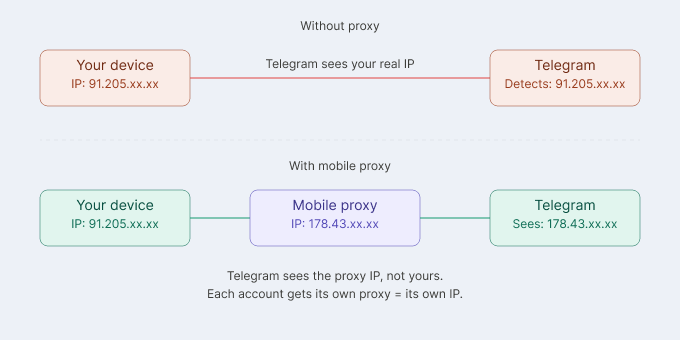
An IP gateway routes your traffic through a different IP address. Instead of Telegram seeing your real IP, it sees the gateway's IP. For multi-account setups, each account can appear to connect from a different location and network.
There are three main gateway types, and the differences matter:
Datacenter IP solutions are cheap and fast. They run on servers in data centers (AWS, Hetzner, OVH, and similar). The problem: Telegram checks the ASN (Autonomous System Number) of connecting IPs. Datacenter ASNs are instantly recognizable. No real user connects from a Hetzner server. These nodes get flagged regardless of how good your behavior patterns are.
Residential IP relays use IP addresses assigned to home internet connections. They look more legitimate because the ASN belongs to an ISP like Comcast or BT. Quality varies between providers, though. Some route traffic through datacenter infrastructure despite advertising residential IPs, which defeats the purpose.
Mobile IP nodes use IP addresses from real mobile carriers: T-Mobile, Vodafone, AT&T, and others. These are the highest-trust IP type. Telegram rarely blocks carrier IPs because millions of legitimate users share them. Mobile carrier ASNs pass every anti-fraud check that datacenter and many residential IPs fail.
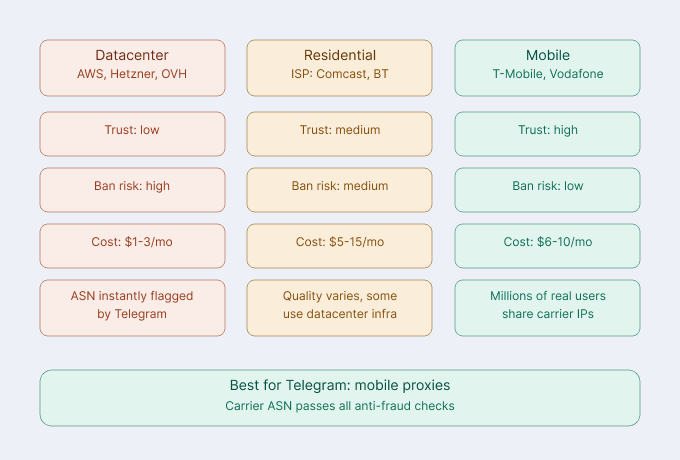
Note: The gateway type matters more than the protocol. A SOCKS5 datacenter node will still get flagged. A mobile IP gateway on HTTP will still pass. ASN classification is the first check.
Setting Up Mobile IP Gateways for Telegram
The core principle: one account per dedicated IP. If an account gets restricted, it shouldn't take others down with it.
iProxy.online turns any Android phone with a SIM card into a private SOCKS5 or HTTP gateway server. No root access required, no coding involved. Setup takes under five minutes.
What makes it useful for Telegram multi-account setups:
Multiple independent gateway ports per device. A single phone can host up to 15 separate access points, each with its own IP. One Android device with one SIM can serve multiple Telegram accounts, each isolated on its own connection.
IP rotation options. You can rotate the IP manually, on a schedule, or through an API call. There's also a Telegram bot that lets you trigger rotation directly from a chat. Monthly rotation is a good hygiene practice for long-running accounts.
SOCKS5 and HTTP support. Both protocols work. SOCKS5 is generally preferred for Telegram because it handles all traffic types cleanly without parsing application data.
Pricing starts at $6/month per device. For the full feature set including higher speed limits, it's $10/month per device. iProxy.online also offers a free 2-day trial with no credit card required.
Best Practices for Daily Management
Warm-Up Schedule for New Accounts
Don't skip this. A new account that immediately starts sending campaign messages will get restricted within hours.
Days 1-2: Profile setup only. Add a profile photo, bio, and username. Join 3-5 public groups relevant to your niche. Read messages, browse channels. Send nothing.
Days 3-4: Light engagement. Reply to a few group messages with genuine responses. Start 1-2 direct conversations. Subscribe to 5-10 channels.
Days 5-7: Gradual activity increase. Send 5-10 messages to contacts. React to posts in groups and channels. Share content where appropriate.
After week 1: Begin campaign activity. Start with 1-2 outreach conversations per day. Increase volume weekly, not daily. Patience here saves accounts.
Message Pacing
Keep newer accounts under 20-30 messages per day. Even established accounts benefit from pacing. Avoid sending at machine-speed intervals. Add natural variation in timing. If your tool supports randomized delays, use them.
Content Variation
Never send identical messages across accounts. This is one of the easiest patterns for Telegram to detect. Use templates with variable fields: different greetings, reworded sentences, varied CTAs. Each message should read as individually written, even if the core offer is the same.
Account Health Monitoring
Check @SpamBot regularly. If an account gets a temporary restriction, @SpamBot will tell you the status and when it lifts. Rotate gateway IPs monthly as a preventive measure. Clear stale sessions from inactive accounts, since old sessions from different IPs can create conflicting signals.
Note: If @SpamBot shows a restriction, do not immediately resume campaign activity when it lifts. Give the account 2-3 days of organic-looking behavior before restarting outreach.
Wrapping Up
Successful multi-account Telegram management comes down to a few non-negotiable practices: separate IPs for each account, proper warm-up before any campaign activity, mobile IP gateways instead of datacenter ones, and patient scaling over weeks rather than days.
The technical setup doesn't need to be complicated. A few Android phones with SIM cards running iProxy.online, combined with disciplined warm-up and messaging practices, will keep your accounts healthy and your campaigns running.
Get the fundamentals right first. The accounts you save by being patient in the first two weeks will pay for themselves many times over.
Important: this website is the only official website of the Telegram Expert project. Licenses, updates, and official technical support are available only through this website. Any other websites offering Telegram Expert are not affiliated with BLB.Team and are either unofficial or fraudulent.

Download Telegram Expert - software for Telegram promotion
Telegram Expert is professional software for fast channel growth and sales in Telegram. Launch mass mailings and invites, warm up accounts without bans, consolidate dialogs in one place, and scale your team. All in one window - fast, safe, and tailored to your tasks.
What it can do:
- TDATA Converter - массово переводит session+json в TDATA.
- Booster - account warm-up via smart dialogs to increase trust.
- Registrar - account creation via any SMS services with the sms-activate standard.
- Duplicator - a second session for existing accounts for transfer and protection.
- Forwarder - routes incoming replies to a working group and sends replies to clients.
- Interceptor - catches messages by keywords from chats/channels and forwards them to you.
- Invite via admin - invitations even to restricted groups.
- Channel and chat cloner - full copies, including protected content.
- Reporter - mass complaints about messages/users/channels.
No one has left a comment yet
Telegram Banned? 2026 Guide to Fix Account Bans, Region Blocks & IP Issues
body, article, section, div, p, h1, h2, h3, li, .content-section { text-align: justify; } body { margin: 20px; font-family: Arial, Helvetica, sans-serif; line-height: 1.6; } In the evolving landscape of global social media marketing, Telegram has shifted from a "wild west" of anonymity to a sophisticated ecosystem with some of the most stringent anti-spam measures in the industry. For many digital marketers, the journey ends...

Which Gateway Type Should You Use for Telegram? A Practical Guide
[media mw=100]3383[/media] If you're using Telegram casually on one phone or laptop, gateways probably aren't something you think about very often. That changes once Telegram becomes part of a larger workflow. Maybe you're monitoring industry chats, managing business accounts, running customer-support processes, testing regional behavior, or using Telegram automation software. At that point, the connection behind each session starts to matter. The mistake we see fairly often ...
How to Keep Bot and Junk Traffic Out of Your Telegram Funnel (and Finally Trust Your Numbers)
[media mw=100]3503[/media] You launch a campaign, the dashboard shows 5,000 clicks, and your channel gains 140 subscribers. Is that a bad creative, a bad offer, or a bad audience? Very often it is none of them. A noticeable share of those "clicks" were never people. If you drive traffic to a Telegram channel, bot, or a landing page that leads into one, cleaning your traffic is one of the cheapest ways to improve results. Not because it makes more people subscribe, but because i...
How to Exclude Already Processed Users from a Telegram Expert Database
When collecting an audience in Telegram again, you may get users you have already worked with. For example, you collected members from several niche chats, sent them messages, and a week later prepared a new database. Some users appeared in both selections. Regular duplicate removal will not help here. It removes repeated records within the same database, while users from previous mailings may appear only once in the new file. To remove these users, you need to co...