
Managed IP Relay Infrastructure for Telegram Expert by Astro: For Registration, Messaging, and Data Scraping
In Telegram Expert scenarios, the network layer directly affects operational stability. Telegram evaluates connection characteristics from the very first minutes, including the IP address, connection origin country, connection stability, and the consistency of network behavior patterns. That’s why even a “perfect” device-level registration is ultimately constrained by the gateway infrastructure. A common mistake is trying to compensate for these limitations by adjusting module settings without changing the underlying network layer. A mismatch between the IP location and the phone number’s country, as well as using the same IP address for multiple accounts, increases the risk of restrictions regardless of the warm-up strategy.
At the same time, relying on public IP blacklists as a universal indicator of mobile or residential gateway quality is misleading. Such lists are often compiled due to mass usage of certain addresses or isolated incidents such as SMTP spam and typically do not reflect whether an IP is suitable for Telegram-related tasks.
This leads to a different validation approach. Third-party checkers and public databases are often outdated, while major platforms rely on proprietary risk models and internal reputation lists. Unlike most services, Telegram Expert provides an advanced, regularly updated checker directly within its interface, which simplifies practical testing.
The conclusion is straightforward: gateway quality can only be confirmed through testing within a specific Telegram or Telegram Expert scenario. This is where Astro addresses the network layer of Telegram Expert operations through a managed IP relay infrastructure. IP addresses of real users are provided in accordance with KYC and AML policies, while residential, mobile, and datacenter relays allow you to select the appropriate connection type for each task and maintain consistent network behavior for registration, warm-up, messaging campaigns, and data scraping.
The core principles of Astro’s integration with Telegram are built around a proper network model:
IP addresses from 150 countries to match the phone number’s geography (in Telegram);
Selection of the relay type based on the specific task;
Dedicated connections for each account;
No mass reuse of the same gateways by different users;
Connection stability – 99.9% uptime.
The key idea behind the Astro × Telegram Expert integration is environment consistency. From the very beginning of working with Telegram – and Telegram Expert in particular – the anti-fraud system compares the IP address country with the phone number’s country code (for example, +33 – France) and analyzes the user’s network fingerprint based on a range of behavioral signals. If a number is associated with France but the connection originates from Brazil, this is treated as anomalous behavior and increases the risk of additional verification or restrictions. The ability to preselect the required location through Astro makes it possible to establish a proper network configuration: connecting from the same country as the phone number used for the account and operating within a consistent environment.
Consistency of usage is equally important. It is recommended to follow the “one region = one account” principle, maintain consistent login behavior, and manage IP changes. Astro provides multiple IP rotation modes – timer-based rotation, rotation on a new connection, or manual switching. This allows IP addresses to change only when justified by operational logic, avoiding random or unnecessary switching.
Under what conditions is IP rotation appropriate for a single account?
First, during long-running scraping of large chats or channels. When handling a high volume of sequential requests, Telegram may apply connection-level limits. Rotating IP addresses within the same region allows requests to continue without affecting the account’s location profile.
Second, when working with Telegram Web or auxiliary tools that generate a large number of automated requests. Changing the IP within the same country helps distribute the load while preserving consistent network behavior.
Third, in multi-account management scenarios, where a single operator controls multiple accounts. In such cases, IP addresses are redistributed across connections based on workload, but always within the same region.
[!!] Please note: IP rotation is acceptable only when geographic consistency is maintained and there are no abrupt country changes. The IP address changes, but the account’s network identity remains consistent.
Different stages of operation require different connection types
Residential gateways are used when it is important to simulate a regular user connection through a home network, ensure a high level of trust, maintain a consistent network profile, and preserve geographic consistency.
Mobile relays are suitable for the most sensitive scenarios (registration, account warm-up, bulk messaging), where the highest trust level is critical. They provide dynamic IP rotation from mobile carriers and the most natural traffic patterns (CGNAT).
Datacenter egress nodes are used when connection stability, predictable network identity, and cost-efficient scaling for high request volumes are the priority (for example, scraping and data collection). However, for Telegram this is a less trusted network type in terms of ASN/ISP compared to mobile and residential connections.
[!!] Please note: Telegram’s anti-fraud system is more sensitive to datacenter connections, as datacenter ASNs are easily identifiable. If used with improper usage patterns, this increases the risk of restrictions, especially during account registration and large-scale activities.
Astro × Telegram Expert Use Cases
When running messaging campaigns, Telegram’s anti-fraud system reacts negatively to extremes. It is suspicious when an IP address changes every few minutes, and it is equally suspicious when 50-100 accounts share the same IP address. Therefore, a relay infrastructure should provide dedicated connections for accounts and a flexible IP rotation model.
In practice, this approach to messaging campaigns ensures:
the use of dedicated gateways instead of a single IP address for all accounts;
controlled IP rotation without frequent or random address changes;
consistent geolocation of gateway connections;
selection of the relay type depending on the workflow stage – registration, account warm-up, or bulk operations.
When scraping Telegram audiences, restrictions are most often related to frequent requests and unstable connectivity. In this case, the goal is not simply to bypass restrictions but to implement proper connection configuration and distribute requests across multiple gateways. This approach makes it possible to scale data collection without relying on a single IP and without service disruptions caused by unstable gateway infrastructure.
Briefly about the Astro integration with Telegram Expert
“Two sides of the same coin.”
Astro’s real user IP addresses work seamlessly with Telegram Expert. They make it possible to:
Minimize overlaps in network parameters between accounts;
Scale operations without using a single IP address for a large number of accounts.
Using Astro Relays in Telegram Expert: Relay Setup in the Astro Dashboard
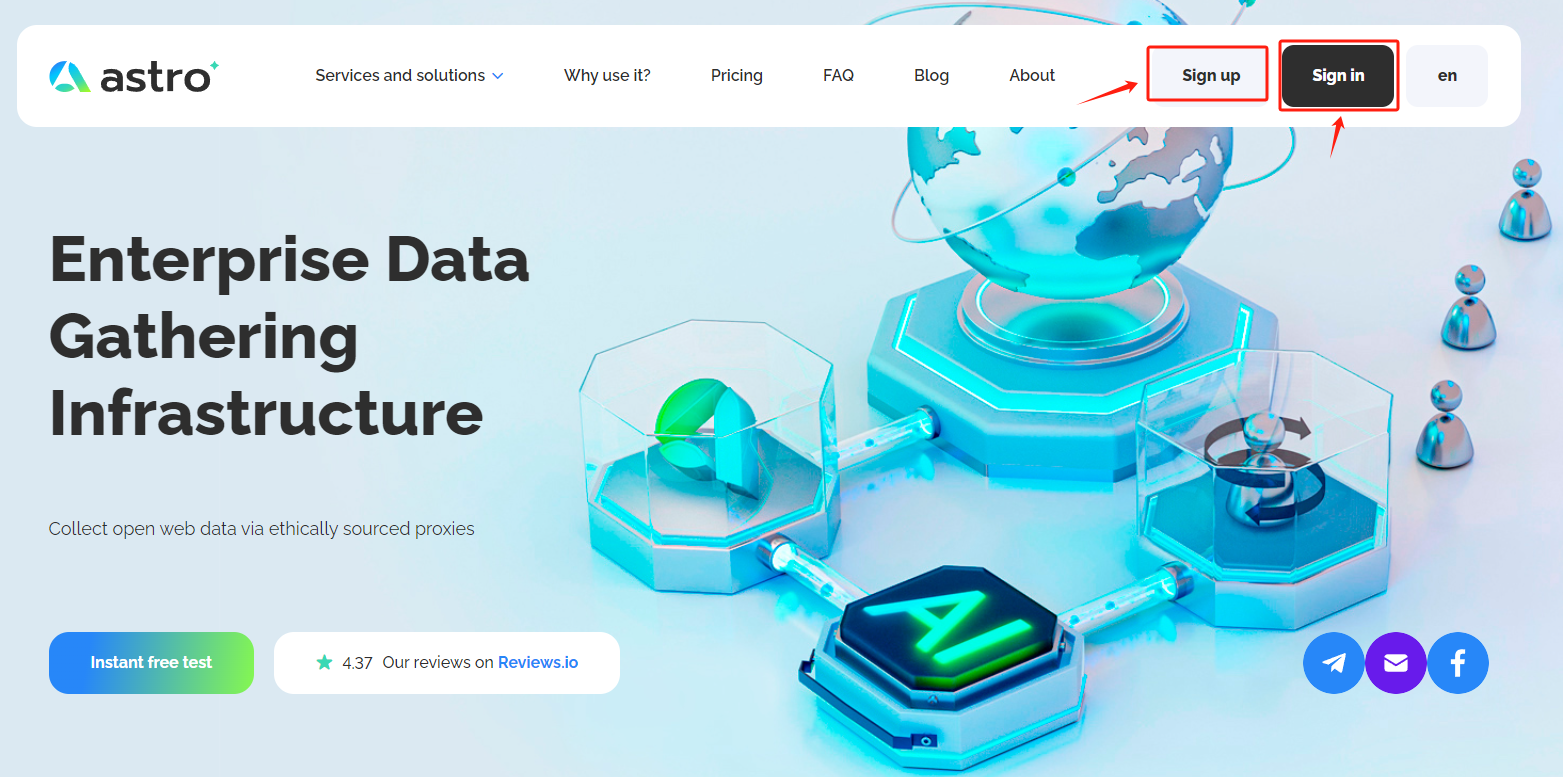
Register and log in to your Astro account on the official website:
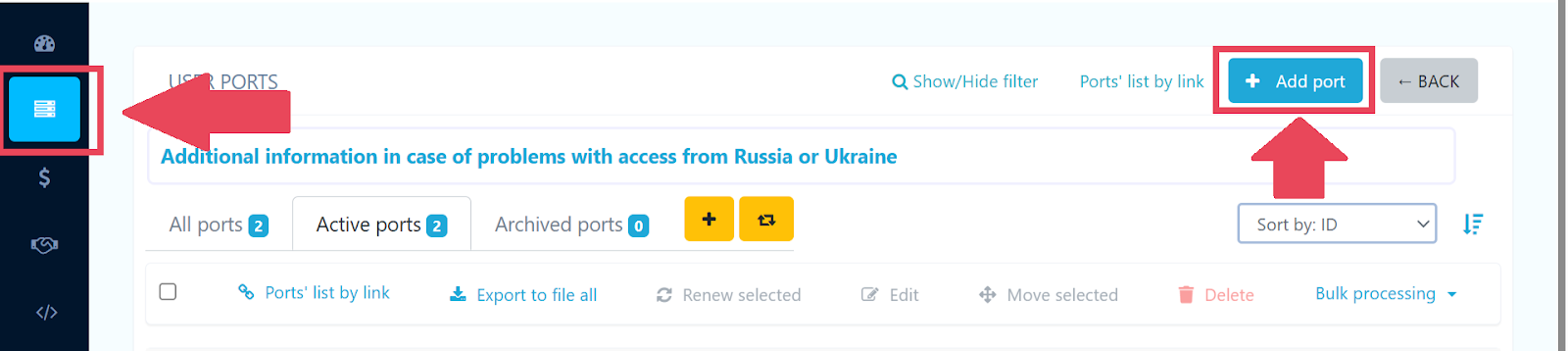
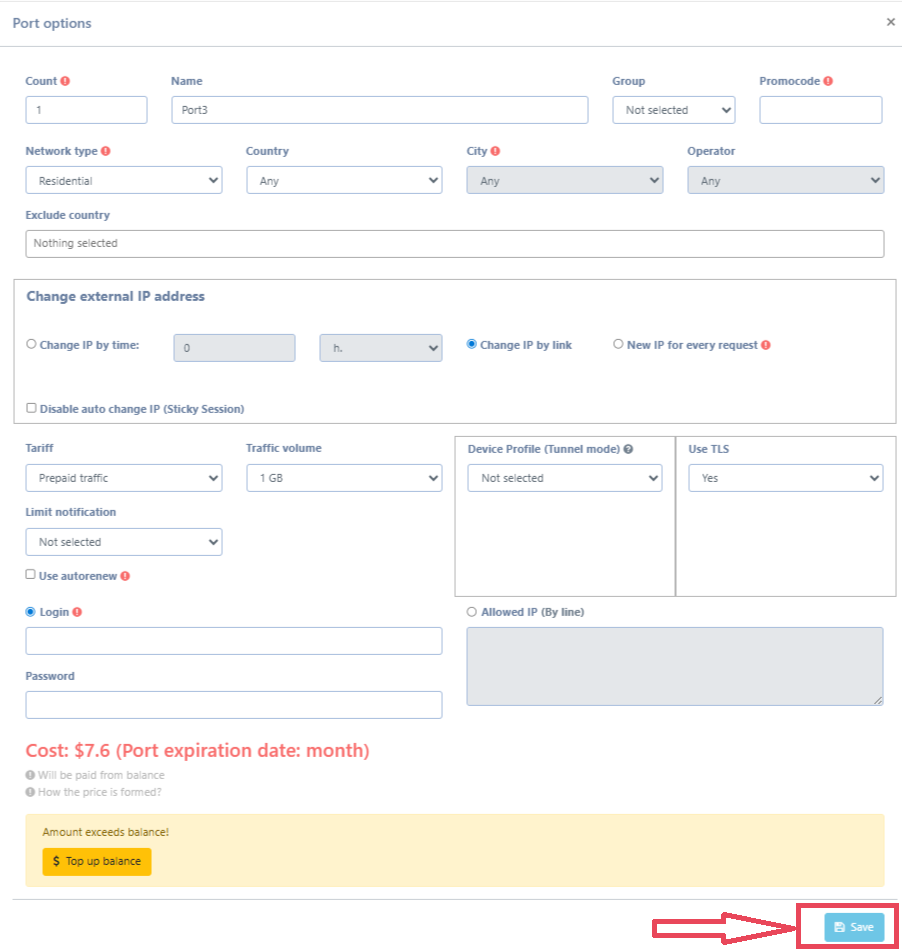
In your dashboard, go to the “User Ports” tab and click “Add port” (click “1”, then “2” – see the screenshot below for instructions):
Configure the port and click “Save”:
Relay Types:
Residential – IP addresses assigned by internet service providers to real household devices, offering a high trust level, stable connectivity, and precise geolocation. They provide a balanced option in Telegram, combining security, a consistent network profile, and scalability.
Mobile – IP addresses from mobile carriers that are often perceived as regular user traffic and provide natural IP rotation. They are optimal for registration, account warm-up, and messaging campaigns while minimizing the risk of restrictions.
Datacenter – IP addresses hosted in data centers with predictable performance characteristics, suitable for cost-efficient scaling. They are commonly used for scraping and automated operations where process stability is important. For Telegram, this network type typically has a lower trust profile due to identifiable ASN/ISP characteristics.
Region (GEO): choose the country, city, and provider to match your use case.
Protocol: HTTP or SOCKS5 (both are supported).
IP rotation (if needed):
on a timer;
a new IP address for each new connection;
manual IP rotation via link or dashboard button.
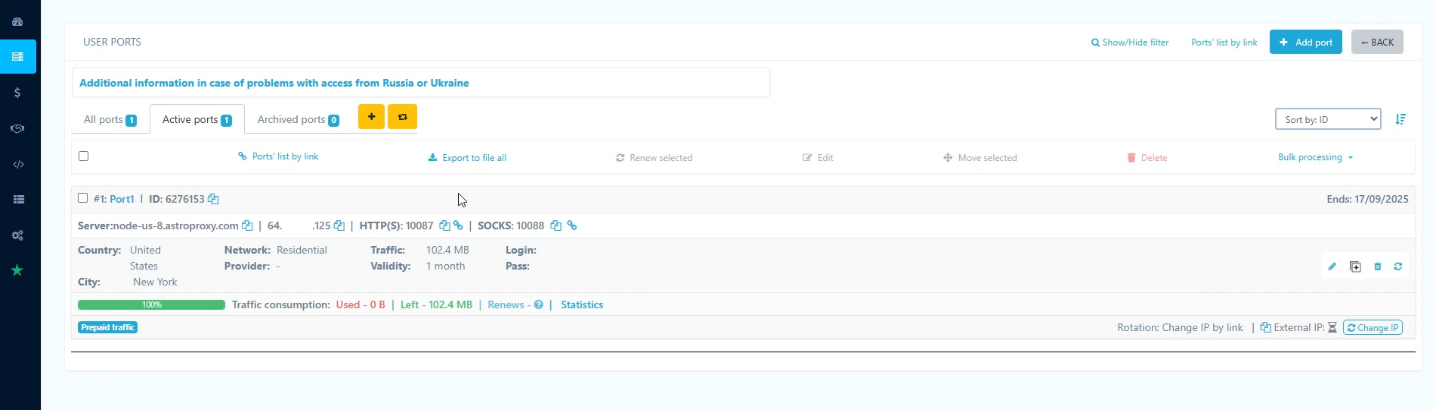
[!!] Please note: after saving the port, Astro will provide the connection details – these must be entered in Telegram Expert: host (IP address), port (port number), login, password, and type (HTTP or SOCKS5).
This is how the created port appears in the Astro dashboard (with all the details that need to be entered into Telegram Expert):
Adding Astro Relays to Telegram Expert
Open the gateway module in Telegram Expert and add the relays you created in Astro. In the application, gateways are displayed in a table showing all key parameters and their status.
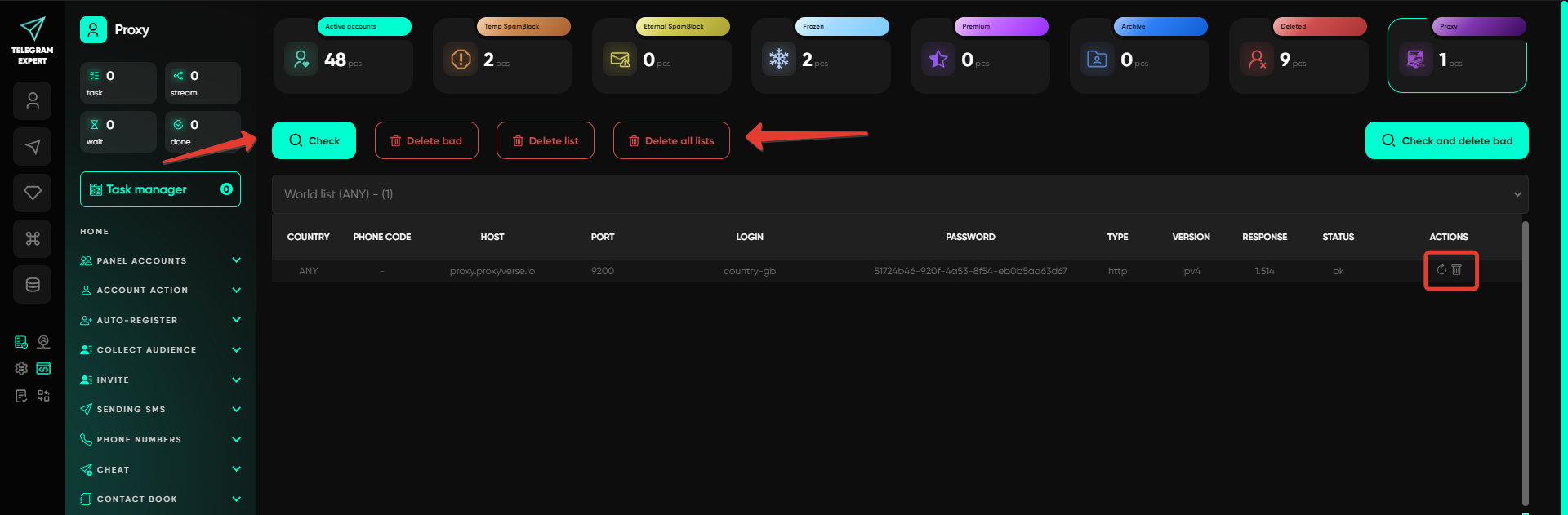
The table displays the following data:
host – the relay server address;
port – the port used for the connection;
login – the username for relay authentication;
password – the password for relay access;
type – the relay type;
version – the relay protocol version (for example, IPv4);
response – the relay response time;
status – the relay check result (ok – the relay is active; bad – the connection failed; with Astro, 99.9% are ok);
actions – available actions (check, delete).
[!!] Please note: Telegram Expert supports only IPv4 gateways. In Astro, all created relays operate in IPv4 format, so integration works directly without additional configuration or conversion.
Astro Pricing:
Pay-As-You-Go
(Reduce your relay costs by up to 45% with bulk order and balance top-up discounts):
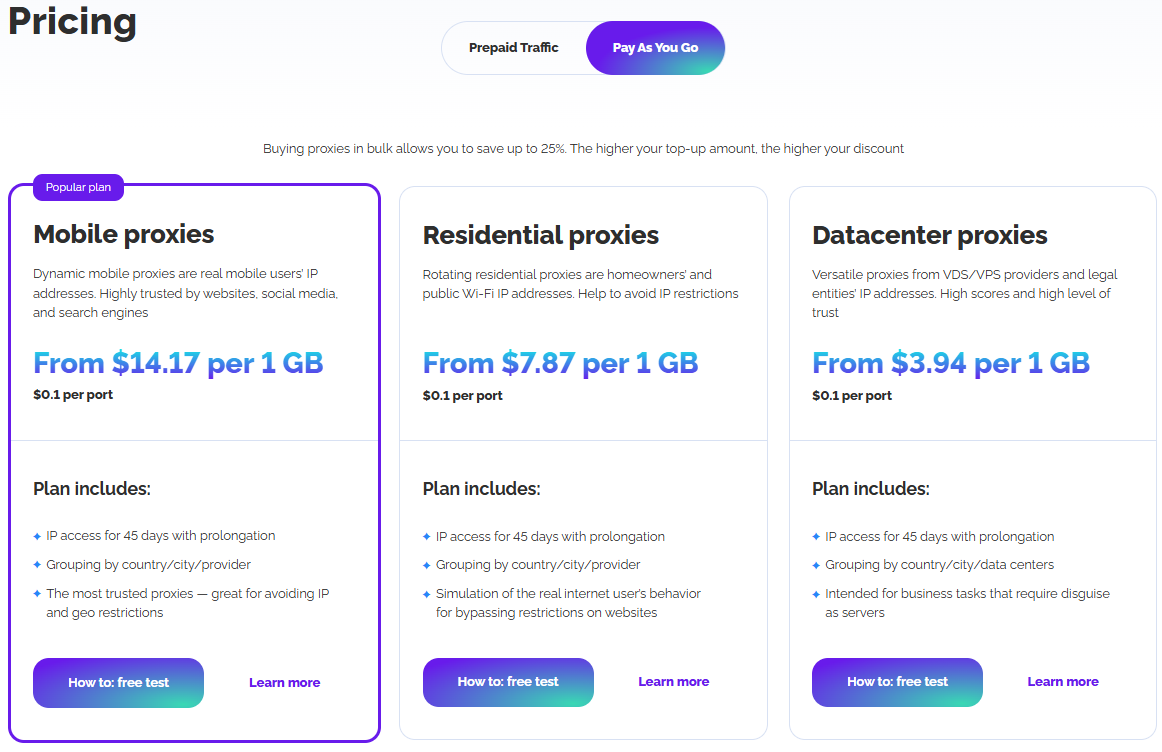
Prepaid Traffic:
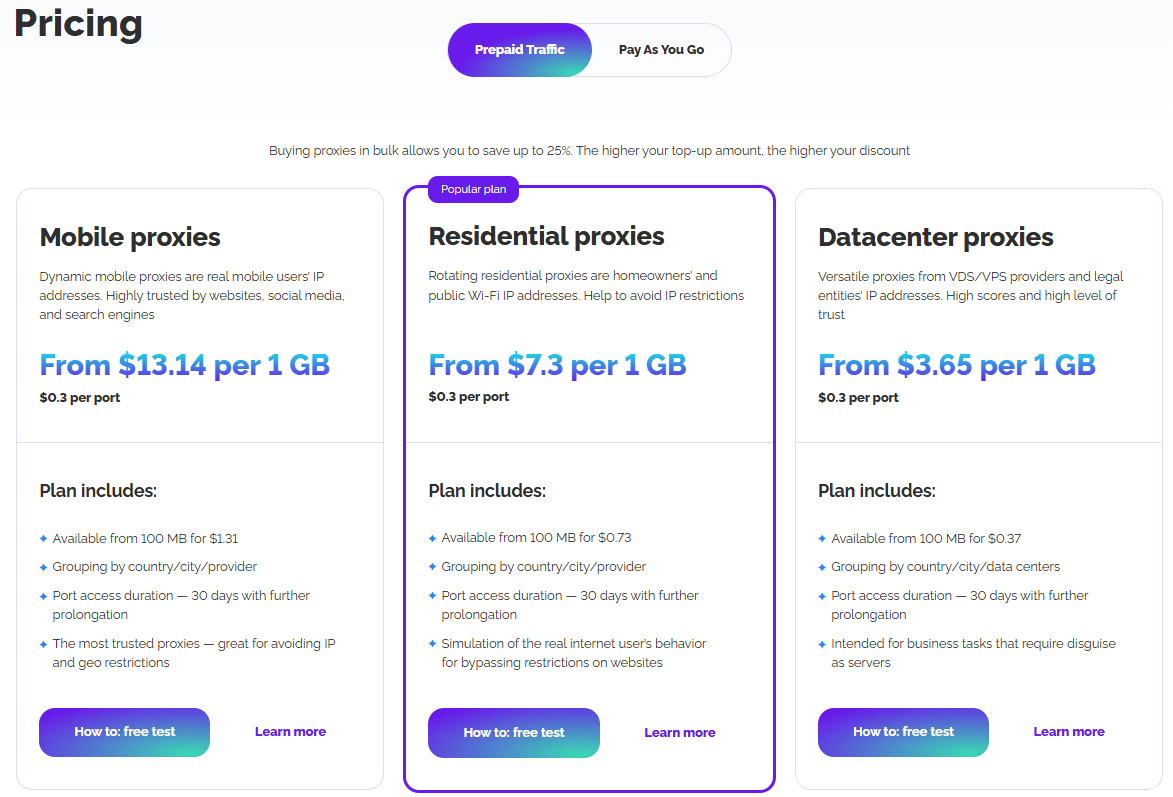
How to get relay discount on Astro
If you want maximum efficiency and optimal relay infrastructure costs, take full advantage of Astro’s discount program.
Astro’s discount program reduces the cost of residential, mobile, and datacenter relays. The discount is calculated automatically and consists of two components: a bulk order discount (based on traffic volume and the number of ports) and a cumulative discount based on total account top-ups over the last 30 days. Both discounts are combined.
The cumulative discount depends on the total amount of account top-ups over a 30-day period: 10% when total top-ups exceed $188, 15% when they exceed $1,000, 20% when they exceed $1,500, and 25% when they exceed $2,000. The discount remains active for 30 days from the top-up and is applied to subsequent orders. If the total top-up amount is lower in the following month, the discount will automatically decrease or expire.
[!!] Please note, the key discount figures:
The final discount consists of two combined components.
Bulk order discount – from 2% to 20%.
Cumulative top-up discount – up to 25%.
Maximum total discount – up to 45%.
Read more in the article.
Astro Referral Program:
In addition, Astro offers a RevShare-based referral program (lifetime revenue share with no time limits). You receive a percentage of all payments made by referred users for as long as they remain active, rather than a one-time bonus.
Earnings are credited to your Astro balance for every payment made by your referral partners. Initially, you receive 10% of all referral spend. The commission rate depends on the number of active referrals: with up to 10 active referrals, the commission is 10%; with 10 to 15 active referrals, it is 12%; and with more than 15 active referrals, it increases to 15%. The more referrals you have, the higher your commission and total earnings.

How it works:
Log in to your Astro account and open the “Referral Program” section in the dashboard – you’ll find your personal link there.
Share the link with friends, clients, or partners.
Users register on the Astro website using your link.
For every payment they make, a commission is credited to your account.
The more active referrals you have, the higher your commission rate and total earnings.
Example: your partner signed up for Astro using your referral link, topped up their balance by $100, and spent $50 on relays. Your reward will be 10% of that amount – $5.
[!!] Please note: only active users are counted in the referral program. An active user is someone who has topped up their account at least once in the last 60 days. If a user registers via your link but never makes a payment, they are not counted toward your referral total, and your commission rate does not increase.
[!!] Astro Support: “One second before reaching the moon”
Astro support is available from 10:00 to 02:00 (UTC+4) and typically responds within 15 minutes. For large-scale Telegram operations, this allows you to quickly adjust configurations without disrupting registration, account warm-up, or messaging workflows.
Want to test Astro? Contact our support team and get $3 credited to your balance: https://t.me/astroproxy_support_bot
*The material is provided for informational purposes only. The use of technologies and the knowledge obtained should be carried out in accordance with the laws of the user's country.
Important: this website is the only official website of the Telegram Expert project. Licenses, updates, and official technical support are available only through this website. Any other websites offering Telegram Expert are not affiliated with BLB.Team and are either unofficial or fraudulent.
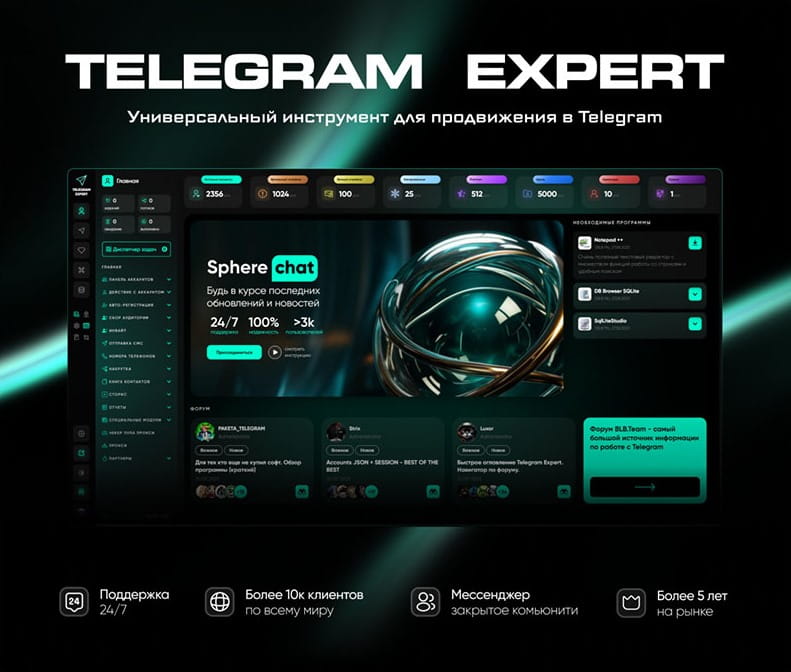
Download Telegram Expert - software for Telegram promotion
Telegram Expert is professional software for fast channel growth and sales in Telegram. Launch mass mailings and invites, warm up accounts without bans, consolidate dialogs in one place, and scale your team. All in one window - fast, safe, and tailored to your tasks.
What it can do:
- TDATA Converter - массово переводит session+json в TDATA.
- Booster - account warm-up via smart dialogs to increase trust.
- Registrar - account creation via any SMS services with the sms-activate standard.
- Duplicator - a second session for existing accounts for transfer and protection.
- Forwarder - routes incoming replies to a working group and sends replies to clients.
- Interceptor - catches messages by keywords from chats/channels and forwards them to you.
- Invite via admin - invitations even to restricted groups.
- Channel and chat cloner - full copies, including protected content.
- Reporter - mass complaints about messages/users/channels.
No one has left a comment yet

Geo QA for Marketers: How to Check Ads, Landing Pages, and Telegram Funnels in Every Country
You open a campaign report for six countries: impressions are rising, CTR is normal, but there are almost no leads from Germany and Poland. The numbers in the dashboard will not explain why. The reason is often that you have not seen what the user sees: a landing page in the wrong language, prices in the wrong currency, or a cookie banner covering the button. To see all of this for yourself, you need to open the page from an IP address in the target country, for example through PSB Proxy. ...

Advanced Web Scraping for SEO and Competitor Intelligence: Overcoming Anti-Bot Protocols at Scale
Introduction In modern Search Engine Optimization (SEO) and market intelligence, competitive data collection is critical. Whether monitoring real-time SERP rankings, auditing backlink footprints across millions of URLs, tracking dynamic e-commerce pricing, or analyzing content structures for programmatic SEO, automated data pipelines provide the foundation for actionable strategies. However, target websites and search engines have deployed advanced anti-bot platforms (such as Cloudflar...
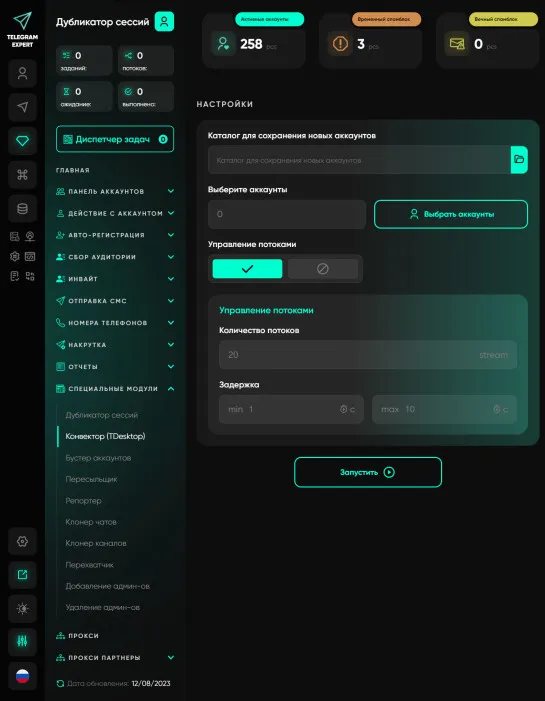
Converter Tdata
TDATA is a standard for Telegram Desktop accounts. Telegram Expert has the session+json format (one account = two files), this format was not chosen by chance, on average its size is a few kilobytes, while tdata accounts are megabytes. They are difficult to store when you have hundreds of thousands of accounts, but this format is used in clickers (programs that work specifically with the Telegram Desktop application, as a rule, clickers are very unstable and work for a long time, they also have ...

Risk-Controlled Telegram Automation: How to Simulate Real User Behavior
body { font-family: Arial, sans-serif; line-height: 1.6; max-width: 960px; margin: 0 auto; padding: 20px; } a { color: #0066cc; text-decoration: underline; } Introduction: Why Automation That Worked Yesterday Gets Accounts Restricted Today Telegram automation is no longer limited to running a script that sends messages, joins channels or performs a predefined sequence of actions. Modern anti-fraud systems evaluate the complete digital context of an account: r...