
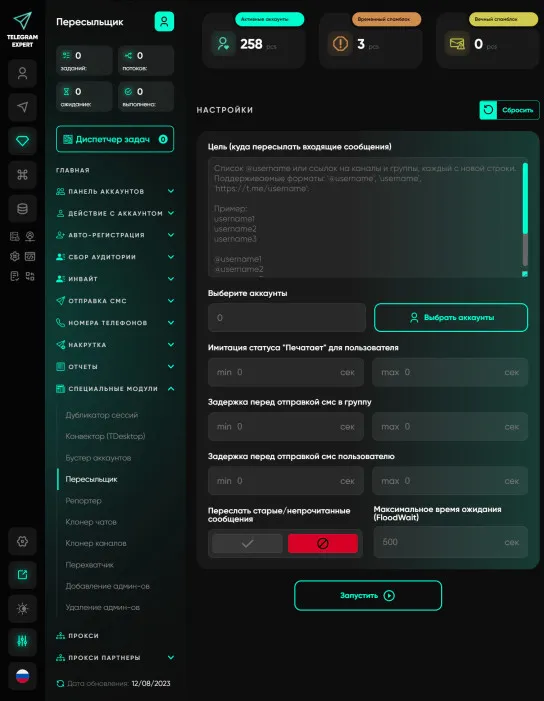
Forwarder
A unique module that works on the principle of message proxying. The principle is extremely simple, after you have sent messages from your accounts, you launch the forwarder and specify the group in which your sales managers are located. Proxy server accounts forward messages to the group, and when they see that someone from the group has responded to the message, the proxy server account forwards the response to your potential client. This allows you to communicate with a large number of people without logging into your account. It seems to the end user that the original sender of the message is responding. Advantages: - There is no need to log into each account via Telegram Desktop - Unlimited number of respondents in the group - There is a function to forward old messages - All the answers of your sales managers are visible and controlled. To work, you need high-quality elite ipv4 proxies with minimal connection interruptions. Telegram bot creation

Download Telegram Expert - software for Telegram promotion
Telegram Expert is professional software for fast channel growth and sales in Telegram. Launch mass mailings and invites, warm up accounts without bans, consolidate dialogs in one place, and scale your team. All in one window - fast, safe, and tailored to your tasks.
What it can do:
- TDATA Converter - массово переводит session+json в TDATA.
- Booster - account warm-up via smart dialogs to increase trust.
- Registrar - account creation via any SMS services with the sms-activate standard.
- Duplicator - a second session for existing accounts for transfer and protection.
- Forwarder - routes incoming replies to a working group and sends replies to clients.
- Interceptor - catches messages by keywords from chats/channels and forwards them to you.
- Invite via admin - invitations even to restricted groups.
- Channel and chat cloner - full copies, including protected content.
- Reporter - mass complaints about messages/users/channels.
No one has left a comment yet

More Than Telegram: How to Safely Redirect Traffic to the Web and Interact with Strict Anti-Fraud Systems
Hello! You already know perfectly well that creating a powerful bot network and successful mailings within a messenger requires quality software, good network gateways, and competent session management. Within the Telegram ecosystem, our program handles tasks 100% effectively. But let's look wider. The ultimate goal of automation and traffic generation is almost always conversion on an external resource. Whether it's registration on cryptocurrency exchanges, farming accounts on Coinlist, uplo...

Telegram Multi-Accounting in 2026: How to Scale Dozens of Accounts Without Getting Blocked
Telegram multi-accounting in 2026 is no longer just about running several profiles — it’s a full-scale infrastructure challenge. Telegram continues strengthening its anti-fraud systems, analyzing IP addresses, behavioral patterns, device fingerprints, and action frequency. If a few years ago basic gateways and simple tools were enough, today scaling Telegram accounts requires a properly built architecture: anti-detect environments, mobile IP relays, traffic distribution, and structured warm-u...

Competitor Analysis on Telegram: How to Scrape Data Without Hitting the Limits
Telegram has long outgrown its role as "just a messenger" — for many niches, it's the primary channel for reaching an audience: channels, chats, bots, mini-apps. And wherever there's an audience, there's competition. Marketers, SMM specialists, and product teams increasingly keep an eye not only on their own channels but on their competitors' as well: how many subscribers they have, how often they post, how strong their engagement is, and which topics resonate most. It sounds simple enough — ...

Network Connections for Telegram Multi-Accounting: How to Manage Dozens of Accounts Without Bans
Mass work in Telegram - mailings, warming up, parsing, inviting, managing a network of channels - comes down to one unobtrusive but decisive factor: IP address. You can configure an anti-detect environment perfectly, separate device fingerprints, and write human-like messages, but if ten accounts connect through the same “dirty” IP, Telegram will link them into one cluster and issue bans - often across the entire group at once. Let’s look at why IP matters so much specifically for Tel...