
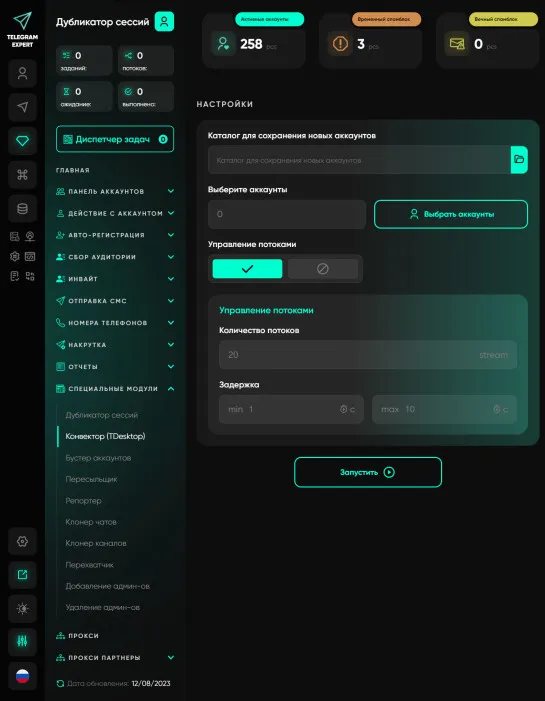
Converter Tdata
TDATA is a standard for Telegram Desktop accounts. Telegram Expert has the session+json format (one account = two files), this format was not chosen by chance, on average its size is a few kilobytes, while tdata accounts are megabytes. They are difficult to store when you have hundreds of thousands of accounts, but this format is used in clickers (programs that work specifically with the Telegram Desktop application, as a rule, clickers are very unstable and work for a long time, they also have a lot of related problems), this format is also used in companies, when, for example, there are 20-30 employees and everyone is promoting in Telegram. The tdata converter allows you to quickly change the account format from session+json to the Telegram Desktop standard. With this, you can convert thousands of accounts in seconds. It is also worth noting that in the basic module you can create a tdata account without buying a converter, you can receive an authorization code in the accounts panel, and you can easily open a session+json account in Telegram Desktop. If you need to massively change the format of accounts, then the tdata converter is exactly the tool you need.

Download Telegram Expert - software for Telegram promotion
Telegram Expert is professional software for fast channel growth and sales in Telegram. Launch mass mailings and invites, warm up accounts without bans, consolidate dialogs in one place, and scale your team. All in one window - fast, safe, and tailored to your tasks.
What it can do:
- TDATA Converter - массово переводит session+json в TDATA.
- Booster - account warm-up via smart dialogs to increase trust.
- Registrar - account creation via any SMS services with the sms-activate standard.
- Duplicator - a second session for existing accounts for transfer and protection.
- Forwarder - routes incoming replies to a working group and sends replies to clients.
- Interceptor - catches messages by keywords from chats/channels and forwards them to you.
- Invite via admin - invitations even to restricted groups.
- Channel and chat cloner - full copies, including protected content.
- Reporter - mass complaints about messages/users/channels.
No one has left a comment yet

Telegram Promotion: Software for Channel and Business Growth
Telegram as the Main Promotion Tool Today, Telegram has become one of the most popular platforms for communication and business. People create sales channels, launch online stores, promote personal brands, and run advertising campaigns here. But with rising competition comes the key question: how to effectively promote a Telegram channel and attract subscribers, clients, and orders? Traditional methods are no longer enough. Simply posting occasionally or sending rare newsletters will not bri...
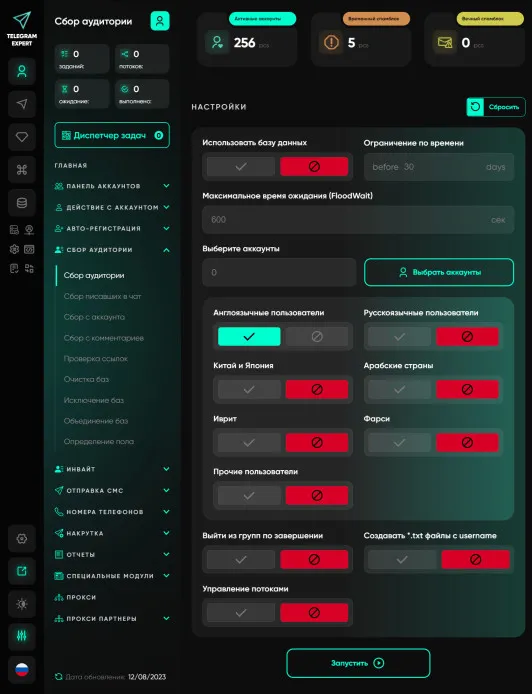
Audience gathering
An audience is an essential component of any business. No matter what you sell, you need customers, you need an audience. Telegram Expert has truly enormous functionality; it has everything you need - collecting chat participants, collecting chat writers, collecting users from comments, etc. And all these modules are included in the base module. But this is not the main advantage; with Telegram Expert you will be able to work more efficiently, this is achieved through the introduction of advance...
How to Pay for Telegram Services and Automation Tools Without Getting Blocked
Telegram has long since outgrown its role as just a messenger. Today, it is a full-fledged platform for marketing, sales, and project promotion. Companies, affiliate marketing teams, channel owners, and digital specialists use dozens of tools to automate their work: messaging services, audience parsers, account registration software, IP infrastructure providers, and analytics platforms. However, as infrastructure grows, another challenge appears - paying for all of these services. Users often...
Telegram Marketing: How to Avoid Bans with the Right Gateway Setup
Scaling Telegram automation is often treated as a behavioral problem. Most operators focus on delays between actions, account warm-up, and message limits. Even when these elements are well optimized, issues such as random bans, session instability, and inconsistent performance still appear. At scale, this assumption breaks. The problem is not behavior. It is the network layer behind each connection. If you’ve worked with Telegram automation, you’ve likely seen this pattern: everything is “opt...