

How to Choose and Set Up IP Connections for Telegram Expert
When Telegram accounts develop connection errors, spam restrictions, or session problems, it is tempting to blame the network immediately. Start by separating these issues: a slow connection, an expired session, and an account restriction are different problems. Check account activity and settings alongside the connection.
This guide explains how to choose residential or mobile IP access for different tasks, configure connections in Telegram Expert, and test a small batch before expanding. A reliable network supports consistent operation; it does not remove Telegram restrictions or make unwanted messaging acceptable.
Why connection quality matters for Telegram accounts
Telegram states that it may collect IP addresses and information about devices and apps for security and abuse prevention. That does not establish a simple rule linking one IP characteristic to a ban. For day-to-day work, focus on factors you can observe and test:
Several accounts sharing one connection. An outage can interrupt all of them. Separate credentials do not necessarily mean separate exit IPs.
Unclear address history or service quality. A “clean” label is not a test result. Measure availability, response time, and repeated addresses instead of judging only by the network category.
Unexpected location changes. Record the intended country and actual exit location, especially after reconnecting or renewing a session.
Regional settings that do not fit the workflow. Choose a consistent region. Matching the phone number’s country can be a project setting, but it is not a universal Telegram requirement or a guarantee against restrictions.
Choose the IP connection type for each task
Buying one plan for every task can create unnecessary costs. Compare address availability, session duration, rotation settings, and billing before choosing a package.
Registration and first login
For a first test, start with residential IPv4 access and a stable session. Keep the selected region consistent and check the connection before logging in. A dedicated assignment per account can make troubleshooting easier, but verify the actual exit IP: one connection entry is not proof of exclusivity.
Warm-up and everyday account work
For warm-up, messaging, comments, and conversations, prioritize stable sessions and predictable reconnects. Residential plans billed by IP count may suit this work, but check how long an activated address remains available. Some plans provide short-lived addresses rather than permanently dedicated IPs.
For example, TradeProxy describes the connected addresses in its 9Proxy IP plan as lasting from a few hours to a maximum of 24 hours. The unused package balance and the lifetime of an active address are different things. If an address expires, reconnect within the planned region and record the change.
Audience collection, search, and link checks
These tasks can generate many requests. Plans billed by traffic in GB can make usage easier to budget, but billing and IP rotation are separate choices. Check whether the provider changes the address on every request or supports a sticky session, and test that behavior with your workflow.
Keep test and technical accounts separate from accounts used for customer conversations. This makes it easier to isolate task settings, costs, and failures without interrupting ongoing correspondence.
When mobile IP access is worth testing
Mobile addresses come from carrier networks and can be shared by many subscribers. Consider them when a controlled comparison shows a practical advantage over your residential plan. Compare the full cost and session behavior; a mobile address does not guarantee account protection.
HTTP or SOCKS5: choose a supported protocol
Telegram Expert supports HTTP and SOCKS5 for these connections; its setup guide specifies IPv4. Select the protocol supplied for the endpoint and test it in the intended module. Do not assume that one protocol is always faster or more reliable regardless of provider and route.
Set up connections in Telegram Expert
Prepare the endpoint details and add a small list first. Keep connection credentials out of screenshots and shared reports.
Prepare the list. Use the format accepted by the connection module, such as
ip:port:login:pass, with one entry per line. A provider may supply a hostname instead of a numeric address.Add the connections. Select HTTP or SOCKS5, enter the list, and confirm that the records appear in Telegram Expert.
Run the connection check. Review status and response time. Recheck failed entries after confirming credentials and timeout settings; one failed check is not a final diagnosis.
Assign connections to accounts. Use a clear mapping and check the actual exit addresses if the project requires separate IPs.
Confirm the region and run an account check. Test access to Telegram through the assigned connection before starting the full task.
Separate connections by role
Registration and first login: a separately tested set of residential or mobile connections.
Warm-up and working accounts: stable sessions in the selected regions.
Audience collection and search: a separate pool with tested traffic costs and rotation settings.
Use separate lists and account folders to keep these roles clear. This does not guarantee that incidents cannot affect other tasks, but it makes diagnosis and replacement more manageable.
Check whether different entries share an IP. The gateway checker in Telegram Expert reports unique and repeated exit addresses, along with connection errors. Use it before distributing the list: different credentials may lead to the same IP. The result describes the sample at the time of testing, not a permanent guarantee of unique addresses.
Test a small batch before expanding
Before buying a large package, define a repeatable test and a stopping condition. The aim is to compare connections under similar conditions, not to prove that a provider prevents restrictions.
Start small. For example, use 10–20 suitable test accounts. This is a practical pilot size, not a statistically conclusive sample.
Record the baseline. Note existing account restrictions, connection settings, and the task before making changes.
Change one factor at a time. Keep account history, task, delays, and workload as comparable as possible when testing another provider.
Observe several sessions. A few days to a week can reveal reconnect or expiry problems missed in the first hour. Stop earlier if your chosen error threshold is reached.
Compare completed work. Evaluate successful operations and interruptions, not only whether the connection checker shows a positive status.
Record account status separately from network status. Telegram Expert’s bulk account check can identify bans or restrictions and sort accounts into folders by result. Run the same check before and after the pilot and retain both results. This helps distinguish an existing restriction from a change observed during the test.
Which metrics to record
The share of connections that pass the check, including the result of a repeat check.
Unique exit IPs and duplicates within the tested sample.
Successful logins or registrations, with failures recorded separately.
New account restrictions, lost sessions, and connection timeouts as separate categories.
Task completion time, interruptions, and traffic used per completed task.
If possible, compare two providers using similar groups in the same time window. Keep other settings unchanged. A lower package price is not necessarily a lower cost per completed task.
Connection warning signs and what to check
Pause expansion and investigate if you see the following patterns:
Many newly added endpoints fail: verify the format, protocol, credentials, package balance, and timeout before rejecting the pool.
The exit country differs from the selected one: recheck the region setting and compare the result after reconnecting.
Tasks repeatedly time out: compare another connection under the same workload and check local bandwidth and server resources.
Login codes are delayed or absent: also check Telegram’s login flow and the phone or delivery service. This symptom alone does not identify a network fault.
Previously working accounts develop restrictions: review activity, recipient complaints, and account history alongside network changes.
A repeated failure across a batch is a reason to investigate a shared cause, not proof that the provider is responsible. Change one variable, rerun the same task, and record whether the result improves.
Compare TradeProxy packages without overspending
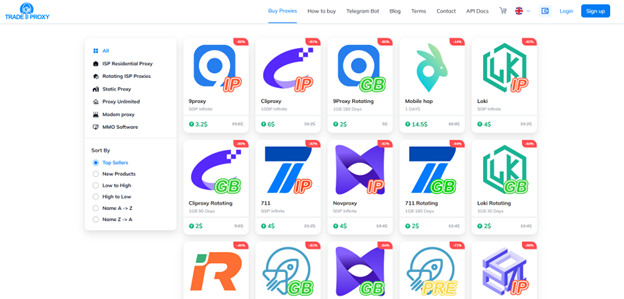
When you need several network types, a marketplace can simplify comparing package prices. TradeProxy sells access packages from providers including 9Proxy, Cliproxy, Novproxy, 711Proxy, LokiProxy, and YumiProxy through one storefront. Compare the exact plan, expiry rules, and activation process rather than assuming every offer is equivalent.
At the time of checking on October 2, 2026, the 9Proxy product page listed 50 IPs for $3.20, while Loki Rotating listed 1 GB for $2. These are examples of small packages, not a claim about the marketplace’s lowest prices. Confirm the current price and conditions before payment. HTTP and SOCKS5 are listed for these products.
Delivery is via a CDKey used to activate the purchased IP or traffic allowance. Follow the instructions for the selected provider: a CDKey is not an endpoint address to paste into Telegram Expert. After activation, obtain the connection details separately. TradeProxy’s product pages state a full refund if the CDKey does not work; keep the order details and contact support if activation fails.
Checklist before launching the full task
The plan matches the task’s session duration, region, and traffic needs.
Actual exit IPs have been checked for duplicates where separate addresses are required.
Connection lists and account folders are separated by role.
Connection checks and a real account-access test have completed successfully.
The pilot covered several sessions, and initial account statuses were recorded.
You have defined when to expand, pause, or replace a connection, based on recorded results.
Build a repeatable connection setup
Choose the connection for the task, verify the actual exit addresses, and test before buying a larger package. Keep network measurements separate from account restrictions so that a connection problem does not turn into guesswork about Telegram’s decisions.
TradeProxy supplies the access package; Telegram Expert provides tools for checking the pool, assigning connections, and monitoring account status. Used together with a consistent test procedure, these tools make it easier to understand what works and where costs or failures arise.

Download Telegram Expert - software for Telegram promotion
Telegram Expert is professional software for fast channel growth and sales in Telegram. Launch mass mailings and invites, warm up accounts without bans, consolidate dialogs in one place, and scale your team. All in one window - fast, safe, and tailored to your tasks.
What it can do:
- TDATA Converter - массово переводит session+json в TDATA.
- Booster - account warm-up via smart dialogs to increase trust.
- Registrar - account creation via any SMS services with the sms-activate standard.
- Duplicator - a second session for existing accounts for transfer and protection.
- Forwarder - routes incoming replies to a working group and sends replies to clients.
- Interceptor - catches messages by keywords from chats/channels and forwards them to you.
- Invite via admin - invitations even to restricted groups.
- Channel and chat cloner - full copies, including protected content.
- Reporter - mass complaints about messages/users/channels.
No one has left a comment yet

Telegram Channels: How to Build a Brand Voice and Turn Reading into a Habit
A Telegram channel is not just a news feed. It’s a place where your point of view shows up regularly and recognizably, and the audience receives predictable value. When people search for “Telegram promotion,” “how a channel grows,” or “content plan for a channel,” they don’t need a bag of tricks but a clear system — promise, rhythm, format, feedback, and careful analytics. The channel’s promise: what exactly you promise and to whom Formulate a short promise that’s easy to repeat out loud...

NodeMaven + Telegram Expert: how to scale Telegram marketing safely
Telegram is now one of the main platforms companies use to find clients, grow communities, and communicate with their audience. It works well for both direct sales and long-term relationship building. But when the number of accounts and messages grows, problems often appear. Accounts can get limited, spam filters become stricter, and message reach can drop. That is why experienced teams do not rely only on automation tools. They also pay attention to the technical side of their setup. Using T...

Automating Multi-Accounting in ChatGPT and Midjourney for Agencies
For an agency generating text, visuals, and content daily for dozens of clients, a single ChatGPT or Midjourney account quickly becomes the main bottleneck. Request limits, image-generation queues, and plan-tier restrictions can bring any volume-driven production process to a halt. The obvious answer is working with several accounts in parallel — different projects, different teams, different loads. But as soon as multiple accounts enter the picture, a new layer of complexity appears: how to ...

Top 8 Cloaking Mistakes in 2026 and How to Avoid Them. Tips from leading cloaking service Adspect.ai
[media mw=100]3382[/media] In 2026, moderation across many advertising networks has become more sophisticated, and even experienced media buyers can lose accounts because of common mistakes. In this guide, we have compiled the 8 most common mistakes media buyers make when launching their campaign setups — based on real cases, current advertising-network policies, and feedback from active users. 1. Using weak cloaking The number-one cause of bans in 2026. Many people still rely on ...