

Every account has its own residential IP. Why they still end up linked
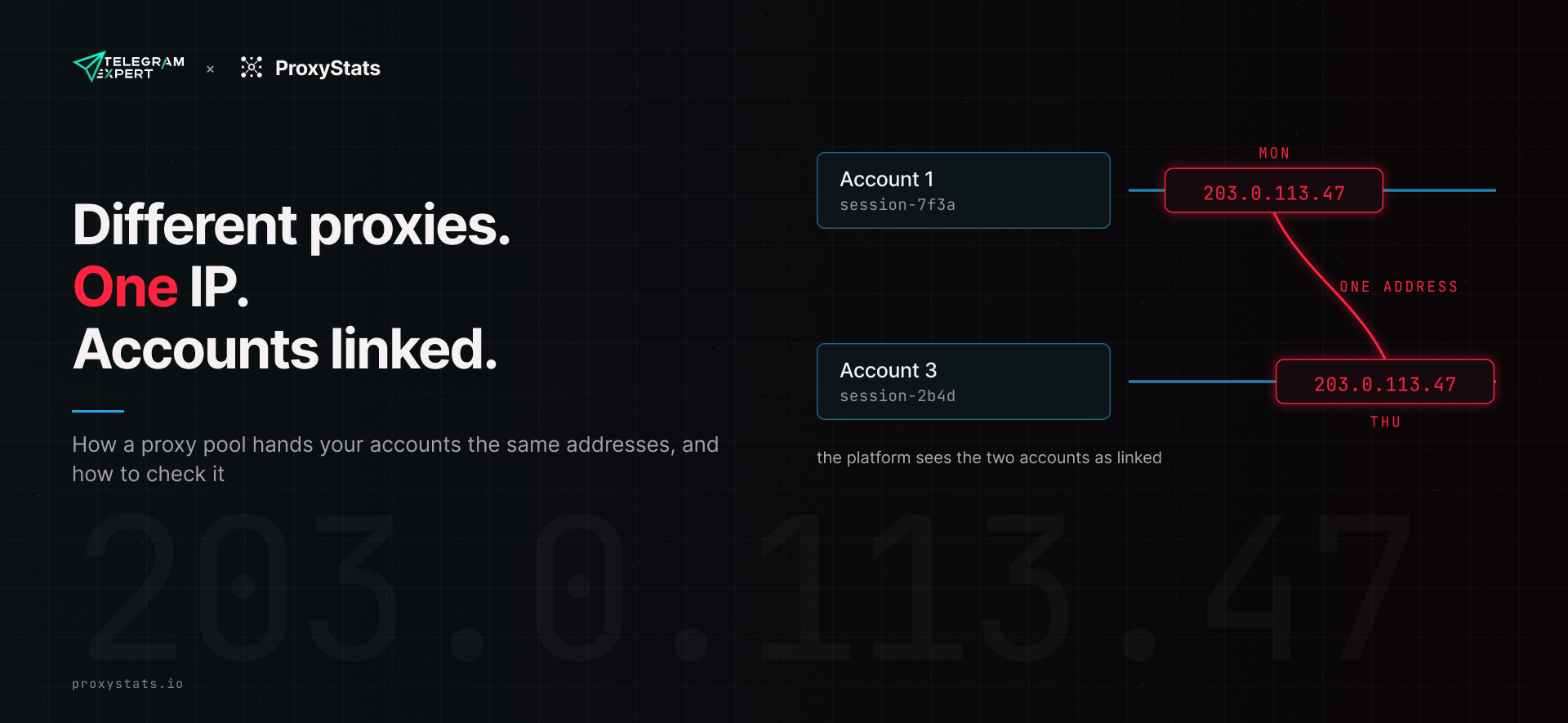
ProxyStats, an independent benchmark of residential IP relays. Research on data from 14 networks, September 2026.
Key findings
A "fresh residential IP" does not mean the network never gave that address to you before. Two sessions with different session IDs can leave from the same address, and then two of your accounts share an IP in their history.
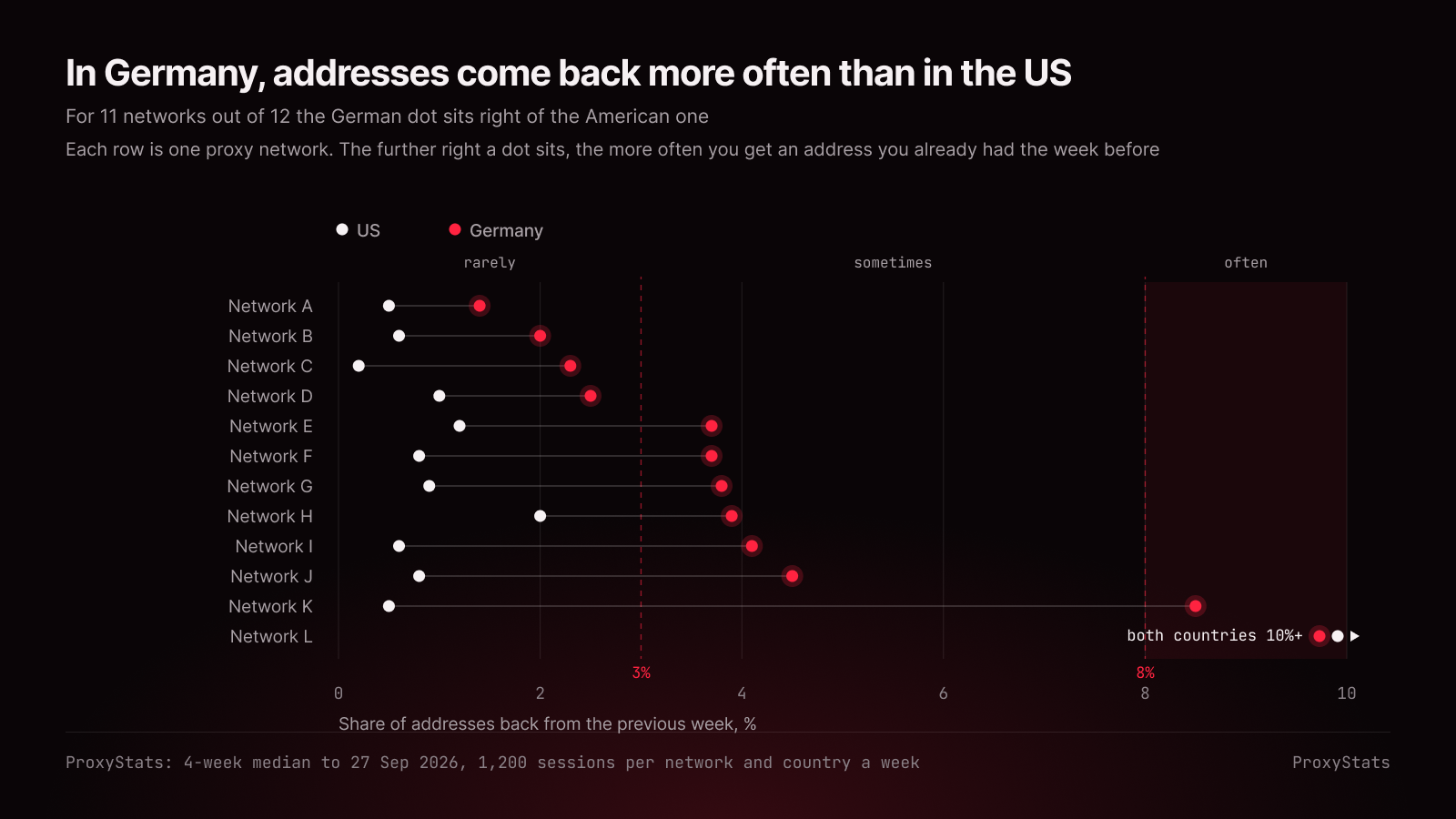
We measured how often addresses come back on 12 networks. In Germany, 10 networks out of 12 bring back 1.4% to 4.5% of addresses week to week, and two bring back over 8%. In the US, 11 out of 12 bring back 0.2% to 2%.
You can test your own pool in an evening with the script in this article. It costs about 10 MB of traffic and gives you two numbers that show whether the pool can carry your number of accounts.
The scenario
You run 50 Telegram accounts. Each has its own sticky session with its own session ID, the network gateways are residential, and the provider's pricing page promises "millions of addresses". By every rule, the accounts have nothing to do with each other.
Then one account gets restricted. You open your login log and find that its address belonged to another of your accounts last week, and to a third one the day before yesterday.
Your software may have nothing to do with it. The repeats come from how the pool hands out addresses, and you can measure them.
How it happens
A session ID does one job: while the session lives, the provider keeps you on one exit address. It does not decide which address your next new session gets. The provider picks that from the addresses it has in the country, and if it has few, it hands out ones you have already had.
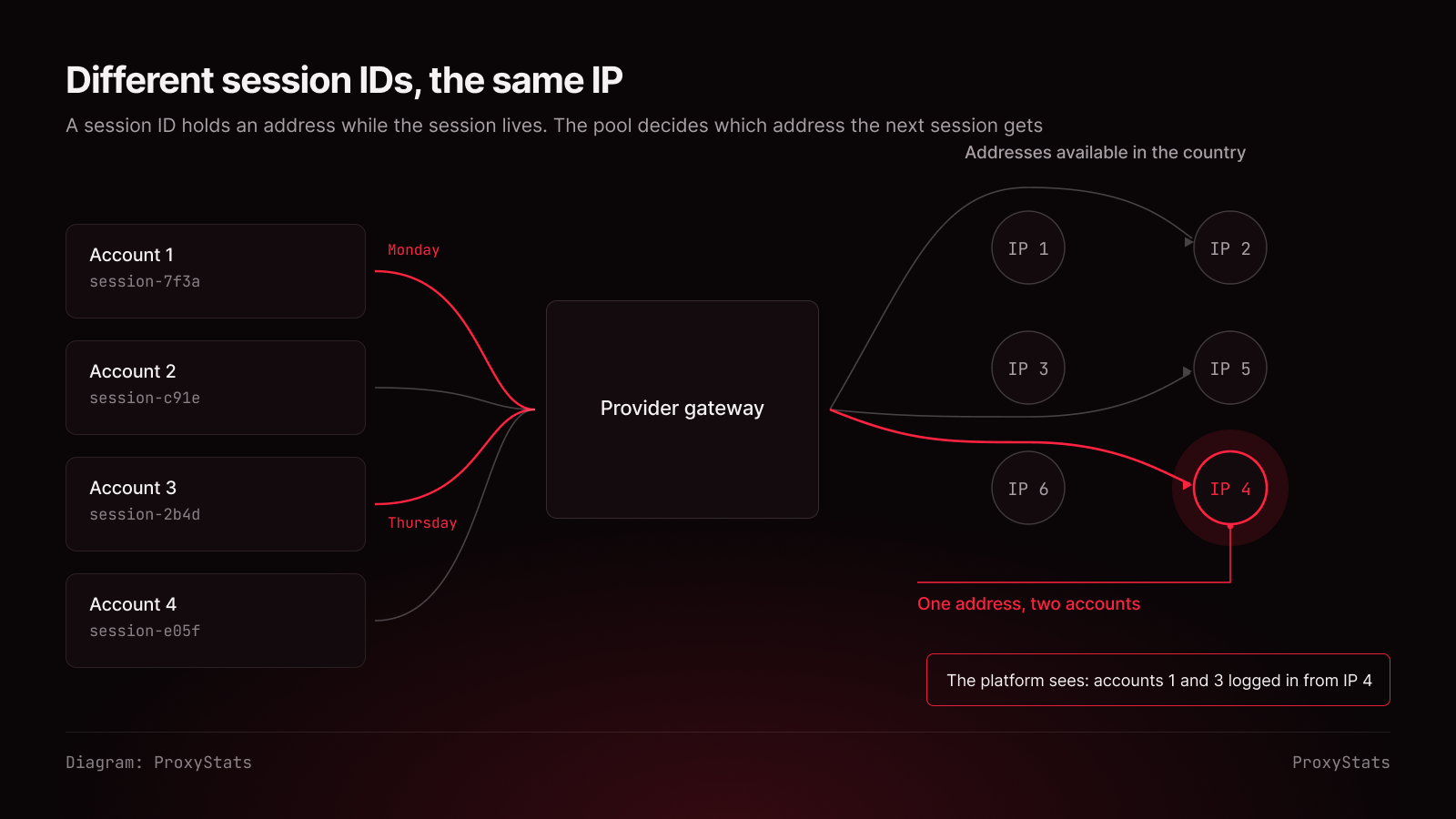
For any platform that compares login addresses, a shared IP links two accounts. Telegram does see login addresses: Settings → Devices shows where each login came from.
"Millions of IPs" on a landing page says nothing about this: it usually counts every country over a long period. You need something else: how many addresses are actually available in your country this week, and how often they come back.
The research: 12 networks, 1,200 sessions a week
Every 15 minutes our servers in Frankfurt, New York and Singapore open new sessions through 14 gateway networks and record which address each request left from. We open each session the way the network's own product opens a new one: with a new session ID or on a new port.
Once a week we take 1,200 of these sessions per network and country and compute the return from the previous week: the share of this week's addresses we had already seen the week before. That is your chance of landing on an IP where another of your accounts sat a week ago.
Periods when a network had an incident (an attack on it, our own traffic running out) stay out of the count. Below is the median of the last four weeks, to 27 September. Two networks have not reached the sample size yet, and two have only two weeks so far.
Return from the previous week | US | Germany |
|---|---|---|
Most networks | 0.2–2% (11 of 12) | 1.4–4.5% (10 of 12) |
The rest | one network, over 8% | two networks, over 8% |
What follows from it.
Germany runs shallower than the US. For 11 networks out of 12, German addresses come back more often than American ones, five times as often or more for four of them. The same network can be deep in one country and shallow in another.
Repeats happen within a single week too. The return from the previous week shows how the pool refreshes over time. If you start accounts in batches over a few days, you also need to know how many different addresses you get right now. The script below counts that second number.
How to test your own pool
The test repeats our measurement: 1,200 new sessions, each with a new session ID, one request each to a service that returns your IP. Use exactly 1,200: the repeat rate grows with the sample, and on 300 sessions any pool looks cleaner than it is. It takes about 10 MB of traffic and 20 to 40 minutes.
The script is in Python (pip install httpx). Put in the login format from your provider's dashboard; the script replaces {sid} with a new session ID.
import json, sys, uuid
import httpx
PROXY = "http://USER-session-{sid}:PASS@gate.example.com:7000" # format from your provider's dashboard
N = 1200
ips = []
for _ in range(N): url = PROXY.format(sid=uuid.uuid4().hex[:10]) try: with httpx.Client(proxy=url, timeout=20) as client: ips.append(client.get("https://api.ipify.org").text.strip()) except httpx.HTTPError: pass # skip a failed request: it tells us nothing about repeats
json.dump(ips, open(sys.argv[1], "w"))
print(f"successful sessions: {len(ips)}, different addresses: {len(set(ips))}")
Run python pool_check.py week1.json, and a week later python pool_check.py week2.json. The second script computes the return from the previous week:
import json, sys
prev = set(json.load(open(sys.argv[1])))
cur = set(json.load(open(sys.argv[2])))
print(f"came back from last week: {100 * len(prev & cur) / len(cur):.1f}%")
Test the country your accounts live in, not the cheapest one.
If your provider gives access by port rather than session ID, you will never see more different addresses than you have ports. We made this mistake ourselves: we got a hundred addresses from a hundred ports and filed the pool as small, when our own allocation was the limit.
The result: what to do with the numbers
Different addresses. Every address short of 1,200 is a session that landed on an address already handed out. 1,150 different means 50 of 1,200 sessions hit a repeat, one in twenty-four. Scale that to the number of accounts you start in a week.
Return from the previous week:
Return from last week | What it means for multi-accounting |
|---|---|
up to 3% | The pool refreshes well; you can start accounts in batches |
3–8% | Repeats are visible. Spread account creation over time and keep an address log |
over 8% | A shallow pool for this country. Look for another country or another network |
The 3% and 8% lines are the same ones behind the Address recurrence card on each network's page on our site.
Three rules that hold for any pool:
Keep a log of which account logged in from which IP. That way you will spot a shared address yourself.
One session per account. Never reuse a session ID across accounts.
The more new accounts you start on one network in a week, the more often they meet on the same address. On a shallow pool, spread account creation over time.
Where to find data on networks
Our ranking shows score, price, latency from three cities and the share of addresses with no abuse reports for each network, Open a network's page: under What we measured, the Address recurrence card shows, per country, whether an address comes back rarely (under 3% a week), sometimes (3–8%) or often (over 8%), on the same four-week median. The methodology explains how we compute every number.
ProxyStats sells no network gateways and no places in the ranking. We earn from analytics that providers buy about their own networks, and paying and non-paying networks get the same score. Found a mistake in our data? Write to us at proxystats.io/contact. We will fix it and say so in public.

Download Telegram Expert - software for Telegram promotion
Telegram Expert is professional software for fast channel growth and sales in Telegram. Launch mass mailings and invites, warm up accounts without bans, consolidate dialogs in one place, and scale your team. All in one window - fast, safe, and tailored to your tasks.
What it can do:
- TDATA Converter - массово переводит session+json в TDATA.
- Booster - account warm-up via smart dialogs to increase trust.
- Registrar - account creation via any SMS services with the sms-activate standard.
- Duplicator - a second session for existing accounts for transfer and protection.
- Forwarder - routes incoming replies to a working group and sends replies to clients.
- Interceptor - catches messages by keywords from chats/channels and forwards them to you.
- Invite via admin - invitations even to restricted groups.
- Channel and chat cloner - full copies, including protected content.
- Reporter - mass complaints about messages/users/channels.
No one has left a comment yet

How to Pay for Telegram Services and Automation Tools Without Getting Blocked
Telegram has long since outgrown its role as just a messenger. Today, it is a full-fledged platform for marketing, sales, and project promotion. Companies, affiliate marketing teams, channel owners, and digital specialists use dozens of tools to automate their work: messaging services, audience parsers, account registration software, IP infrastructure providers, and analytics platforms. However, as infrastructure grows, another challenge appears - paying for all of these services. Users often...

How to Manage Multiple Telegram Accounts Safely (Without Mixing Sessions)
Telegram Has Become a Business Tool Telegram is no longer just a messaging app. Today it's used by affiliate marketers, crypto communities, e-commerce businesses, customer support teams, and digital agencies to communicate with customers and manage online communities. As businesses grow, so does the number of Telegram accounts they need. One account may be dedicated to customer support, another to affiliate partnerships, while others are used for regional communities or different brands. ...

Mini-apps in Telegram: what is it?
Mini-Apps in Telegram: What They Are and How They Help Businesses Mini-apps in Telegram are lightweight IT solutions that don't require special installation, as they open and perform their functions directly within Telegram. With them, users can access a variety of services: pay for goods and services, play their favorite music, play strategic or board games, track their physical activity, and more. They provide significant help to businesses, which is of great interest to entrepreneurs promoti...

Telegram Multi-Accounting in 2026: How to Scale Dozens of Accounts Without Getting Blocked
Telegram multi-accounting in 2026 is no longer just about running several profiles — it’s a full-scale infrastructure challenge. Telegram continues strengthening its anti-fraud systems, analyzing IP addresses, behavioral patterns, device fingerprints, and action frequency. If a few years ago basic gateways and simple tools were enough, today scaling Telegram accounts requires a properly built architecture: anti-detect environments, mobile IP relays, traffic distribution, and structured warm-u...