

Automating Multi-Accounting in ChatGPT and Midjourney for Agencies
For an agency generating text, visuals, and content daily for dozens of clients, a single ChatGPT or Midjourney account quickly becomes the main bottleneck. Request limits, image-generation queues, and plan-tier restrictions can bring any volume-driven production process to a halt.
The obvious answer is working with several accounts in parallel — different projects, different teams, different loads. But as soon as multiple accounts enter the picture, a new layer of complexity appears: how to manage them without getting hit with bans, without losing track of access, and while building a process that actually scales instead of one you're constantly firefighting week after week.
This article is a practical breakdown of how agencies organize multi-accounting in ChatGPT and Midjourney: why it's needed, what risks it carries, and which engineering and organizational solutions help build the process without losses.
Why an Agency Needs Multiple Accounts
The reasons are rarely singular — usually it's a combination of factors:
Request volume limits. Even on paid tiers there's a cap on the number of messages or generations per unit of time. For an agency running 10–20 clients simultaneously, a single account gets exhausted within a couple of hours of active work.
Client project isolation. Clients often require that their content, prompts, and chat history not overlap with other projects — for confidentiality or NDA reasons.
Different tier needs. One project might be fine with basic functionality, while another needs more powerful models or priority queueing in Midjourney — it's more convenient to keep separate accounts with separate subscriptions for that.
Fault tolerance. If one account is temporarily restricted or under maintenance, work doesn't stop — the team switches to a backup.
Team access separation. Different specialists work with different clients, and it makes more sense to grant access to a dedicated account rather than a shared workspace with all the history mixed together.
Fundamentally, multi-accounting for an agency isn't an attempt to skirt the rules for its own sake — it's a natural consequence of scale: the more clients and the higher the generation volume, the more fragmented the infrastructure needs to be.
What Process Automation Consists Of
Chaotic multi-accounting — where five people on a team use seven accounts however they happen to be used to — quickly turns into a mess: it's unclear which account belongs to which client, what the limits are, who's already used up their quota and who hasn't. Automation exists precisely to remove that uncertainty and make the process predictable, rather than requiring constant manual intervention from the team.
A centralized account registry
The first — and most underrated — step is setting up a single record: which account is assigned to which client or workstream, what tier it's on, its limits, its subscription renewal date, and who on the team has access. Without this registry, any automation is built on sand — a script can't sensibly distribute load if nobody actually knows how many resources are available and where.
Even a simple spreadsheet with columns like "account — client — tier — status — owner" clears up most of the organizational chaos from the start.
Load balancing across accounts
When a large volume of requests goes through the API (for example, an agency generating text in batches via the ChatGPT API, or images through third-party Midjourney integrations), it makes sense to distribute requests across multiple keys and accounts using some logic:
round-robin — requests go to different accounts in turn;
by remaining quota — the system automatically picks the account with the most headroom;
by client priority — important or urgent projects get accounts with a wider limit.
This kind of balancing reduces the risk of one account exhausting its limit during peak load while the others sit idle.
Queues and request throttling
Mass generation — whether it's hundreds of Midjourney prompts for social media visuals or batch text generation via the API — almost always works better through a queue than through a simultaneous burst of requests. A queue with controlled processing speed:
lowers the odds of hitting a per-minute request limit;
allows load to be spread evenly across working hours;
simplifies retrying on error — you just put the task back in the queue instead of rerunning the whole batch.
Monitoring account status
Automation without monitoring is like autopilot without a dashboard. It's worth tracking in real time:
remaining quota per account;
subscription status (whether it's about to expire);
error and rejection counts over the recent period — a sharp spike in errors often signals a problem with a specific account before the team even notices.
Even a simple notification to the team chat when an account is approaching its limit saves hours of downtime.
If the agency also uses Telegram for client or audience communication, Telegram Soft Expert can serve as a separate Telegram software layer for centralized account management, broadcasts, and auto-replies without mixing those workflows with the ChatGPT and Midjourney infrastructure. This keeps AI production and Telegram operations distinct while still making the overall process easier to manage.
Technical and Infrastructure Details
Environment separation isn't optional — it's a necessity
One of the most common sources of problems in multi-accounting is trying to run several accounts from the same browser profile, the same device, and — critically — the same IP address. Platforms don't just look at account-level data; they also fingerprint the technical session: IP address, browser characteristics, behavioral patterns. When several formally independent accounts regularly log in from the same address, it looks suspicious and raises the risk of restrictions — potentially resulting in several accounts being banned at once if the system decides it's looking at a coordinated cluster rather than separate users.
So the baseline rule for agencies that take multi-accounting seriously is: each account gets its own isolated environment. In practice this means:
a separate browser profile (an antidetect browser, or at minimum a dedicated profile in a regular browser) for each account;
its own IP address, ideally stably tied to that specific account, to avoid sudden geolocation jumps between sessions;
where volume allows, spreading accounts across separate devices or virtual machines.
To handle the IP-address side of things, agencies typically turn to gateway services that let them assign a dedicated static or semi-static IP to each account. Pool quality matters here — low-quality datacenter addresses get flagged more often, while residential or mobile IP relays look to the platform like ordinary traffic from real users. Services like SpaceProxy provide IP relay pools of this kind across different regions and address types — useful when you need to keep a specific IP tied to a specific account long-term without rebuilding the infrastructure for every new client.
API keys vs. web interface
For an agency genuinely scaling volume, working through the official API is almost always preferable to automating the web interface. The API approach has several advantages:
transparent, documented limits that are easier to plan around in advance;
no risk tied to emulating browser actions (clicks, scrolling), which is less stable and looks more like automation from the platform's point of view;
the ability to programmatically distribute load across multiple keys and billing accounts.
Script-driven automation of the web interface should be reserved for tasks the official API doesn't cover functionally — for example, some Midjourney features have historically been available primarily through its Discord bot rather than an open API.
Organizational Practices That Save the Team Time
Technology only solves part of the problem — the other half of successful multi-accounting rests on internal team processes.
A clear process for granting and revoking access. When someone leaves a project or the company, access to their assigned account should be revoked immediately — not "whenever someone remembers." Otherwise the account registry quickly stops reflecting reality.
A shared prompt and settings format. If different specialists configure generation parameters (style, resolution, model version) differently, results end up inconsistent even within a single client's work. A shared prompt-template library reduces quality variance and speeds up onboarding for new hires.
Planned load rotation. It's worth building in periods of lower activity for each account — this reduces the risk that an account running at full tilt for months without a break draws heightened scrutiny from the platform.
A reserve pool of accounts. In case of a temporary ban or technical failure, it's worth keeping a few spare accounts in working condition — not abandoned, but with a minimal amount of regular activity — so a client project can be quickly switched over in a critical moment.
Risks Worth Keeping in Mind
Multi-accounting is a balance between efficiency and caution, and it's important not to lose that sense of proportion. Key risks include:
Violating the terms of service. Most platforms restrict the number of accounts per user or place limits on commercial use of certain tiers. Before building out large-scale infrastructure, it's worth carefully rereading the current terms of use, since platform policies change regularly.
Cascading bans. If accounts are visibly linked (shared payment method, shared IP, identical behavioral patterns), a ban on one can drag the others down with it. Environment isolation reduces this risk but doesn't eliminate it entirely.
Loss of client data. If chat history or generated content is tied to a specific account and access to it is lost, recovering that history may be impossible. Backing up finished results outside the platform isn't optional — it's a mandatory practice for any agency.
Multi-accounting in ChatGPT and Midjourney for an agency isn't just "set up more logins" — it's a full-fledged infrastructure task that deserves the same attention as any other part of the production process. An account registry, sensible load balancing, generation queues, and environment isolation — including thoughtful IP allocation per account — together form a system that can absorb client growth without chaos or bans at the worst possible moment. The earlier an agency builds this infrastructure deliberately, rather than reactively after the first round of problems, the less time the team spends firefighting sudden failures — and the more it spends on the actual product for clients.

Download Telegram Expert - software for Telegram promotion
Telegram Expert is professional software for fast channel growth and sales in Telegram. Launch mass mailings and invites, warm up accounts without bans, consolidate dialogs in one place, and scale your team. All in one window - fast, safe, and tailored to your tasks.
What it can do:
- TDATA Converter - массово переводит session+json в TDATA.
- Booster - account warm-up via smart dialogs to increase trust.
- Registrar - account creation via any SMS services with the sms-activate standard.
- Duplicator - a second session for existing accounts for transfer and protection.
- Forwarder - routes incoming replies to a working group and sends replies to clients.
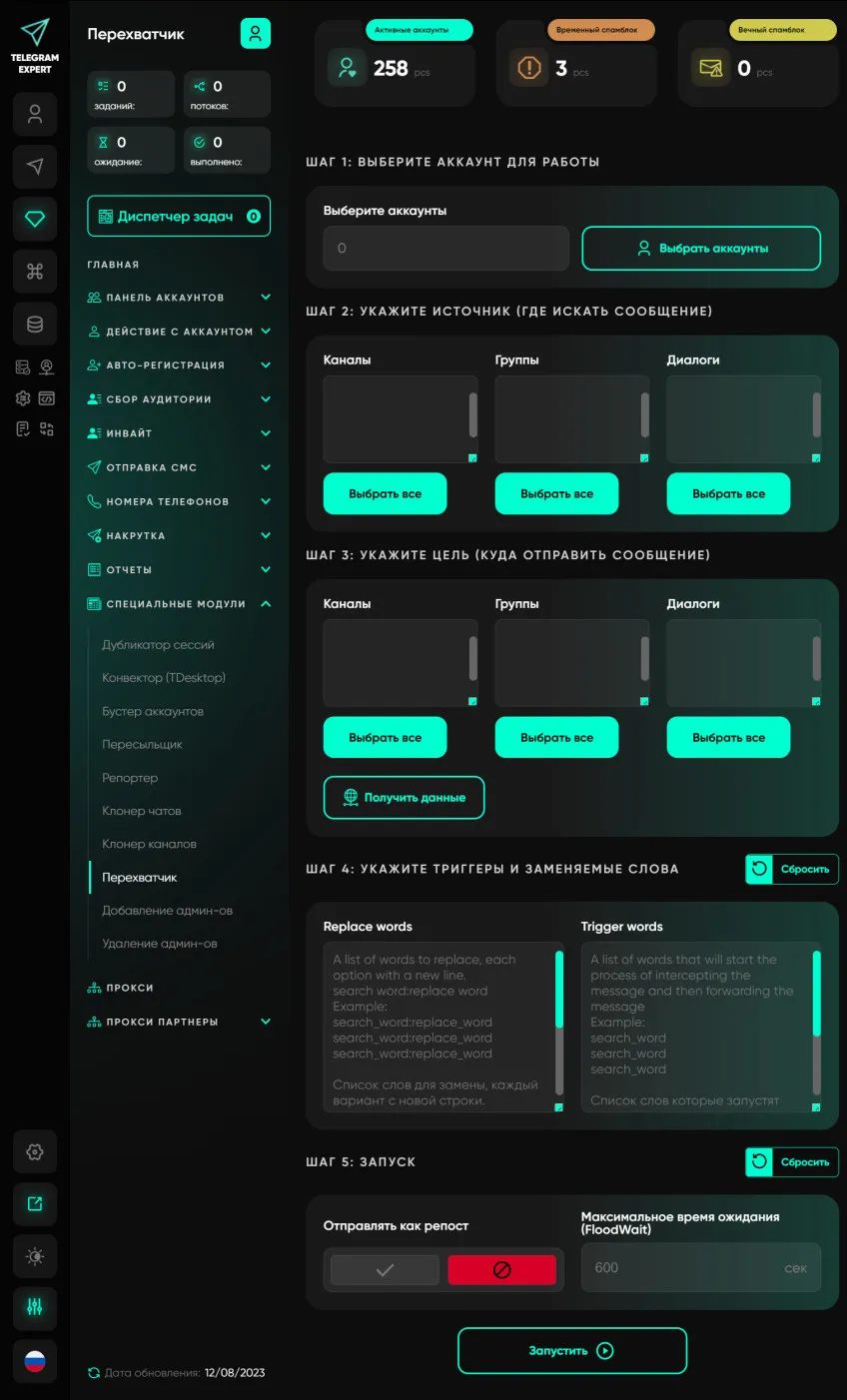
- Interceptor - catches messages by keywords from chats/channels and forwards them to you.
- Invite via admin - invitations even to restricted groups.
- Channel and chat cloner - full copies, including protected content.
- Reporter - mass complaints about messages/users/channels.
No one has left a comment yet
NodeMaven + Telegram Expert: how to scale Telegram marketing safely
Telegram is now one of the main platforms companies use to find clients, grow communities, and communicate with their audience. It works well for both direct sales and long-term relationship building. But when the number of accounts and messages grows, problems often appear. Accounts can get limited, spam filters become stricter, and message reach can drop. That is why experienced teams do not rely only on automation tools. They also pay attention to the technical side of their setup. Using T...

Dolphin Anty: An Antidetect Browser for Telegram Multiaccounting
Managing multiple Telegram accounts has become standard practice. Some users promote channels, others run ads, work with clients or trade crypto. A regular browser or the Telegram app is usually enough when you only have a few accounts. But as that number grows, keeping track of the right profile and constantly logging back into sessions quickly becomes a mess. This is exactly where an antidetect browser like Dolphin Anty can help. It helps organize any number of accounts by keeping each one ...

SEO on Social Media: How to Increase Visibility
Search engine optimization has long gone beyond Google. Social media platforms have become full-fledged search engines in their own right—people use them to look for information, products, and answers to questions. That is why SEO principles are being applied more and more actively to TikTok, Instagram*, Pinterest, and other platforms. If you properly optimize your profiles and posts for social media search, you will become more visible not only within those platforms, but also in traditional...
Interceptor
Our software module allows users to monitor groups, channels, conversations and forward all messages containing certain keywords. This module has many applications; you can use it to search for potential clients or to automate the filling of telegrams of groups and channels in real time. This module will become your personal Telegram marketer and will bring a large number of clients. To work with this module, it is recommended to use high-quality elite proxy servers.