
How to Use Mobile Network Nodes for Social Media Marketing in 2026

A social campaign can have an excellent video, a convincing offer and a broken customer journey. A visitor follows the link, lands on the wrong regional page, loses the discount or meets a form that will not submit. None of those problems becomes visible simply because the post looks good in an editor's preview.
Mobile network nodes can help a marketing team investigate one part of that journey: the network route used to reach a website. The useful question is not how many IP addresses you can acquire. It is whether a controlled network check reveals a problem that your ordinary office connection missed.
Here is a practical workflow for checking campaigns and websites you own or have permission to test, without confusing a different IP address with a complete simulation of a customer.
1. Start with the campaign question, not the connection
Choose a test that can produce a clear answer. For a regional promotion, that might be: does the published social link open the approved offer, in the expected currency, and preserve the offer through checkout?
Write down the destination, the market being checked, the expected result and the person responsible for fixing a failure. Include the account state: a signed-in customer and a first-time visitor are different scenarios. Save the exact campaign URL rather than typing the homepage from memory.
Define what you will not test
Keep the scope narrow. A landing-page check does not require bulk account creation, artificial engagement or attempts to get around a platform restriction. For advertising placements, use the platform's own preview tools where available. Do not generate paid clicks simply to see whether an ad works.
The deliverable is a documented answer about your campaign, not a claim that your team has reproduced every user's feed.
2. Separate the network from the device
A network intermediary forwards a client's traffic through another server or network endpoint. MDN's explanation of intermediary servers and tunneling explains this relationship and the distinction between forwarding requests and establishing a tunnel. In a mobile network node setup, the onward route uses a mobile-network connection.
That route is only one variable. It does not turn a desktop browser into an iPhone, reproduce an app's embedded browser or establish a person's physical location. Cookies, language settings, account history and device behavior can still affect what appears.
Build separate checks for separate questions. Use the network intermediary to investigate the network-dependent experience; use a real device for touch interactions, app-to-browser transitions and layout. Chrome's remote debugging guide for Android describes one way developers can inspect live pages on an actual phone.
Keep one comparison interpretable
Run the same URL on the ordinary connection first. Record the browser, language, account state and time. Then change the network route without changing those other settings. An apparent improvement is difficult to explain when five variables changed together.
3. Select a connection that fits the test
When regional mobile-network checks are part of your workflow, Proxied is a relevant place to evaluate 4G/5G network node listings. Choose according to the specific location, connection method and session requirements of the task, rather than treating a marketplace description as a guarantee about every endpoint.
Before starting, confirm the authentication method, supported client configuration, rental period and what the seller means by dedicated access. Ask how rotation works and whether a stable session is available for the time you need. Keep passwords and connection details out of shared screenshots.
Validate the observed exit address using a service or server approved by your team. Record the result and timestamp. A location label is useful context, but the actual landing-page behavior remains the result you are testing.
For campaigns that ultimately send users into a Telegram channel, bot, or chat, Telegram Expert can serve as the Telegram-side operational layer for centralized work with multiple accounts, channels, and chats. Proxied remains the network-testing layer used to verify regional routing and landing-page behavior, keeping campaign QA separate from day-to-day Telegram operations.
4. Keep a complete journey on a stable session
For a stateful journey, avoid deliberately changing the network exit halfway through. Opening an offer, adding an item and submitting a form should be one documented scenario. Where the connection supports session persistence, configure it before beginning.
Rotate between independent tests only when the next scenario requires another exit. After rotation, check what actually changed instead of assuming the command produced a different address. Record unexpected reconnects, too; they may explain a result that otherwise looks random.
Test beyond the first page
Work through these checkpoints in order:
Open the exact campaign link and check the final address after redirects.
Confirm the offer, language, currency and any advertised conditions.
Complete the permitted test action and inspect its confirmation.
Use test transactions or an approved staging environment when money is involved. A page that loads successfully is not evidence that a purchase, booking or lead submission also works.
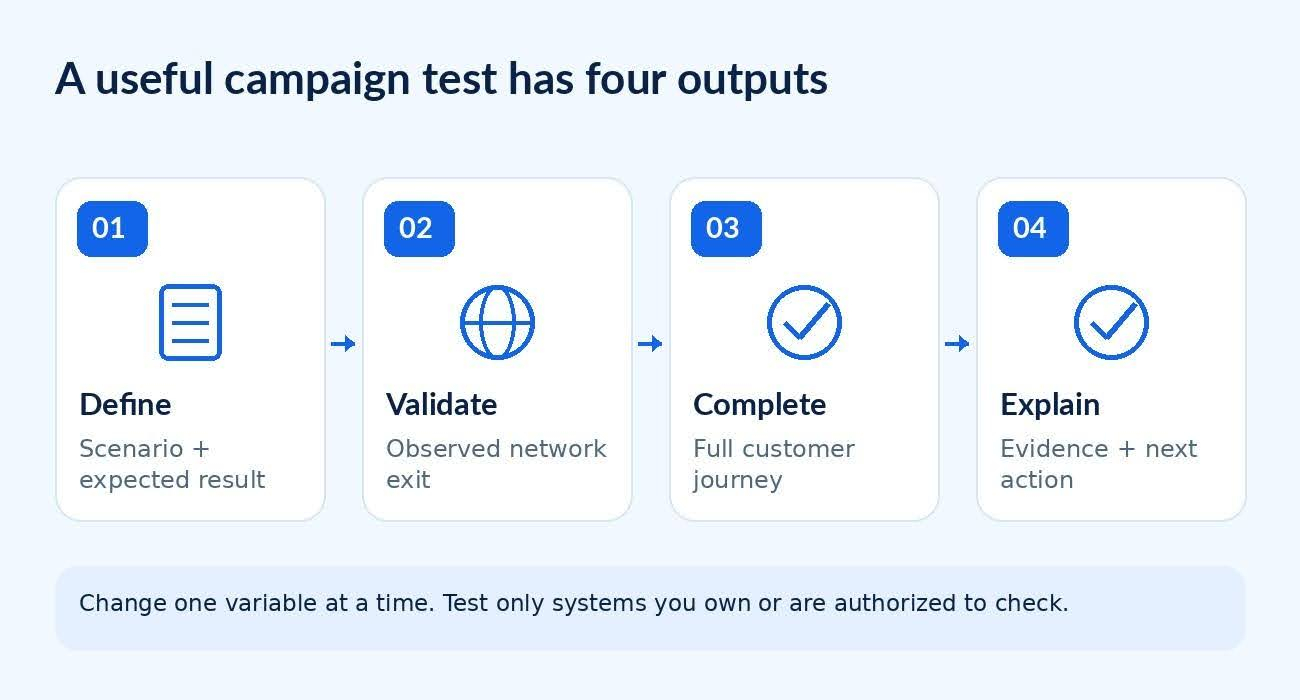
Figure 1. A campaign check connects a defined question with evidence and a decision.
5. Check tracking without polluting the results
A functioning page can still create confusing campaign reports. A redirect may lead to an unexpected URL, or a team may label the same campaign in several ways. Inspect both the destination and the measurement setup before drawing conclusions about creative performance.
Google Analytics' campaign URL guidance explains how UTM parameters identify referral campaigns. An example naming scheme is utm_source=instagram, utm_medium=paid_social and utm_campaign=autumn_launch. These are illustrative labels, not a promise about attribution in every analytics configuration.
Keep personal information out of campaign parameters. Use a test property, staging environment or an agreed test-traffic procedure where practical. Document which events should fire and verify them with the responsible analytics owner. Do not count repeated internal checks as evidence of customer demand.
Once the external campaign path and tracking are validated, Telegram Soft Expert can handle recurring Telegram workflows such as account management, different types of broadcasts, and auto-replies across working accounts, channels, and chats. UTM and analytics data stay in the measurement stack, while the Telegram software is used for the operational stage after the handoff.
6. Turn a failure into a reproducible report
Suppose a retailer promotes a local offer, but a visitor following its social link reaches a different storefront. This is a hypothetical diagnostic example, not a reported result from a provider.
First, repeat the exact link through the baseline connection. Next, run it through the selected mobile-network route while retaining the same browser settings. Note the redirect sequence and displayed storefront. Then change the language or account state in a separate test, not during the network comparison.
If both routes fail identically, investigate the link or destination before blaming the network intermediary. If only one route fails, preserve that observation without immediately declaring a cause. A geographic rule, an application error and a temporary network issue require different fixes.
A useful report contains the expected result, actual result, timestamp, final URL, relevant settings and a redacted screenshot. Add the smallest sequence of actions that reproduces the problem. "Wrong currency after the second redirect" gives an engineer a starting point; "the campaign is broken" does not.
7. Make release decisions, not collections of screenshots
Agree on launch blockers before the campaign goes live. An incorrect price, unusable form or missing confirmation may justify pausing. A cosmetic difference may belong in a follow-up ticket. Assign an owner and retest the failed scenario after the fix.
Use a short handover checklist:
The intended offer and destination match the published message.
The complete action works in the agreed network and device scenarios.
Tracking has been checked without treating internal tests as conversions.
Repeat important checks after a landing-page deployment, redirect change or offer update. Keep the previous evidence so the next investigation has a baseline.
Mobile network nodes are most useful in marketing when they answer a specific operational question. They do not guarantee anonymity, account acceptance, higher rankings or better conversion rates. A narrow test, a stable scenario and a report someone can act on are more valuable than a large list of addresses with no clear purpose.

Download Telegram Expert - software for Telegram promotion
Telegram Expert is professional software for fast channel growth and sales in Telegram. Launch mass mailings and invites, warm up accounts without bans, consolidate dialogs in one place, and scale your team. All in one window - fast, safe, and tailored to your tasks.
What it can do:
- TDATA Converter - массово переводит session+json в TDATA.
- Booster - account warm-up via smart dialogs to increase trust.
- Registrar - account creation via any SMS services with the sms-activate standard.
- Duplicator - a second session for existing accounts for transfer and protection.
- Forwarder - routes incoming replies to a working group and sends replies to clients.
- Interceptor - catches messages by keywords from chats/channels and forwards them to you.
- Invite via admin - invitations even to restricted groups.
- Channel and chat cloner - full copies, including protected content.
- Reporter - mass complaints about messages/users/channels.
No one has left a comment yet

How to attract users to your Telegram channel: a repeatable 14‑day plan
Acquisition is a sequence: prepare the channel, segment the audience, invite gently, respond fast, retain with value. Here’s a standard, repeatable playbook. Prepare the channel Readable avatar/name, human description with value and cadence, pinned welcome with a starter resource and subscribe CTA. Tag rubrics for navigation. Segment the audience Source users from relevant chats/channels, then segment by topic, country and experience level. Alignment beats volume. Content magnets Pub...

Telegram trading, you can and you should
Trading via Telegram: It's Possible and Necessary The Telegram messenger, one of the most popular applications, is actively used by entrepreneurs, bringing high profits to channel owners. However, not all users know how to do it correctly. Let’s start with the main point. Why Should You Trade on Telegram? There are many reasons. Here are the most important ones: This messenger has an audience with high purchasing power, and it grows year by year. Telegram stands out for its intuitive, s...
How does IP infrastructure increase business efficiency in Telegram
Every day, billions of people around the world use Telegram. Some rely on it to stay connected with friends and colleagues. Others publish content to build influence and attract followers. Many join Telegram communities to exchange ideas, discuss challenges, and seek answers. Increasingly, younger users are spending significant amounts of time on the platform. With nearly 450 million daily active users and steady growth, Telegram has become a digital ecosystem that businesses simply cannot ignor...

How to Build a Secure Multi-Accounting Infrastructure with an Anti-Detect Browser
Almost all websites and social networks discourage multi-accounting. To combat it, they use sophisticated anti-fraud algorithms that ban accounts when they detect links through an IP address or device fingerprint. While an IP address can be changed, device fingerprint parameters (processor, graphics card, user agent, system language, number of microphones, and much more) cannot be altered without specialized software. For any large marketing team, however, having multiple accounts—for example...