
Where to Buy Google Ads Accounts for Affiliate Marketing: Choosing by Vertical, GEO, and Budget
A practical breakdown by the Banana Traff team
Hi everyone! A familiar situation: you open a shop looking for a Google Ads account and see self-registered accounts, LowBill, HighBill, and accounts with spend history. The product cards seem to explain everything, but the main question remains: which option should you choose for your launch, and what is actually worth paying extra for?
To get an answer, we turned to our partners at Banana Traff. The team has been working with Google Ads infrastructure since 2019 and prepared more than 50,000 accounts in 2025. We asked them to explain what the names in the catalog mean and which parameters they look at when selecting an account.
We will look at where to find accounts, how the formats differ, and how to choose the right option for your vertical, GEO, and budget. Inside are five questions you can copy and send to a supplier before paying.
At the end of the article, there is also a bonus from Banana Traff: a promo code for Telegram Expert readers.
When it makes sense to buy a ready-made account
If your launch is already planned, a ready-made ad account can save preparation time. Before buying, compare it with using your own account: how long setup will take, who will manage access, and whose details the payments profile is registered to.
Google prohibits circumventing advertising policies, for example, re-entering the system with new accounts after a suspension or using multiple accounts to promote a product without the required certification. Learn more in Google’s Circumventing Systems policy.
Clarify whose details the account is registered to and who will be able to complete re-verification if Google requests it. It is better to resolve these questions before paying.
Where to buy Google Ads accounts: the main options
A specialized shop, a marketplace, and a private seller may offer different terms. Compare what is included in the order, who will help if access problems arise, and when a replacement is available.
Option | What to check before choosing |
|---|---|
Specialized shop | Package for each listing, support, and replacement terms. |
Account marketplace | Reviews of the specific seller, transaction rules, and dispute process. |
Seller on Telegram or a forum | Reputation, ability to get the terms in writing, and payment procedure. |
Your own account | Setup time, access management, and responsibility for the payments profile. |
With a new supplier, start with a small order. This makes it easier to check whether the delivered package matches the description. If you plan to buy regularly, ask whether the supplier can repeat the same order in the required GEO and how quickly.
Self-registered, LowBill, HighBill, and accounts with history: what is the difference?
LowBill and HighBill are labels used in supplier catalogs. With automatic payments, Google charges costs when the payment threshold is reached or on the first day of the month. The threshold depends on the account, country, and currency. Check the current value in the Billing section; there is no universal scale for every account.
A self-registered account is a recently registered account. Clarify whether the Google Ads account has already been created and whether billing has been configured.
A farmed account is an account with a usage history before sale. Sellers use the term “farmed” differently, so clarify exactly what has been prepared.
LowBill is an account with a relatively low payment threshold under automatic payments.
HighBill is an account with a higher payment threshold. Ask for the exact amount and currency; the product name alone is not enough.
An account with spend history, or Old Spended, is an account that already has advertising spend. The payment threshold and verification status should be checked separately.
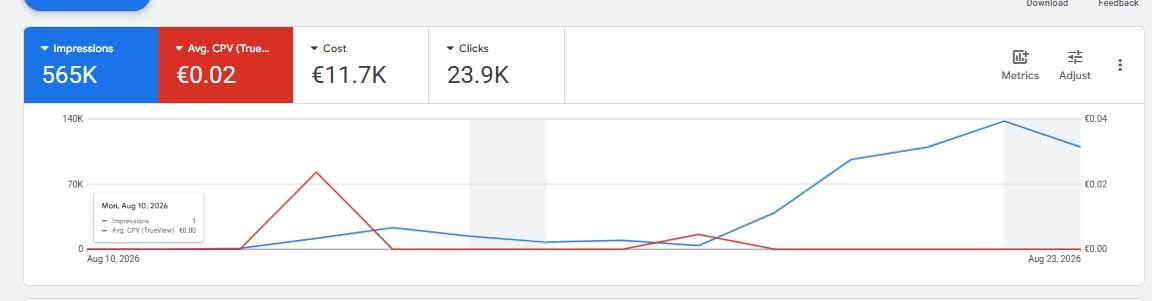
Google Ads summary for August 10–23, 2026: the Cost field shows advertising spend for the selected period (€11.7K).
Format | What to check |
|---|---|
Self-registered or farmed account | Whether the Google Ads account has been created and what is already configured. |
LowBill or HighBill | Current payment threshold, currency, and payment method. |
Old Spended | What spend is visible in the history and whose details the account is registered to. |
Verified account | Who completed verification and which tasks are still open. |
The payment threshold answers only one question: when will Google charge the money? Spending limits and permission to advertise a specific vertical must be checked separately.
How to choose an account by vertical, GEO, budget, and volume
Start with the offer. If it can be advertised in the target country, move on to choosing an account: look at billing, the package included, and the purchase volume.
Vertical. For e-commerce or lead generation, check the policies for the specific product, ad, and landing page. Gambling, certain financial products, and healthcare-related products have additional requirements. They depend on the offer and the country where the ads are shown. Advertiser verification and certification for a specific category are separate procedures.
Suppose you are launching an e-commerce offer in Poland. First, check the product itself and the claims on the landing page. If it is a gambling offer, start with the rules for the target country: is this type of advertising allowed there, and what approvals are required? It only makes sense to compare billing after these checks.
GEO. Keep the country where ads are shown separate from the country of the payments profile. Clarify the currency, payment method, and whose details the profile is registered to. Category policies should be checked for the country where users will see the ads.
Budget. For the first test, estimate the full preparation cost: the account, billing setup, and team time. If campaigns are already running and frequent charges are inconvenient, compare options by their actual payment threshold.
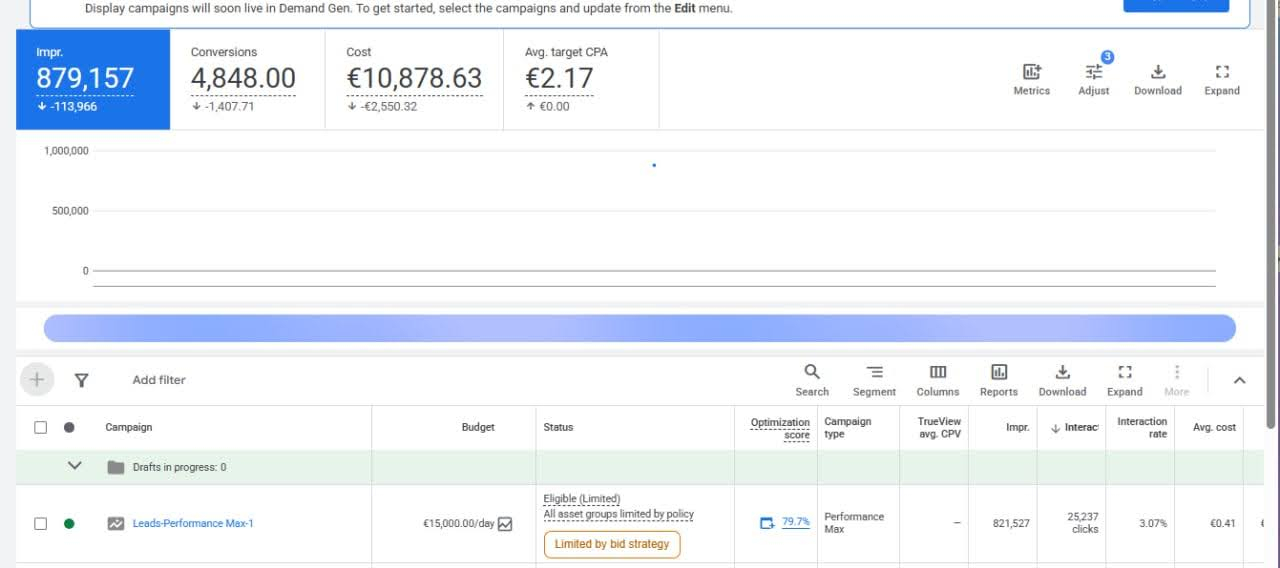
Campaign budget and actual spend are shown in different fields: Budget and Cost. The payment threshold is not displayed on this screen.
Volume. For regular work, record how many accounts you need and in which GEOs. Discuss with the supplier whether they can repeat the same package and how quickly.
Landing page. Before launch, compare the offer on the page with the ad, verify the advertiser’s contact details, and review the offer terms. The account type does not replace these checks.
If the advertising traffic then goes to a Telegram channel, bot, or chat, Telegram Expert can be used as Telegram software for centralized work with accounts, channels, chats, different types of broadcasts, and auto-replies. In this setup, the Google Ads account is responsible for traffic acquisition, while the Telegram software handles the operational work after the transition. Keeping the advertising infrastructure and Telegram operations as two separate layers makes the workflow easier to manage.
What to ask the supplier before paying
Before paying, send the supplier these five questions and save the answers in the chat. When you receive the order, you will be able to compare it with what was agreed.
Package. Has the Google Ads account been created? What is included: payments profile, spend history, balance? If the listing is sold as HighBill, what is the current payment threshold in the account?
Access. How are account permissions transferred? Who keeps administrative access, and who can restore it if necessary?
Verification. Whose identity or business has been verified, which tasks are still open, and what will be needed if Google requests verification again?
Support. Where should you contact the supplier if access does not work, and how quickly do they respond?
Replacement. When does the claim period begin, which cases are covered by replacement, and what information is required for the supplier to review a request?
If a seller promises “no bans,” ask for specifics: what exactly is included in the order and which problems are covered by the replacement policy. You can verify these terms after purchase.
Where to view Banana Traff accounts
In the Banana Traff catalog, it is convenient to start with three parameters: the required GEO, account format, and order volume. For a one-time purchase, compare the package of specific listings. For regular purchases, discuss in advance how many accounts you will need and how often.
For teams making regular purchases, Banana Traff offers wholesale discounts of up to 30%. Message the manager with the required format, GEO, and batch size to clarify the order terms.
When a team buys Google Ads accounts in batches for several GEOs while running multiple Telegram projects in parallel, Telegram Soft Expert helps bring the Telegram side of the workflow into one workspace: account management, search across chats and channels, different types of broadcasts, and auto-replies. Banana Traff remains the infrastructure for ad accounts, while the Telegram software is used for subsequent audience work inside Telegram.
Common mistakes when choosing an account
Overpaying for HighBill without checking the actual payment threshold and expected budget.
Treating a “verified” label as permission to advertise any offer.
Buying a batch without written replacement terms and confirmation of who controls account access.
Delaying order verification. Check access and the package within the period agreed with the supplier.
Counting only the account price. When comparing suppliers, include the team time spent on setup, support requests, and replacement handling. For example, two teams each bought 10 accounts. In the first order, each account cost $10, and 5 of 10 reached the agreed launch-readiness stage: $100 ÷ 5 = $20 per ready account. In the second order, each account cost $15, but 9 of 10 reached the launch stage: $150 ÷ 9 ≈ $16.67. This is a simplified example that does not include replacements or refunds. For your own purchases, compare batches using the same readiness criterion and the same time period.
Frequently asked questions
What does HighBill mean in a catalog?
It usually refers to an account with a higher payment threshold. Always clarify the exact threshold and currency for the specific listing.
How is a self-registered account different from a warmed/farmed account?
A self-registered account is usually registered recently. A farmed account is sold with a stated history of use. The label alone does not tell you whether the Google Ads account has been created or billing configured, so ask for these details.
How long does a purchased Google Ads account last?
There is no fixed lifespan. Buying an account does not guarantee uninterrupted operation. If a problem occurs, check the Google notification and the supplier’s terms.
Can I get a refund for a banned account?
It depends on the transaction terms. Before paying, clarify when a replacement or refund is available and how long you have to submit a claim.
Is verification enough for gambling, finance, or nutra offers?
No. First check Google’s policies for the specific product and target country. Some categories require separate certification, and certain offers may be restricted or prohibited.
How many accounts should I buy to test a new supplier?
Start with a batch you can fully check within the agreed period. If access works, the package matches the description, and the replacement procedure is clear, you can discuss a larger volume.
Bonus for Telegram Expert readers
Banana Traff promo code: EXPERT05 (5% discount on the first and subsequent orders)

Download Telegram Expert - software for Telegram promotion
Telegram Expert is professional software for fast channel growth and sales in Telegram. Launch mass mailings and invites, warm up accounts without bans, consolidate dialogs in one place, and scale your team. All in one window - fast, safe, and tailored to your tasks.
What it can do:
- TDATA Converter - массово переводит session+json в TDATA.
- Booster - account warm-up via smart dialogs to increase trust.
- Registrar - account creation via any SMS services with the sms-activate standard.
- Duplicator - a second session for existing accounts for transfer and protection.
- Forwarder - routes incoming replies to a working group and sends replies to clients.
- Interceptor - catches messages by keywords from chats/channels and forwards them to you.
- Invite via admin - invitations even to restricted groups.
- Channel and chat cloner - full copies, including protected content.
- Reporter - mass complaints about messages/users/channels.
No one has left a comment yet
How does IP infrastructure increase business efficiency in Telegram
Every day, billions of people around the world use Telegram. Some rely on it to stay connected with friends and colleagues. Others publish content to build influence and attract followers. Many join Telegram communities to exchange ideas, discuss challenges, and seek answers. Increasingly, younger users are spending significant amounts of time on the platform. With nearly 450 million daily active users and steady growth, Telegram has become a digital ecosystem that businesses simply cannot ignor...
The Role of Spy Services in Affiliate Marketing: Why You Need Them and How to Use Them
Full-Width Article /* Reset any margins/paddings that could restrict width */ * { margin: 0; padding: 0; box-sizing: border-box; } html, body { width: 100%; overflow-x: hidden; /* prevent horizontal scroll */ } /* The main container uses full available width */ .full-width-container { width: 100%; max-width: 100%; ...
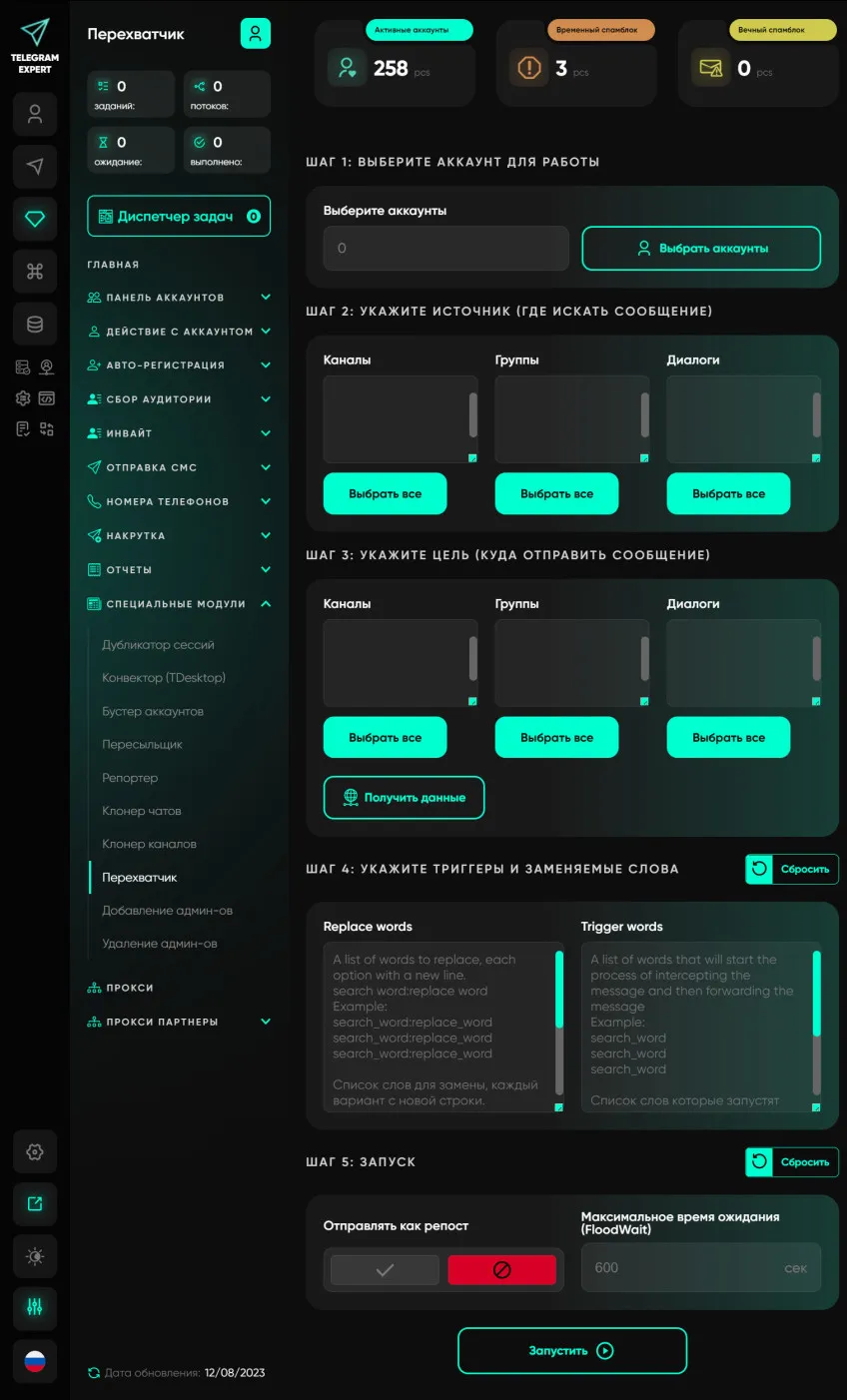
Interceptor
Our software module allows users to monitor groups, channels, conversations and forward all messages containing certain keywords. This module has many applications; you can use it to search for potential clients or to automate the filling of telegrams of groups and channels in real time. This module will become your personal Telegram marketer and will bring a large number of clients. To work with this module, it is recommended to use high-quality elite proxy servers.
How to Exclude Already Processed Users from a Telegram Expert Database
When collecting an audience in Telegram again, you may get users you have already worked with. For example, you collected members from several niche chats, sent them messages, and a week later prepared a new database. Some users appeared in both selections. Regular duplicate removal will not help here. It removes repeated records within the same database, while users from previous mailings may appear only once in the new file. To remove these users, you need to co...