

How We Run 50+ TikTok and Instagram Accounts: A Practical Setup Guide with Antidetect Browsers and Mobile Network Tools
If you are trying to drive traffic to a Telegram channel, a CPA offer, or an online store in 2026, short-form video is still the most reliable free organic channel available.
Posting three clips a day on a single personal account rarely brings consistent volume. But when you manage 50 accounts posting three clips daily, you publish 150 videos every single day. Even if 40 of those videos get only 600 views, a handful will catch the algorithm and hit 50,000 to 200,000 views, sending hundreds of warm leads into your bio links every week.
The hard part isn't making the videos—it is keeping 50 accounts active and going without interruptions or going broke on network fees.
Here is the exact setup our team uses every day to manage 50+ accounts across desktop and mobile, step by step, in plain English.
THE 50-ACCOUNT PIPELINE
Daily Content Vault: 150 Clips
↓
Two working environments:
Desktop: Antidetect Browser
25 Browser Profiles
Scheduled Web Uploads
Canvas & WebGL Isolated
Mobile: Mobile Network Configuration Utility
25 Physical Phones / Emulators
Native App Engagement & Sounds
Full Device Network Routing
↓
Both environments connect through:
4G/5G Cellular Gateway
Unmetered bandwidth (no per-GB charges)
Real carrier CGNAT pools (AT&T, Vodafone)
8s rotation for research / Sticky for posting
↓
Final destination: TikTok & Instagram Accounts
When TikTok or Instagram is used to bring leads into Telegram, the social-media infrastructure is only the acquisition layer. Telegram Expert can then serve as the Telegram automation software layer for managing multiple Telegram accounts, channels, chats, broadcasts, and auto-replies in one workflow. This keeps video acquisition separate from the Telegram-side processes that handle and organize incoming audiences.
1. The Bandwidth Math: Why Pay-Per-GB Network Services Fail for Video
Most beginners make one of two mistakes when choosing network connections:
They buy cheap datacenter network addresses ($1–$2 each): TikTok and Instagram can identify hosting server ranges. Your clips may upload, but they can sit permanently at 0 views. The platform's distribution system may limit the visibility of your profile.
They use pay-per-GB residential network services: Residential IPs are clean, but raw video files consume massive bandwidth.
150 videos/day × 35 MB per 1080p clip = 5.25 GB/day in uploads alone.
Scrolling feeds, warming accounts, and downloading trending clips adds another 12–15 GB/day.
That totals ~550 GB of data every single month.
At standard residential rates of $4/GB, your monthly network bill exceeds $2,200.
The Fix: Dedicated Cellular Modems with Unmetered Data
Physical mobile carriers (like AT&T, Vodafone, or Movistar) connect through Carrier-Grade NAT (CGNAT). Because IPv4 addresses are limited, thousands of regular mobile phone users share the same public carrier IP address at the same time.
This makes individual mobile connections harder to distinguish at the IP level, since large numbers of legitimate subscribers may share the same public carrier address.
For video-heavy automation, you need high-trust 4G and 5G mobile network connections operating on physical cellular hardware. Specifically, you want a provider that assigns you dedicated modems with unmetered data, like PXM2 rotating mobile network solutions with unlimited bandwidth. You pay a predictable flat monthly rate, and you can push hundreds of gigabytes of video without worrying about per-gigabyte overage bills.
2. Desktop Setup: Antidetect Browser for Browser Scheduling
When scheduling uploads from a computer, an antidetect browser isolates hardware fingerprints so you can manage your 50 accounts through separate browser environments.
Settings That Matter
Protocol: Always select SOCKS5, not HTTP. In our setup, SOCKS5 handles raw binary video chunk uploads much more reliably without dropped packets.
WebRTC: Set WebRTC to Altered / Real-Public.
Critical rule: Never turn WebRTC completely off. Real consumer browsers on real laptops have WebRTC running. In our experience, disabling it can make the browser environment behave differently from a typical consumer setup.
Timezone & Geolocation:
Toggle Fill Timezone based on IP → ON.
Toggle Fill Geolocation based on IP → ON.
If your network IP is located in Dallas, Texas, your profile time must show America/Chicago. If your IP is from Texas but your browser clock says London or Madrid, the mismatch can create regional inconsistencies.
Hardware Noise: Keep Canvas and WebGL on Noise. This adds microscopic variations to rendering tests and provides separate rendering configurations for individual browser profiles.
3. Mobile Setup: Network Configuration Tools for Physical Phones
Browser uploads work well for bulk scheduling, but native mobile apps still receive the strongest initial algorithmic distribution.
If you run a fleet of physical iPhones or Android devices, you need a system-level network configuration utility.
How to Configure a Mobile Network Utility
Tap + in the top right corner.
Select Type: SOCKS5.
Enter your dedicated server host, assigned port, username, and password.
Global Routing: Set to Proxy where this option is available. This configures network traffic routing through the assigned cellular connection.
DNS Configuration: Go to Settings → DNS and enable Remote DNS Resolution where supported. This allows domain lookups to use the configured network infrastructure rather than the local Wi-Fi resolver.
The Verification Test: Open Safari on the phone and run a network diagnostics test. Confirm that:
Trust Score: 100%
ASN Type: Cellular / Mobile (e.g., AT&T Mobility, Vodafone)
DNS IP: Matches your configured network location.
4. The Daily 50-Account Schedule
Running 50 accounts requires a structured daily routine to keep activity consistent:
Time Window | Routine Phase | Network Mode | Action |
|---|---|---|---|
09:00 – 11:00 | Phase 1: Ingestion & Research | Fast Rotation (8s API) | Research 200+ viral clips in your niche to study hooks and trending sounds. Use network session management for large-scale research workloads. |
13:00 – 16:00 | Phase 2: Account Warm-Up | Sticky Session (30 min) | Open profiles, scroll feeds, like 2–3 relevant posts, and search your niche hashtag. Maintain the same IP throughout. |
18:00 – 21:00 | Phase 3: Video Publishing | Sticky Session | Publish one prepared video per account. Maximum 3 videos per profile in 24 hours. |
For teams using short-form video as the top of a Telegram funnel, Telegram Soft Expert can centralize the next stage after the click: working with Telegram accounts, channels and chats, running different types of broadcasts, and handling recurring inquiries through the auto-reply functionality. This gives the workflow a clear split between TikTok/Instagram traffic generation and Telegram-side audience management.
5. Troubleshooting Common Issues
"My TikTok videos are stuck at 0 views after 12 hours"
The Cause: Your network IP may have a poor reputation, WebRTC may be disabled, or your phone language may not match the target country.
The Fix: Run your connection through a network diagnostics tool. If the ASN says "Hosting" or "Datacenter", consider switching to real dedicated cellular mobile network infrastructure. Make sure device language is set to English (US) if targeting American viewers.
"Instagram asked for SMS verification on 5 accounts at once"
The Cause: Subnet correlation. You registered or logged into multiple accounts using IPs from the same /24 residential subnet in a short window.
The Fix: Avoid configuring multiple account sessions on the same IP lease. When using 4G/5G mobile network services, manage individual connection sessions and clear local browser storage when setting up a new independent profile.
Pre-Launch Checklist
Keep this checklist handy before opening accounts:
Protocol: SOCKS5 selected across all tools (not HTTP).
Bandwidth: Flat-rate unmetered mobile network active to prevent mid-upload cutoffs.
DNS: Remote DNS resolution enabled.
Timezone: Browser/device clock synchronized with external network coordinates.
WebRTC: Altered / Real-Public enabled (never turned off).
Upload Pace: Maximum 3 uploads per profile per 24 hours.
Session Stability: Same IP held for at least 20–30 minutes while actively working on an account.

Download Telegram Expert - software for Telegram promotion
Telegram Expert is professional software for fast channel growth and sales in Telegram. Launch mass mailings and invites, warm up accounts without bans, consolidate dialogs in one place, and scale your team. All in one window - fast, safe, and tailored to your tasks.
What it can do:
- TDATA Converter - массово переводит session+json в TDATA.
- Booster - account warm-up via smart dialogs to increase trust.
- Registrar - account creation via any SMS services with the sms-activate standard.
- Duplicator - a second session for existing accounts for transfer and protection.
- Forwarder - routes incoming replies to a working group and sends replies to clients.
- Interceptor - catches messages by keywords from chats/channels and forwards them to you.
- Invite via admin - invitations even to restricted groups.
- Channel and chat cloner - full copies, including protected content.
- Reporter - mass complaints about messages/users/channels.
No one has left a comment yet

Telegram Multi-Accounting in 2026: How to Scale Dozens of Accounts Without Getting Blocked
Telegram multi-accounting in 2026 is no longer just about running several profiles — it’s a full-scale infrastructure challenge. Telegram continues strengthening its anti-fraud systems, analyzing IP addresses, behavioral patterns, device fingerprints, and action frequency. If a few years ago basic gateways and simple tools were enough, today scaling Telegram accounts requires a properly built architecture: anti-detect environments, mobile IP relays, traffic distribution, and structured warm-u...

Every account has its own residential IP. Why they still end up linked
[media mw=100]3427[/media] ProxyStats, an independent benchmark of residential IP relays. Research on data from 14 networks, September 2026. Key findings A "fresh residential IP" does not mean the network never gave that address to you before. Two sessions with different session IDs can leave from the same address, and then two of your accounts share an IP in their history. We measured how often addresses come back on 12 networks. In Germany, 10 networks out of 12 bring back 1.4%...

NodeMaven + Telegram Expert: how to scale Telegram marketing safely
Telegram is now one of the main platforms companies use to find clients, grow communities, and communicate with their audience. It works well for both direct sales and long-term relationship building. But when the number of accounts and messages grows, problems often appear. Accounts can get limited, spam filters become stricter, and message reach can drop. That is why experienced teams do not rely only on automation tools. They also pay attention to the technical side of their setup. Using T...
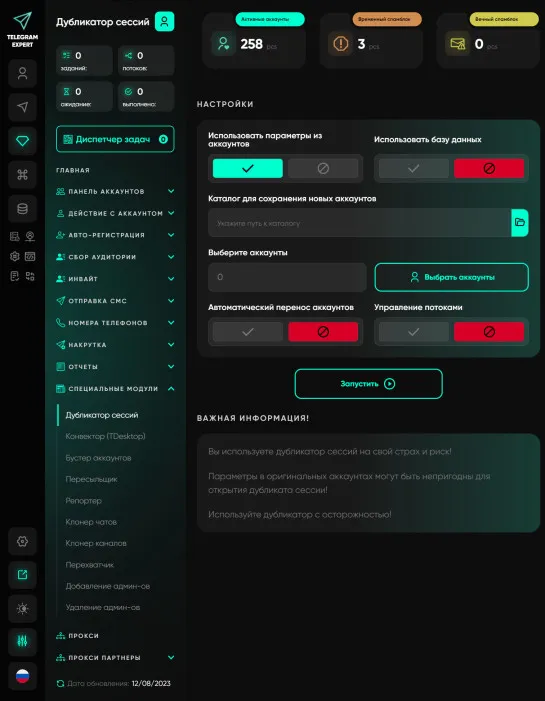
Duplicator
A module for opening an additional session on an account. The module is very useful and simply irreplaceable in your work. Opening a second session allows you to protect yourself from unscrupulous account sellers, test parameters and pairs, and perform mass actions in several copies of the program on the same accounts simultaneously. Let's consider the standard situation Let's say we need to send messages from 1000 accounts, and we want the accounts to automatically respond if prospects reply to...