

Telegram Channels: How to Build a Brand Voice and Turn Reading into a Habit
A Telegram channel is not just a news feed. It’s a place where your point of view shows up regularly and recognizably, and the audience receives predictable value. When people search for “Telegram promotion,” “how a channel grows,” or “content plan for a channel,” they don’t need a bag of tricks but a clear system — promise, rhythm, format, feedback, and careful analytics.
The channel’s promise: what exactly you promise and to whom
Formulate a short promise that’s easy to repeat out loud: “every weekday — one practical idea,” “once a week — a case study without fluff,” “industry news that actually matters.” This promise is your filter for topics and a quality criterion: anything that doesn’t help deliver the promise is unnecessary.
Design is part of the meaning
@username and avatar: recognizable even in small previews.
Two-paragraph description: what the channel is about, for whom, and what value it provides.
Starter pack of 8–12 posts: a new reader immediately sees the “substance.”
Pinned post: how things work here, how to subscribe to sections, where to ask questions.
Rhythm, sections, and attention “anchors”
People return for predictability. Introduce rituals: Friday digests, Tuesday case studies, Sunday tool breakdowns. Keep 3–5 sections and publish consistently. This way “channel growth” happens gently: the reader knows when to expect value, and you know what exactly to prepare.
A post people finish reading
Lead paragraph: why this post exists and who it helps.
Essentials: specifics instead of generalities, examples and formulas.
Conclusion and action: save, discuss, move to a bot or a guide.
Use keywords naturally: “subscribers,” “monetization,” “Telegram analytics,” “content plan” — only where they truly reflect the meaning.
Growth without pushiness
What works: cross-mentions with like-minded channels, a preview widget on your website, personal recommendations from authors, and “best of the month” selections. Create separate invite links and add UTM tags to see which sources bring not just traffic but readers who finish and react.
Analytics: simple questions instead of complex dashboards
Completion and reactions: is the post truly useful?
Link clicks: where does the audience go next?
Repeat visits: do people come back for new releases?
If there are reactions but no comments — add a discussion “hook” at the end. If clicks are low — rewrite the lead and make the CTA clearer.
Common mistakes and quick fixes
Too many formats at once: keep 2–3 core ones for 6 weeks.
Long posts without a lead: the first paragraph must answer “why read this.”
No linked group: discussions move to DMs and get lost.
FAQ
Where to start a channel? With a short promise, a starter pack of 8–12 posts, and a clear description.
How often to publish? Consistently. To begin — 3–5 posts per week.
How to measure results? Completions, reactions, clicks, transitions to the bot, and repeat visits.

Download Telegram Expert - software for Telegram promotion
Telegram Expert is professional software for fast channel growth and sales in Telegram. Launch mass mailings and invites, warm up accounts without bans, consolidate dialogs in one place, and scale your team. All in one window - fast, safe, and tailored to your tasks.
What it can do:
- TDATA Converter - массово переводит session+json в TDATA.
- Booster - account warm-up via smart dialogs to increase trust.
- Registrar - account creation via any SMS services with the sms-activate standard.
- Duplicator - a second session for existing accounts for transfer and protection.
- Forwarder - routes incoming replies to a working group and sends replies to clients.
- Interceptor - catches messages by keywords from chats/channels and forwards them to you.
- Invite via admin - invitations even to restricted groups.
- Channel and chat cloner - full copies, including protected content.
- Reporter - mass complaints about messages/users/channels.
No one has left a comment yet
Competitor Analysis on Telegram: How to Scrape Data Without Hitting the Limits
Telegram has long outgrown its role as "just a messenger" — for many niches, it's the primary channel for reaching an audience: channels, chats, bots, mini-apps. And wherever there's an audience, there's competition. Marketers, SMM specialists, and product teams increasingly keep an eye not only on their own channels but on their competitors' as well: how many subscribers they have, how often they post, how strong their engagement is, and which topics resonate most. It sounds simple enough — ...

From Search to Telegram: Building a Smarter Geo-Targeted Lead Generation Strategy in 2026
[media mw=100]3387[/media] Modern lead generation is no longer simply about driving as much traffic as possible to a landing page. For businesses operating across multiple countries, the bigger challenge is understanding what potential customers actually see, search for, and respond to in each market. Search results, advertising messages, pricing, recommendations, and online communities can all vary by location. As a result, marketers need to look beyond global averages and underst...
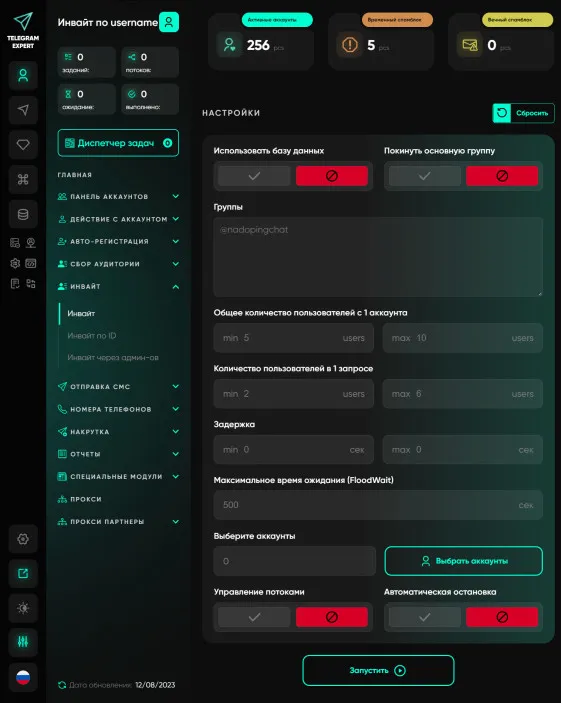
Invite
Invite is an invitation to a group or channel. Creating a large group in Telegram is not an easy task. You need to monitor advertising and content; very often this is a rather long method to get the right audience; an invite is easier and cheaper. The “Invite” module will allow you to invite people to your group by username, id and phone number. The module has excellent functionality, good and understandable statistics. You can invite your audience to several groups at the same time. As a rule, ...

Channel Cloner
Do you want to fill your marketing Telegram channel with a minimum of effort? Then you need a Channel Cloner.Advertise on telegram! The module is very effective for filling channels with interesting information; in a matter of minutes you can fill a channel by cloning. It is used masse if you need to increase your network of channels and attract an audience. Examples of the work of this module can be seen everywhere in Telegram. You have probably seen channels where posts are published with a ce...