
How to Avoid Losing Your Telegram Data While You Still Have Access: What to Save in Advance and How Telegram Expert Helps Archive Accounts
Telegram stores the history of regular chats in the cloud. That means that after switching phones or computers, you usually only need to sign in to your account to regain access to your cloud chats. Telegram itself describes this model as a built-in solution to the problem of data backup.
However, cloud storage and your own archive solve different problems. The cloud stores the current state of your data and synchronizes changes across devices. An archive preserves a separate copy as it existed at a specific point in time.
If an important conversation is deleted, the account itself is deleted, or work data needs to be handed over to someone else, having a separate copy becomes a practical necessity. That is why valuable data is best archived while you still have access to the account.
Telegram Cloud Keeps Your History Synced Across Devices, but It Does Not Create a Separate Version of Your Data
Regular private chats, groups, and channels are Cloud Chats. Telegram stores the messages, photos, videos, and documents from these chats on its servers. As a result, the history is available across devices and is not tied to a specific phone or computer.
At the same time, synchronization does not mean that several independent versions of the history exist. If a message is deleted, that change is applied to the current state of the chat. A second device does not become an archive of an older version of the conversation.
That is why a personal archive is not a replacement for Telegram Cloud. Its purpose is to preserve the state of important data as of a specific date.
This is especially important for work accounts. Telegram may contain agreements with clients, documents, technical specifications, decision histories, contacts, and other materials that can be difficult to recover after they are lost.
Some Telegram Data Can Be Deleted Without Any Way to Restore the Previous History
Private Conversations Can Be Deleted for Both Participants
In private cloud chats, Telegram allows both sent and received messages to be deleted for both participants. The entire conversation history can also be cleared. There is no time limit on this feature.
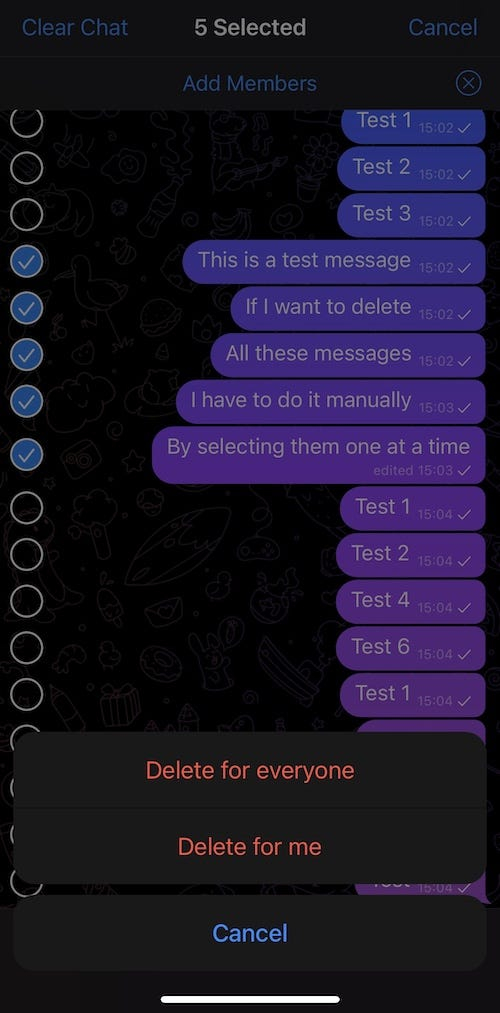
For work-related conversations, this is an important detail. The contents of a chat do not depend solely on the actions of the account owner. The other participant in a private chat can also delete the history for both sides.
If a conversation has value in its own right, you should not rely on it remaining available in Telegram indefinitely.
Deleting an Account Erases Its Cloud Data
Deleting an account is irreversible. Telegram removes messages, contacts, and other data associated with the account. If a new account is later registered with the same phone number, the previous history and contacts are not restored.
Telegram also automatically deletes inactive accounts. By default, an account is deleted after 18 months of inactivity, although this period can be changed in the settings. Data stored in Telegram Cloud is deleted together with the account.
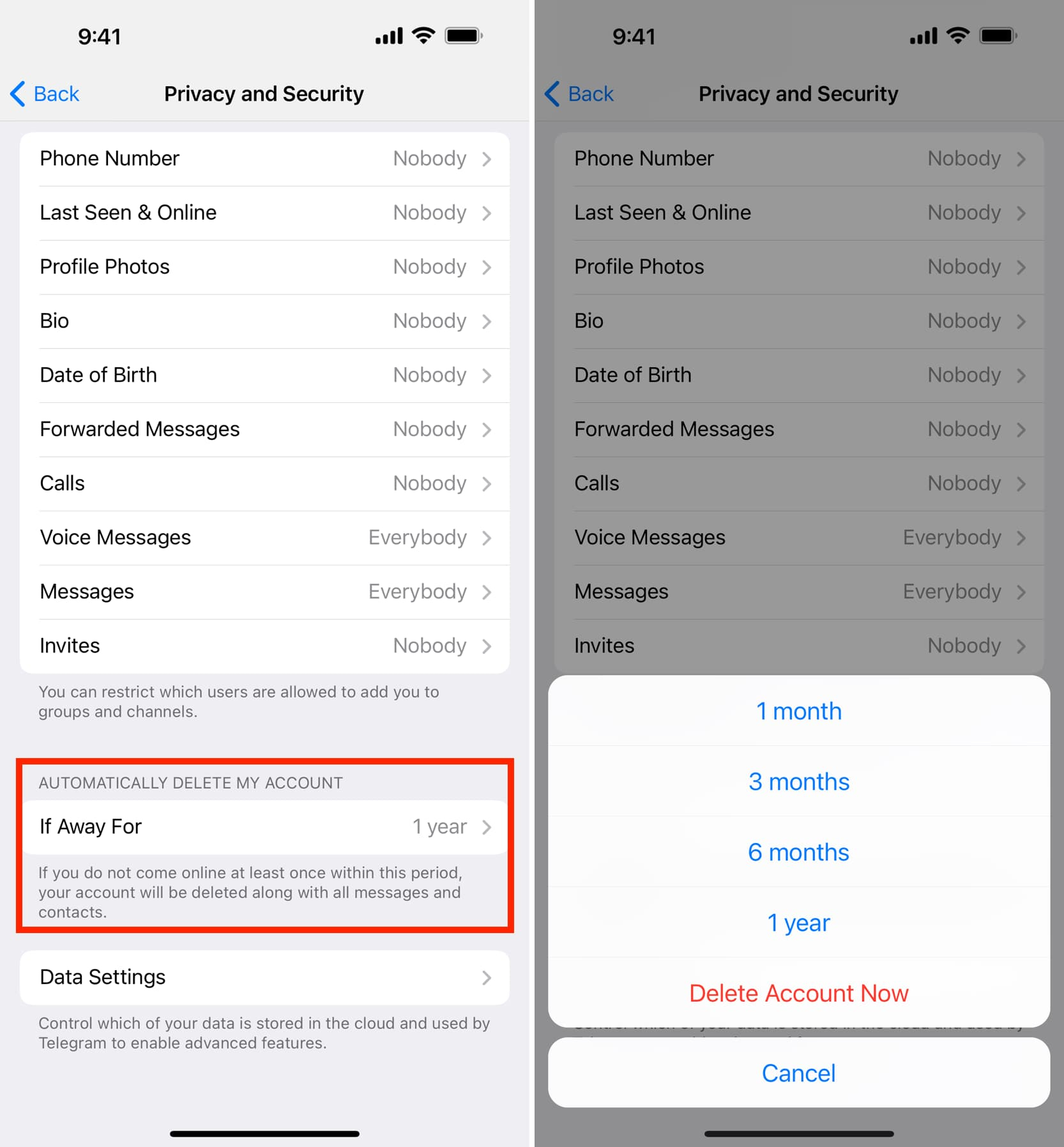
An archive is therefore particularly useful before retiring a work account, handing over responsibility for it, or deleting the account.
Secret Chats Should Not Be Treated as Part of Telegram's Regular Cloud Archive
Secret Chats use a different storage model. Telegram does not store their history on its servers. These messages are available only on the devices of the participants in that specific secret chat.
When you log out of an account, cloud messages remain available, while Secret Chats and the messages inside them are lost on that device. Telegram warns about this separately in its FAQ.

For this reason, a Secret Chat should not be treated like regular cloud storage. Telegram Cloud and Desktop Export do not provide the same access model for Secret Chat history that applies to regular cloud chats.
Telegram Desktop Can Already Export Data from a Single Account
For a regular cloud account, the first step should be to use Telegram's built-in tools. Telegram Desktop can export all cloud chats or the history of an individual chat. Photos, videos, and documents can be included in the export.
For a full export, use:
Settings → Advanced → Export Telegram Data
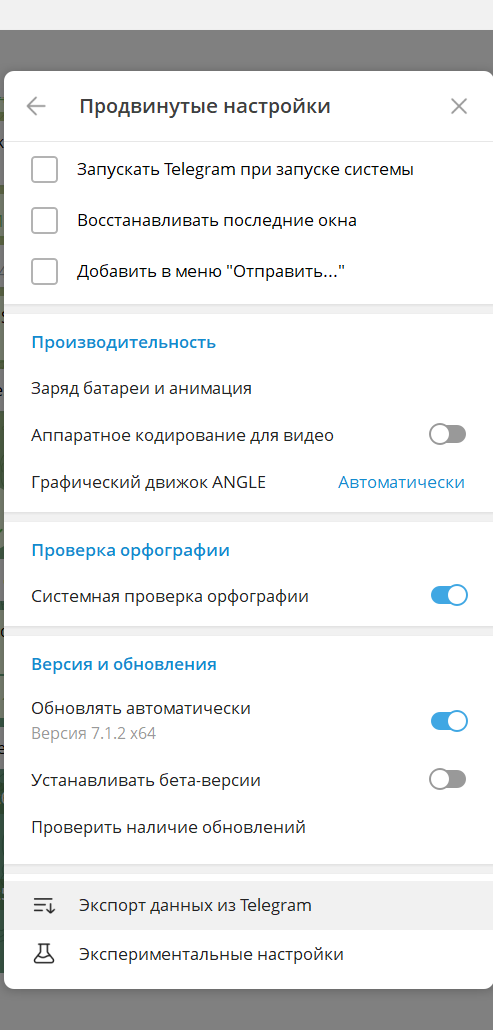
For an individual conversation:
⋮ → Export chat history
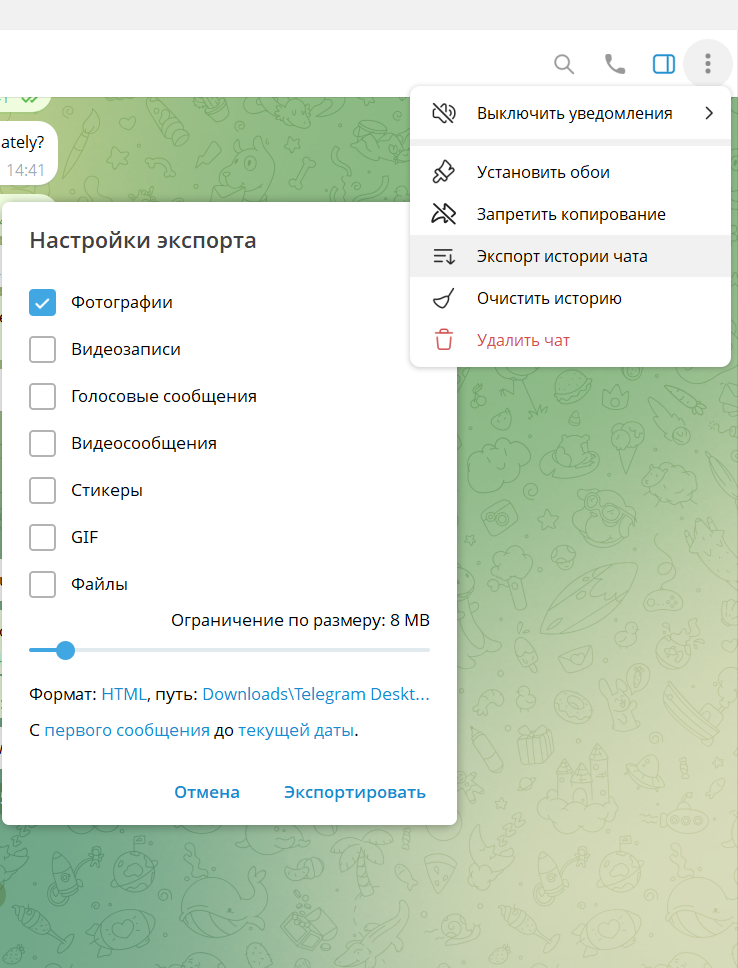
This feature is available specifically in the Telegram Desktop app. Telegram explicitly states that exporting is done through the Desktop application, not the web version.
There is one more detail to keep in mind. If a new authorization has just been created in Telegram Desktop, the export may not be available immediately. Telegram offers two options: wait up to 24 hours, or confirm the request from a device where the account is already authorized and start the export right away.
That is why you should not postpone archiving until the old device is no longer available.
Telegram Export Can Save More Than Just Conversations
Telegram Desktop Export lets you choose which categories of data to include. Depending on the settings, the export can contain account information, contacts, private chats, groups, channels, photos, videos, voice messages, files, and other data. Telegram also includes information about active sessions in the exported data.
When exporting media, you can set a size limit. For individual chats, you can also choose the period of history to export.
This means you do not have to archive everything indiscriminately. Start by deciding which data is actually valuable for that particular account.
For example, a support account may need conversation histories and related documents. A team's work account may need contacts, groups, channels, and key conversations. A research account may derive value from its communication history and accumulated materials.
The main criterion is simple: archive anything that would be expensive or impossible to restore.
HTML Is Convenient for Reading, While JSON Is Better for Further Processing
HTML Works Well for a Regular Conversation Archive
HTML is convenient when you simply need to open and read the archive without any special tools.
Save the export, open the local page, and find the conversation you need. For a personal archive or a small work archive, this is often enough.
JSON Is Better Suited to Large Data Sets
JSON is more convenient when the export will be analyzed or processed programmatically. Structured data can be searched, compared, transferred into your own systems, and used for further analysis.
This does not make JSON better than HTML. It is simply a different output designed for a different task.
For important work data, it can make sense to keep both formats. HTML remains convenient for viewing, while JSON preserves a structured representation of the data.
Telegram Export Creates an Archive, but It Does Not Restore an Account from That Archive
This is where a common misconception about the Export feature arises.
Telegram lets you export history as HTML or JSON, but the resulting file should not be treated as a complete copy of the account that can later be uploaded to restore Telegram to its previous state. Telegram's official history import mechanism is designed to transfer messages from supported third-party apps.
An export should therefore be treated as a local copy of data for viewing and processing.
This distinction matters. An archive helps preserve information, but it does not automatically become a working copy of a Telegram account.
It Is Better to Create an Archive Before Losing Access, Not After
User stories reveal the same recurring problem: people often start thinking about preserving their data only after the information is no longer available on their main device.
In some cases, an older device may still have a locally accessible copy of the history. However, this should not be treated as a reliable recovery method. User reports of such cases do not prove that Telegram systematically loses data. They simply show how inconvenient it is to start archiving only after a problem has already occurred.
There is also a more practical reason not to delay an export. After a new authorization in Telegram Desktop, you may have to wait up to 24 hours if the request is not confirmed from another device where the account is already authorized.
A better workflow is to prepare in advance: identify the important data first, export it, and then store the archive in an appropriate location.
Not Everything in Telegram Can Be Included in Your Own Archive
There is another limitation to keep in mind when working with groups and channels.
Group and channel owners can enable Restrict Saving Content. This setting limits message forwarding, media saving, and other ways of saving content.
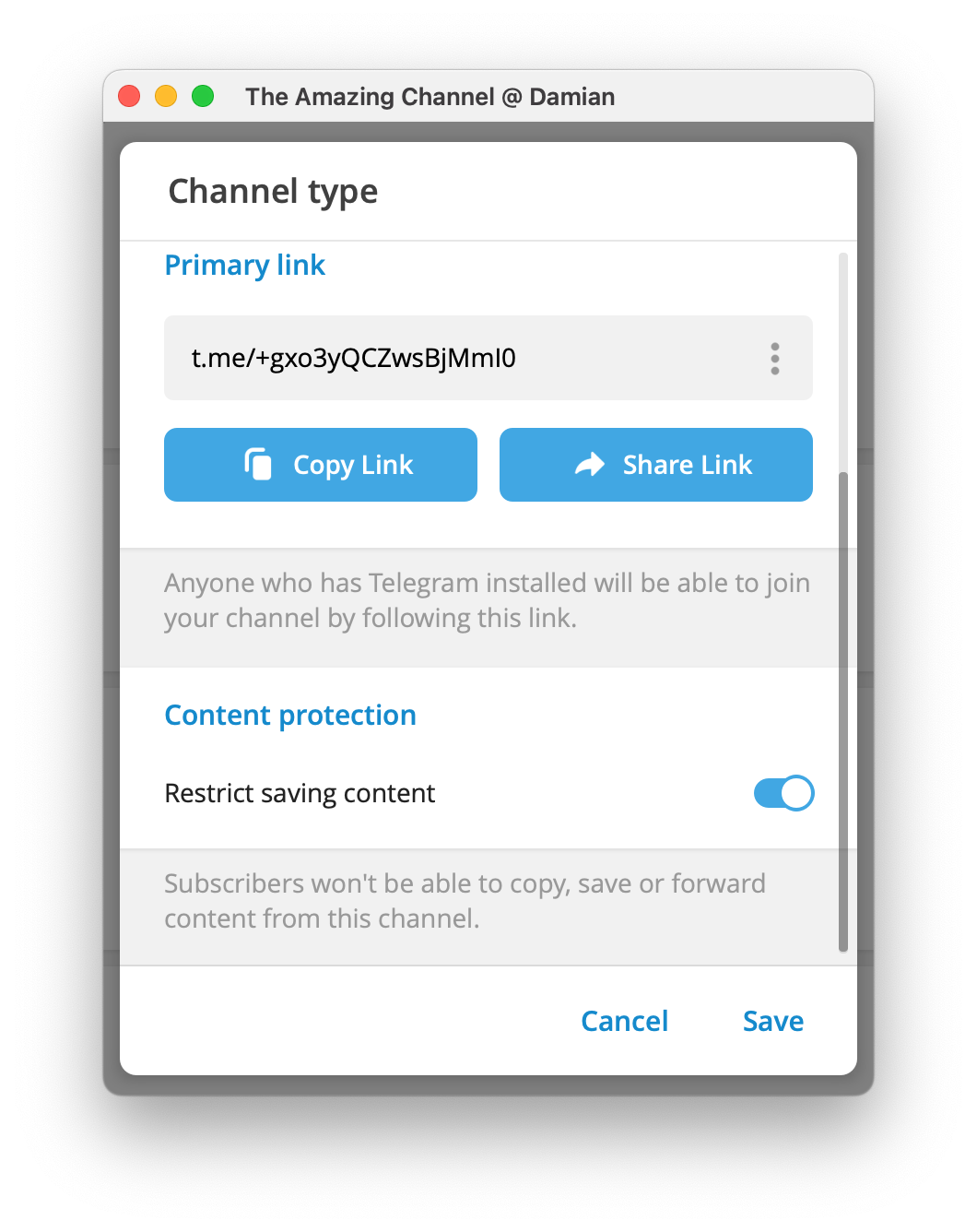
So having access to a piece of content today does not mean you will necessarily be able to save it locally tomorrow.
This is especially relevant for private professional communities, partner groups, paid channels, and other sources where the content belongs to a third-party owner.
If content is subject to saving restrictions, those restrictions should be taken into account when planning the archive. There is no need to bypass them.
For Work Accounts, Save the Data Whose Loss Would Cost More Than Storing It
Data Without Which Work Would Stop
This includes client agreements, documents, payment details, technical requirements, histories of important decisions, and other materials that directly affect ongoing work.
This type of information should not exist only in Telegram. Once an important stage of work is complete, it should be moved into the company's primary storage system: a CRM, task tracker, corporate cloud, or another suitable tool.
In this model, Telegram remains a communication channel rather than the only place where work data is stored.
Data That Is Expensive to Rebuild
This includes years of support history, work contacts, negotiation archives, accumulated materials, and other information that would take a long time to collect again.
For this kind of data, regular exports have clear practical value.
Data That Is Easy to Obtain Again
Temporary files, public materials, and messages with no standalone value do not necessarily need to be included in a permanent archive.
This keeps the archive manageable: you preserve data whose recovery cost is higher than the cost of storing it.
Update the Archive Based on Events, Not Only on a Calendar
A one-time export does not protect you from losing new data added later.
For critical conversations, it is sensible to save an archive after an important stage of work has been completed. An operational account can be exported periodically. Before taking an account out of service, it also makes sense to create a separate final archive.
It is also worth saving an export before handing an account, or responsibility for it, over to another employee.
The file name or accompanying information should record the account, export date, period covered, format, and whether media is included. This makes it clear, even months later, exactly what a particular copy contains.
Do Not Store the Export Only on the Same Computer
If the export exists only on the computer where Telegram is used, it protects against data being deleted from the account itself, but not against losing the computer.
Truly important data should also have another independent copy in a storage location approved by the company.
After export, conversations, phone numbers, documents, and media exist outside Telegram. Those files are therefore governed by your own access, storage, and data-protection rules.
Exporting gives you more control over the information, but it also transfers responsibility for protecting the local copy to the owner of the archive.
Telegram Desktop Is Usually Enough for One Account; a Large Number of Accounts Creates a Different Problem
If you need to preserve a single personal or work account, start with Telegram Desktop Export. It can already export cloud chats, media, and other data in HTML or JSON.
The task changes when you are working with a large number of accounts.
Each account has to be opened separately, the required data collected, the result saved, and then multiple sets of information organized. With dozens of accounts, this is no longer a one-off operation but a recurring workflow.
This is where Telegram Soft Expert becomes useful.
Telegram Soft Expert Helps Automate Data Export from Large Numbers of Accounts
Telegram Expert includes a dedicated 'Export Account Data' module. It can export dialogs, usernames, IDs, and groups. The module supports two operating modes: with the account connected and without connecting the account.
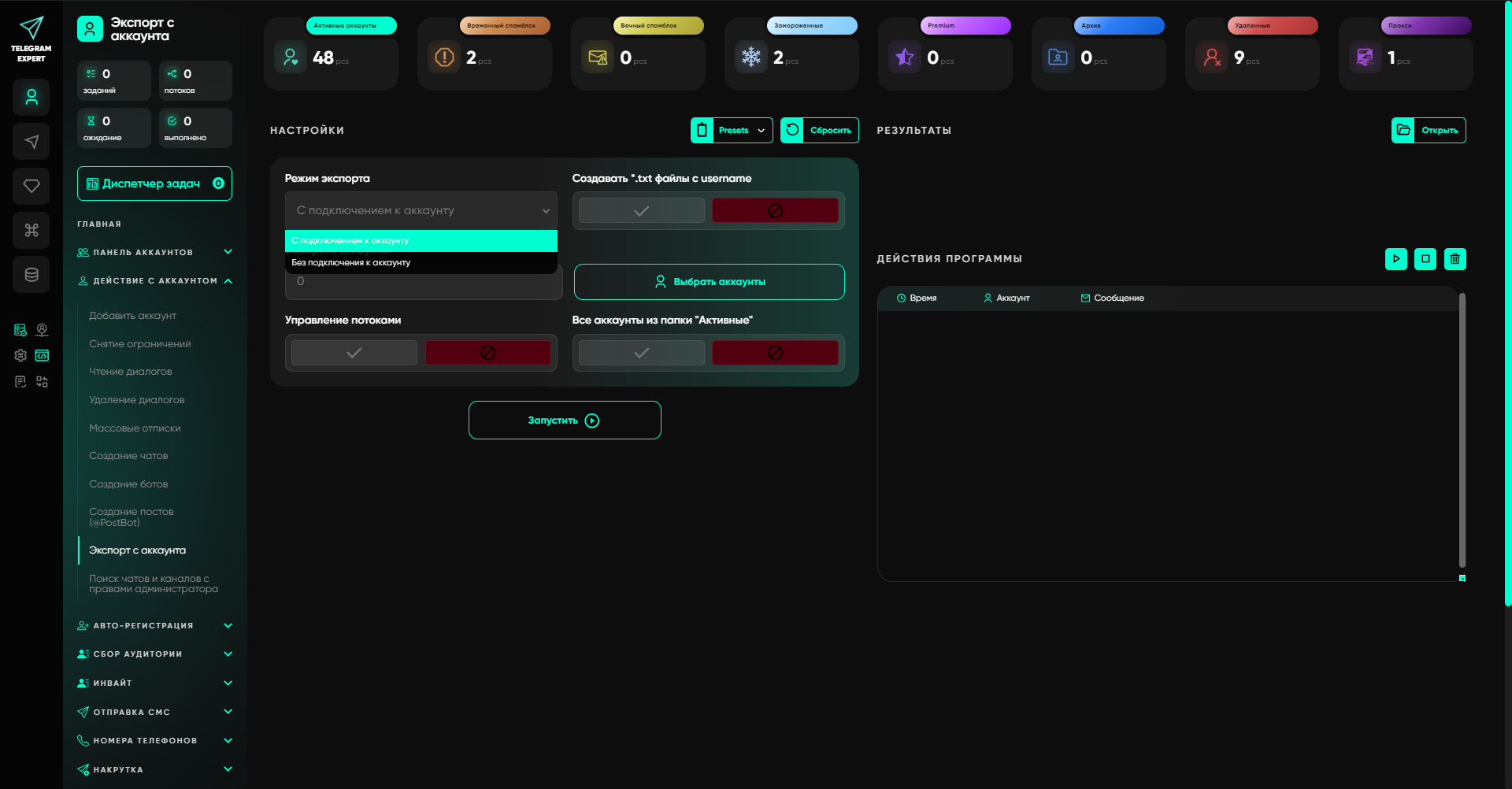
This is a different use case from Telegram Desktop.
Desktop Export is convenient when you need a local archive of a specific account, including its history and media. Telegram Expert addresses the operational task of working with large numbers of accounts and structured data.
For the user, this means fewer manual steps when preparing data from a pool of accounts. The exported dialogs, Telegram IDs, usernames, and groups can serve as a working data set for subsequent processes.
This is where the main value of expert-level Telegram software becomes clear. It is not intended to replace Telegram features where those features already work well. It is useful when the number of accounts turns individual manual actions into constant routine work.
Telegram Expert Makes Sense When Exporting Becomes Part of Ongoing Work
Telegram Expert is designed for more than exporting. The program includes an account management panel and separate modules for registration, account operations, audience collection, communication, and bulk actions. It also includes modules for account checking, contact export, global search, and other tasks.
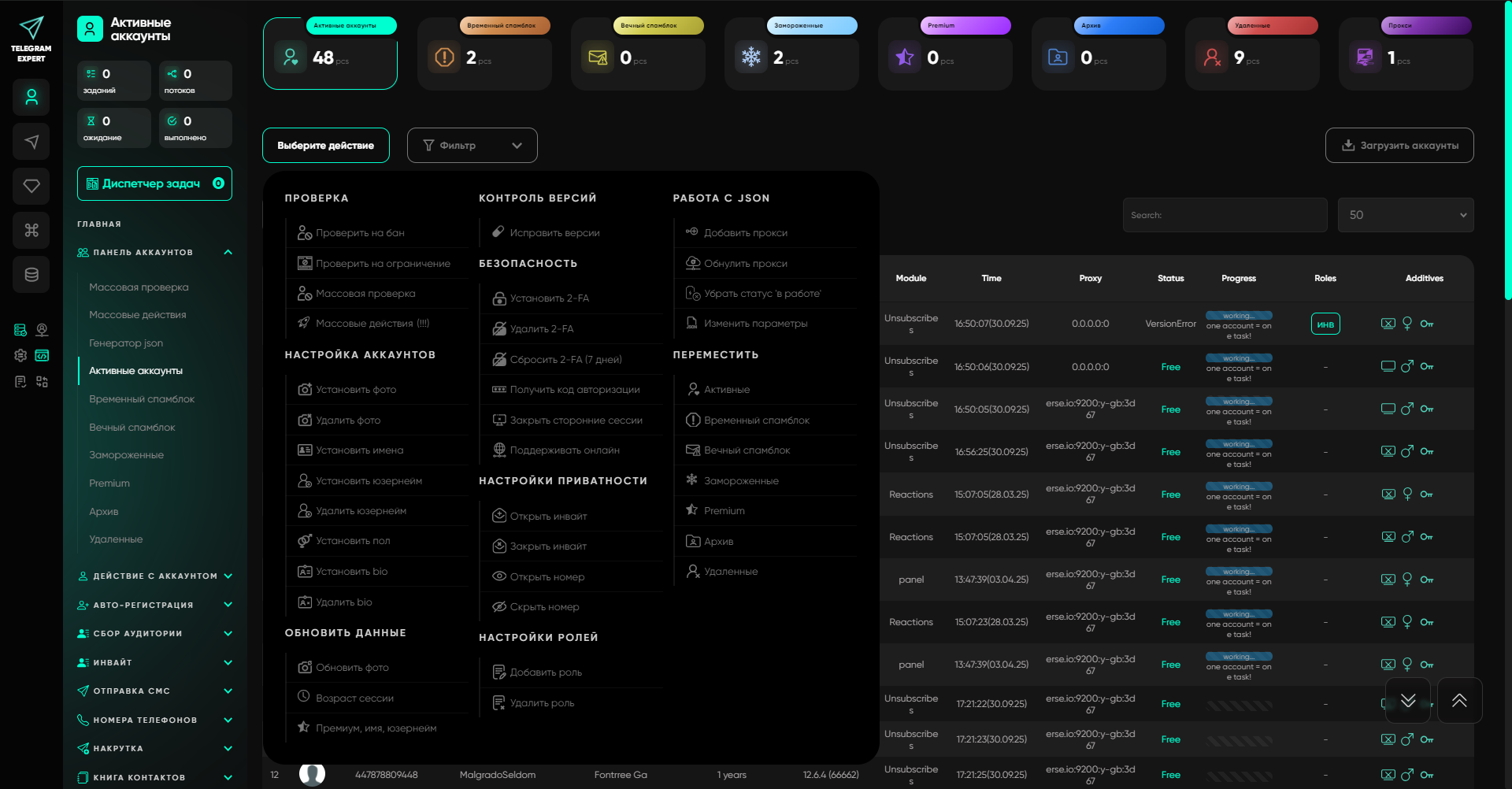
That is why there is little point in using Telegram Expert merely as a replacement for Telegram Desktop Export for a single account.
The scenario changes when there are many accounts and their data must be collected, checked, and used regularly in subsequent work. In that case, Telegram Expert helps move part of this routine into a dedicated workflow.
What to Save from Telegram Before You Lose Access
Before changing devices, handing over an account, or stopping work with it, check the following:
Important personal and work conversations.
Documents and files that would be difficult to obtain again.
Work contacts.
Groups and channels required for ongoing work.
Account data that will be needed after the handover.
Active sessions and the information required to maintain access control.
The date and period covered by the export.
An independent copy stored outside the work device.
For a single account, the built-in Telegram Desktop Export is a sufficient starting point.
When there are many accounts, exporting becomes a separate operational task. In this scenario, Telegram Expert can automate the collection of structured account data and reduce the amount of manual work.
The main principle is simple: important data should be saved before you actually need the backup. Telegram Cloud does a good job of providing access to regular chats from different devices. Your own archive solves a different problem: it preserves a selected state of the data independently of the account's current state.
That is why Telegram's built-in tools are usually enough for a single account, while Telegram Expert becomes useful when there are many accounts and working with their data becomes an ongoing process.

Download Telegram Expert - software for Telegram promotion
Telegram Expert is professional software for fast channel growth and sales in Telegram. Launch mass mailings and invites, warm up accounts without bans, consolidate dialogs in one place, and scale your team. All in one window - fast, safe, and tailored to your tasks.
What it can do:
- TDATA Converter - массово переводит session+json в TDATA.
- Booster - account warm-up via smart dialogs to increase trust.
- Registrar - account creation via any SMS services with the sms-activate standard.
- Duplicator - a second session for existing accounts for transfer and protection.
- Forwarder - routes incoming replies to a working group and sends replies to clients.
- Interceptor - catches messages by keywords from chats/channels and forwards them to you.
- Invite via admin - invitations even to restricted groups.
- Channel and chat cloner - full copies, including protected content.
- Reporter - mass complaints about messages/users/channels.
No one has left a comment yet

Geotargeting in Telegram: how to work with Europe and Asia without bans
[media mw=100]3230[/media] Telegram has long outgrown the role of a simple messenger. For businesses, affiliate marketers, and SMM specialists, it is a powerful channel for driving traffic and sales. But once you move beyond the CIS and start targeting audiences in Germany, the UAE, or Singapore, many people run into an unexpected problem: accounts get banned immediately after login or after just a few days of activity. Why does this happen? Because Telegram is tightly tied to geolocation....

Which Anti-Detect Cloud Phone Is Best for Multi-Account Marketing in 2026?
In 2026, as account security and anti-fraud systems on platforms like TikTok, Instagram, and Facebook continue to evolve, cloud phones have become essential infrastructure for e-commerce and social media marketing teams. A cloud phone is an independent cloud-based Android device with unique hardware fingerprints including IMEI, MAC address, and Android ID. It provides complete isolation between accounts, solving the problems of high physical device costs and easy detection of Android emulators. ...

How to Choose and Set Up IP Connections for Data Collection and Global Workflows
A practical guide to selecting gateway types, configuring connections, and testing them before scaling a project. Introduction Collecting online data across markets can be more complicated than sending requests to a website. Search results, product prices, available content, and advertising displays may vary by region. At the same time, automated workflows need a connection setup that is appropriate for their workload, location requirements, and budget. A gateway...

Automating Multi-Accounting in ChatGPT and Midjourney for Agencies
For an agency generating text, visuals, and content daily for dozens of clients, a single ChatGPT or Midjourney account quickly becomes the main bottleneck. Request limits, image-generation queues, and plan-tier restrictions can bring any volume-driven production process to a halt. The obvious answer is working with several accounts in parallel — different projects, different teams, different loads. But as soon as multiple accounts enter the picture, a new layer of complexity appears: how to ...